
Increase Monitor Refresh Rate: Reduce Eye Strain, Headaches
Ever have headaches after staring at your screen? Maybe your computers monitors screens refresh rate is too low and your screen flickers. Many users are used to the flicker, or your eyes are not sensitive enough to detect it, but the flicker is there. And till it flickers, it will irritate your eyes and cause eye strain. Higher refresh rates are less likely to cause eyestrain
What is the refresh rate?
The refresh rate (or frequency) refers to the number of times per second that the video board redraws the entire screen.
Change Monitor refresh rate In Windows 10
- Right click on desktop wallpaper > Display Settings
- Scroll down and click ‘Advanced Display Settings’
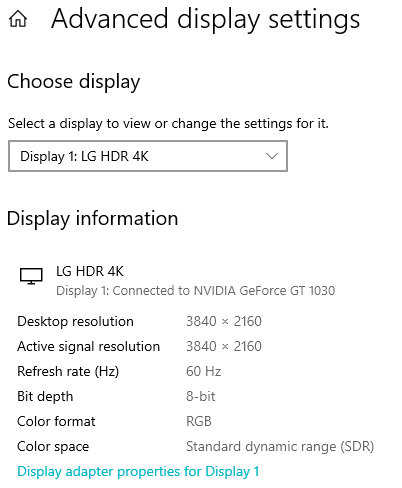
Click on ‘Display Adapter Properties‘ > This will open the screen refresh rate options supported by your monitor.

Choose and apply. Most users agree it should be 60 Hz or more for optimal results. My 4K monitor was set to 60 Hz, the maximum by default.
Change Monitor refresh rate In WindowsXP
- Go to Control Panel>Display
- In Settings> Advanced>Monitor
- Always Check the box for ‘Hide modes that this monitor cannot display’ to avoid hardware disputes. This will then give a drop down list of refresh rates that your monitor safely supports and you may set it up without error. You may also check your manufacturer’s documentation for information about the settings that your monitor supports.
- And then increase the monitors refresh rate.
Note: If you specify a refresh rate that is too high for your monitor, your screen may become unusable and your hardware may be damaged. Also note, Some monitors flicker at higher rates and some of the higher resolutions and color depths may be unavailable at the higher frequencies.
In my older monitor, it displayed resolutions from 60Hz to 200Hz. When I clicked the ‘Hide modes that this monitor cannot display’ box, the choices were only few from 60-80Hz. So I was glad I did not mess up by selecting a higher value which my very old CRT monitor did not support. I had selected the recommended 75Hz on that monitor. Increasing the refresh rate setting has made a marked improvement and got rid of my headaches and has been ergonomically a wise step.