
How to Fix Errors and Format USB Flash Drives
August 9th, 2005We all have USB flash drives, pen drives, memory drives and it is a great data storage and safe data transfer gadget. But if you believe that flash memory is secure and stable forever, you are wrong.
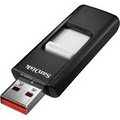
Flash memory is considered insulated from jerks and related damage. However, these USB pen drive do get corrupt as I noticed. I use a top branded 512MB USb drive and am using it for the last 6 months and it worked very well. (I do not rely on cheap unbranded usb drives – you never know when your data is lost)
So of late, when I started to open my powerpoint presentations, they would not open. Thankfully I had a back up CD. So what went wrong. Well some files opened and rest did not. Some error had occurred during transfer or storage as the main file from which it was transferred worked well. So the problem was in a data storage as the transfer was smooth.
WARNING: Please try all these procedures at YOUR OWN RISK. I take no responsibility for your actions. There is no surety it will work. You may land up deleting all data or making your drive unusable. I am no expert in fixing usb drives. This is just my experience of how I fixed my usb drive. It is always best to seek professional support from the manufacturer (and some advise against formatting your USB lash drive).
Some tips to fix and format your USB Flash Drives
An important precaution is not to remove the pen drive while the data is being transferred. Always remove the pen drive after stopping it. Go to ‘Safely remove hardware’ (green arrow icon art bottom right corner), stop the usb drive and when it says it is safe to remove it, then remove it.


Always check by opening your important files before that important presentation. If it does not open now, probably it will not open there also. If it works now, it should work there also.
If for some reason your file does not work. Transfer another copy of the file with a renamed version – it may work..
If you delete the file and retransfer the same file with the same name and size, it probably gets written to the same area and will not work. A different name with a different size gets written to another area and can work. Its better to transfers 2 copies of your file anyway.
If you want the presentation to work on older computers (like Windows 98), do not forget to take the drivers CD which will allow such computers to recognize your plug and play usb drive. Always keep this invaluable CD handy, you never know when you encounter an older computer. I also keep a copy of the Wind 98 driver on the USB drive, can become useful on eday.
If your flash drive data is still getting corrupted
After going to My Computer, Right click the Removable drive, Go to Properties >Tools. Run Error Checking and Scan for errors and fix them. The files that are corrupt or in bad sectors already will not work but at least the new transferred files should work.
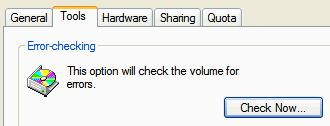
If all fails, format your drive.
It will delete all the data from your USB drive and make it fresh and hopefully remove all errors. The software for formatting comes on the CD or available on support sites for your branded usb drive on the net. For some reason, when I ran this formatting software, it would say the USB drive is not connected.
How did I format my flash drive?
Right click removable drive and select and format the drive. Then scan and fixes all errors. So all the bad sectors are fixed and my drive has become all new and is working well now.
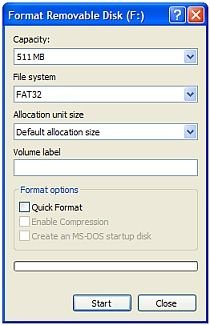
In the File System drop down, you will see FAT and FAT32. So which one to select?
If you right click Removable Drive >Properties

The General Properties of the USB drive reveals it is FAT, so I use FAT in the format utility. Then just select “Quick Format” and “Start” and all data will be deleted and hopefully all errors are now gone.
If still none of these tips work
Get hold of the warranty and get it fixed from customer support.
If all fails…. its time to buy a new high memory storage USB drive !


Hello, my viking flash drive is not read anymore by the computer, can someone assist me in how to fix it?
I have Flash disk Named as MyFlash, it is not detecting in any operating system. before it was detecting but after using it for few days suddenly it stopped. i mean it is not atall detecting now. can some one suggest me how to fix this problem
i have a USB 256mb LEXAR pen drive.
it was fine but it stoped working after i copied two large files of flex Sign boards. my PC detect it as unknow device. if there is any solution please any body E-mail me . I will be very thankful for that help.
waiting a nice reply in my E-mail box
plato472@msn.com
take care
Hi,
I have a 512 MB pen drive cum Mp3 player. since i bought that, i can store upto 240 Mb of datas only. its not allowing me to store beyond that. Once you see the properties, it saying capacity is 488 mb, used space is 243 mb & free space is 245 mb. but there is no files in the pen drive. I have tried formating with fat & fat32, but nothing works…….. can any one help?
hi all i have 8 GB sony flash drive.i formatted it on wrong software now it shows just 31 mb.i have than formatted again by computer option but doesnt work….if any one knows its solution or knows its software tahn plz send me on my email adress…
Dear All,
I’ve been using a SanDisk Cruzer Micro flashdisk for 9 months. Just recently it sends a “Device I/O Error” when I try to copy anything to it. It’s still being found by the OS and I can read the data but very slowly. I already tried every solution that is presented here and all failed. however when I formatted the drive frm command prompt it returned an “Invalid media or Track 0 bad” error. does it mean that I should trash it and buy another one? Please some pro give me some suggestions.
Cheers,
Mehdi
i purchased a usb flash drive with mp3 layer with a capacity of 512mb but when i mistakeingly formatted it using windows xp under fat32 i lost almost 250 mb and i have only 235 mb now .please provide me with a solution for my problem.
can any one help me out??/ i ve bought a pen drive (512mb) local brand…while transferring data ,my system hung up and i had to restart my pc…my pc was not detecting this pen drive anymore. once i formatted it, its recognizing it as 256 Mb drive…….can any one help me out ???? i want to retrieve another 256 mb….
I have an MP4 MP3 player that acts as a USB flash drive. When i try to format it, all i see in the drop down menu is “FAT32″ only, i can see the “FAT.” THis player specifically needs to be formatted in “FAT” mode, not FAT16 or FAT32. How do I format in FAT then?
WRITE PROTECTED problem
hey u guys. Please, I need ur help here. my flash disk being wite protected by itself. i cannot cut or del files. i have try to format it but no result even from command prompt
I am having a problem with my usb it is 256mb when I bought it but right now it is only working wit 30mb of its capacity if I copy a file greater than this size it will show only the folder or icon of my file but it display the folder size in the property of the usb.I any one who can help me with this pls send me ur advice ,thanks in advance for the help.
i had a 512 mb flash drive with mp3 player when i formatted using win xp format option i have only 235 mb capacity what could i do
I have a sony maicrovault 2GB USB flash disk, from the first useing it damaged any data copied into , it was formatted FAT, I tried to format it in FAT32, the damaged files became less than before, i tried to san it by file properties/tools/check now, it toke long time formating, when the blue line indicator reached the middle, the home electricity is gone, when i swiched my coputer again and check the flash dick if says:”please insert disk into drive I” and its size became 0 KB , i tried to format it again or using disk managment or the included CD or any program, i faild, coud any one please help me to fix the USB, i just bought it :((
I have a pen drive 1 gb after inserting it in Win xp pro it doesnot shoe in my computer but it does show in device manager in disk management and when the drive letter is changed it does show in my computer as well as it auto pops up for diff options .any help to directly access it without any drive letter change pls help .any microsoft update to rectify pls help.
please help.i formatted my 1 GB mp3 player and now it reads only 119mb.how can i recover the rest of the space
dear sir/madam
it’s an honor to inform you that the information you provided on your site is very special but, i have still problem that you might solve. which is: my flash memory responds unknown device when I plug it. It is GENX 256 MB So I truely need you help.
if you can help please send me a mail by : ashenafi20052000@yahoo.com
FLASH DRIVE NOT DETECTED BY COMPUTER
Hello. I think i have the same problem as Scott Harrisson, person leaving comment number 32. Computers could’t read my flash drive anymore, it’s an iMax 256mb. My friend thinks it got burned, and i do think too, because it got too hot it scathed my skin as i removed it from the USB port. The desktop did’t read my flash disk in the first place, nor my camera.
I have a one very important question: Is the chance that i can retrieve my data?
Please, please do comment on this. I hope somebody can help me with this.
Thanks so much in advance!
i have a siren mp3 512 mb player from china.. i cannot format it..and it always say’s “invalid format, pls reformat the player” ive tried almost everything exept using the disk.. pls hel me..
can pen drive be converted to fat32 using win98 converter is it safe. my 1 gb drive of transcend is showing only 969 mb.
Anybody that knows a fix for this(or a third person program) … I have a sony maicrovault 2GB USB flash disk, from the first useing it damaged any data …
and get 0 byte are there any program to fix that
I have basically the same problem as #37, #41, and #44. I have a 512MB Creative USB flash drive with mp3 player. I made the mistake of formatting it ( FAT system ), then began copying my files, and right now I have 260MB used space, windows recognizes the drive but I can’t write on it or format it again, the mp3 player doesn’t work either so the usb drive is pretty much unusable. Is there a way the problem can be fixed ?
I apologize if i post the wrong topic.
My computer detected the new USB device plugged into it, but the drive doesnt appear in the windows Explorer; my OS is XP.
Please anyone help me list all the possible solution.
Thank u very much.
Best regard.
hi, i hv a sony flash with size 512mb, there was data on the flash which i could not delete so i used the format software which was on the cd that came with the flash disk, but after formatting the flash the size of my flash disk reduced to 64mb!!!! i tried formatting it again but it didnt help. can anyone help me out, plz mail me if anyone has a solution
i have a lg 1gb flash drive…
my pc can detect it and and will assign a proper drive letter..but when i try to access the contents on my computer—-it says : Please insert a disk on drive E:
I can’t format it nor open it…can you help me fix it?
please send your replies on jayson.c.escano@gmail.com…..
tnxz guyz
Dear Readers,
i have a 40 gb external USB Data storage drive, which i am using since last 11 months. i found “Device I/O Error” these days, when i tried to copy few files from it. i formatted the device, but problem was still there.
So finally i deleted the existing partition, and created a new partition for my external device.
and now i am happy, as my device is working very fine.
hope it will help some of huys like you, who are in similar trouble.
I have a kingston datatraveller 256 MB. It worked well fro 5 months but now it has become write protected. I’ve tried to format it but its still write protected and won’t let me format. Doesn’t work on my desktop or laptop either. Please help me.
The problem with the counterfeit Sony drives is not just the 4&8 GB. My buddy brought back a bunch of 1GB drives from China. They are really 512MB drives. Note that when you reformat, sometimes Windows will clue you in and say after formatting that 512MB is already used space, with 512 free. However when you use the “quick format” check box option, it doesn’t detect it, and says you have 1GB free. You can add data until you reach the halfway mark, then it says “sector not found” or whatever. Clever. Someone needs their ass kicked for this.
22. Anonymous | November 15th, 2005
Admin Tools didn’t work for me. I formatted the hard drive, then removed the device, but when I plugged it back in windows said the device was working properly, but computer manager couldn’t read the drive…Definately a rip off (we bought it in China though, only cost $6)
And from
chenda | July 3rd, 2006
I apologize if i post the wrong topic.
My computer detected the new USB device plugged into it, but the drive doesnt appear in the windows Explorer; my OS is XP.
Please anyone help me list all the possible solution.
Thank u very much.
Best regard.
Firstival try your USB Flash drive with another Window OS a difference Computer to see it still show on …because your USB Flash drive can be reject by window OS Registry during boot or shutdown and may be you are Accidently try to remove USB Flash drive during that time when your computer hang on so long . In that case only the way is to Fix your problem is Format your new Window OS on your computer :)Good luck :)!
my flash has error
i want to fix it. when i open it they show insert disk in to drive F. how can i fix it?
HELP!
I’ve got a 256mb flash player. And I’ve had to format my computer… Before I did that it worked fine.
But now it says that it has “0 byte” of space on it. And it’s not even visible in the admin controls.
I have formatted the flashplayer on another computer and it works fine there..
What shall I do???
Please e-mail me at: wwwcluberect@hotmail.com
i have mp4 drive its capacit is 8GB but it is showing only 46mb.i tried to format it in fat & fat32 also it not worked.any one can help me.