
Quick Online Tips
Home     About     Popular     Photoblog     Themes     Advertise     Shop     Jobs     Contact

How to Fix Errors and Format USB Flash Drives

August 9th, 2005
ADVERTISEMENTS

We all have USB flash drives, pen drives, memory drives and it is a great data storage and safe data transfer gadget. But if you believe that flash memory is secure and stable forever, you are wrong.
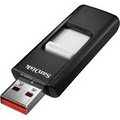
Flash memory is considered insulated from jerks and related damage. However, these USB pen drive do get corrupt as I noticed. I use a top branded 512MB USb drive and am using it for the last 6 months and it worked very well. (I do not rely on cheap unbranded usb drives – you never know when your data is lost)

So of late, when I started to open my powerpoint presentations, they would not open. Thankfully I had a back up CD. So what went wrong. Well some files opened and rest did not. Some error had occurred during transfer or storage as the main file from which it was transferred worked well. So the problem was in a data storage as the transfer was smooth.

WARNING: Please try all these procedures at YOUR OWN RISK. I take no responsibility for your actions. There is no surety it will work. You may land up deleting all data or making your drive unusable. I am no expert in fixing usb drives. This is just my experience of how I fixed my usb drive. It is always best to seek professional support from the manufacturer (and some advise against formatting your USB lash drive).

Some tips to fix and format your USB Flash Drives

An important precaution is not to remove the pen drive while the data is being transferred. Always remove the pen drive after stopping it. Go to ‘Safely remove hardware’ (green arrow icon art bottom right corner), stop the usb drive and when it says it is safe to remove it, then remove it.

Always check by opening your important files before that important presentation. If it does not open now, probably it will not open there also. If it works now, it should work there also.

If for some reason your file does not work. Transfer another copy of the file with a renamed version – it may work..

If you delete the file and retransfer the same file with the same name and size, it probably gets written to the same area and will not work. A different name with a different size gets written to another area and can work. Its better to transfers 2 copies of your file anyway.

If you want the presentation to work on older computers (like Windows 98), do not forget to take the drivers CD which will allow such computers to recognize your plug and play usb drive. Always keep this invaluable CD handy, you never know when you encounter an older computer. I also keep a copy of the Wind 98 driver on the USB drive, can become useful on eday.

If your flash drive data is still getting corrupted

After going to My Computer, Right click the Removable drive, Go to Properties >Tools. Run Error Checking and Scan for errors and fix them. The files that are corrupt or in bad sectors already will not work but at least the new transferred files should work.
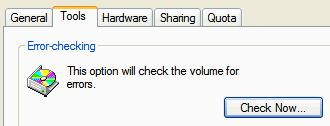
If all fails, format your drive.

It will delete all the data from your USB drive and make it fresh and hopefully remove all errors. The software for formatting comes on the CD or available on support sites for your branded usb drive on the net. For some reason, when I ran this formatting software, it would say the USB drive is not connected.

How did I format my flash drive?

Right click removable drive and select and format the drive. Then scan and fixes all errors. So all the bad sectors are fixed and my drive has become all new and is working well now.
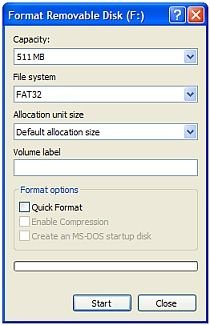
In the File System drop down, you will see FAT and FAT32. So which one to select?
If you right click Removable Drive >Properties

The General Properties of the USB drive reveals it is FAT, so I use FAT in the format utility. Then just select “Quick Format” and “Start” and all data will be deleted and hopefully all errors are now gone.

If still none of these tips work

Get hold of the warranty and get it fixed from customer support.
If all fails…. its time to buy a new high memory storage USB drive !

RSS Subscribe RSS feed     Bookmark and Share


488 Responses to “How to Fix Errors and Format USB Flash Drives”

  1. OLIVER BANDIRA says:

    I am having a problem with my exigo flash disk .I use windows 98 , i downloaded the drivers for win98 , so when i formated using the flash manager , i got an error message disk unfommated , and also delayed error message , whenever i want to save , reduced size to 1mb , i need help guys

  2. OLIVER BANDIRA says:

    I have an exigo flash drive 128mb i use win 98 operating system , i downloaded the divers for this flash but ever since my lyfe has never been the same , i formated using the flash manager , there after , the message came up drive not formated do you want to format now, the size reduced to 1mb , now the write and delay error message comes up, nothing can be saved , i am down and out please help me me

  3. Hie guys i bought a 128mb flash drive but ever since i downloaded the drives for windows 98 , i had a problem , i formated using the flash manager that comes along with the device driver , then i got flash is not formated do you want to format it now , i formated using win 98 , the size was reduced to 1mb , nothing can be saved on it now , the delay error message on writing appears, when i want to foramt the disk says raw drive . i need help guys i am done and out

  4. eyob says:

    hi
    mi new digital mp3 player do not apear on my computer folder who can help me with this problem

  5. daniel says:

    hi every body who expert with this problem.
    I have a problem with my mouth its stop working all of a sudden after that when i pluged out my mouth and insert on other computer the second computer olso stop its working with any mouth what is the problem
    pleas help me!

  6. shubham says:

    i have sony s-81 digital mp3 player its capacit is 256mb but it is showing only 119mb.i tried to format it in fat & fat32 also it not worked.any one can help me.

  7. Trung says:

    Sony Micro Vault 8GB is not true. It made in China and capacity is “Illusive”.

  8. diky says:

    i have 8 bg sony usb flash disk, but i had formatted the capacity is 32 mb. i don’t understand, may be any body can help me. plz e-mail

  9. c. Batch says:

    I had the same problem. I first tried to reformat the player using Windows.

    This did not work for my player. I contacted the manufacturer via their website and they emailed me a program to re-install the firmware. The software for the player was basically corrupted. They sent instructions on how to install the software they sent.

  10. Chris Cornish says:

    I was silly enough to believe that I could buy a Sony 8 GB USB pen drive from China for less than $100 and rave about it to my colleagues. I was able to get a techie to waste an hour trying to format it.

    The old rule if something sounds to good to be true then it isn’t.

    Doesn’t that ring so true.

  11. Jeremiah says:

    I thank you sooooooooo much i tried i didn’t think of lookin this up on the internet until now(2 years later) my warranty was over.But thanks a million if this wasn’t free i would pay u lol.But since its free i will leave a big thanks you = D

  12. joe says:

    i have 8 bg sony usb flash disk, but i had formatted the capacity is 64 mb. i don’t understand, may be any body can help me. plz e-mail

  13. Kerry Rock says:

    My favorite 128 MB USB drive has suddenly become a floppy drive. When inserted into any xp pc, it shows as a 1.44 mb floppy on Explorer and will not accept files in excess of that. However in Disk Management it shows up as a 119 mb FAT healthy active removable drive. If I try to reformat it, it claims that that the volume is not enabled and that the computer should be restarted, but that does not change anything.

    What goes?

  14. sha says:

    My 512 Mb USB thumb drive suddenly stopped working. When i plug it into windows or mac, they won’t recognise it.
    The light on the usb works but the drive doesn’t appear in my computer or under removable disks

  15. kjm says:

    I have a SanDisk Micro Cruzer 1gb the older kind with the translucent skins. For some reason I don’t know why but in XP the drive shows up under it’s own letter, but it seems in Windows Explorer you don’t see the capacity and used/free space in the right pane like you do with hard drives. Weird thing is I used to see this info, I don’t know why now the only way to find out the capacity and space left is to right click on it and hit properties. I tried re-formatting it in FAT and FAT32 and it is the same not showing the details.

  16. Amy says:

    I have 8G SONY pen drive but cannot store the file. When I try to reformat it, it’s claims unable to format and my pen drive become 0 byte.
    Anyone can help me.

  17. kingsten says:

    i have bought an 1gb usb pen drive. i wrongly formatted it. now instead of 1gb i have only 230mb. what to do plz help…

  18. kingsten says:

    i have bought an usb pen drive of 1gb with mp3 player and by mistake i wrongly formatted it. noe the memory space from 1gb now shows only 250mb. plz help me to bring my drive space again to 1gb.

  19. Satyajit says:

    I have 128mb flash disk
    I too face a problem as computer fails to recognixe the disk ang vie out he message

    insert disk in drive F:

    Any body has a solution for this

  20. azman says:

    Cannot Format usb Flash drive.error write protect

  21. Phil says:

    i have a 1GB scan disk cruzer micro usb device. prob with that device is i am unable to perform any operations. i am unable to write the contents to disk n also i’m unlucky in formatting the device,

    O.S’s are able to detect the usb device but are not able to perform any more actions. i tried all the ways to format the disk, control panel >> admin tools >> computer management to DOS format command.

    while formatting it display an error at 99% n while writing any contents to disk , error “the request could not be performed because of I/O device error ” gets alerted.

    i am least bothered about the data in the disk.

    so plz help me how to format the disk n make re-use of it.
    reply me at:
    philturner2@yahoo.com.au

  22. Mussa says:

    I have 1GB sony flash drive but it can only stor up to 10.9mb more than that all the excess data can not be oppened.I tried to format several times but still the problem exist.Can anyone help me to fix the problem.

  23. TAHIR says:

    hi,i have usb 2.0(256 mb) and when i m formatted this drive it will formatted it but when i see the property it show me the 188 mb is free and 66 mb is full after formatted and when i trasfer the data of 10mb(for example)it take almost 30 min what can i do plz help me i m wiating for ur reply

  24. Neil says:

    I recently had a Crucial Gizmo 128MB flash drive which developed the ‘Please insert disk’ problem after I installed a new HP PSC2355 printer (it had worked perfectly previously). I tried the re-format option mentiond and the drive formatted ok (win XP). I still got the ‘Please insert disk’ problem though. I noticed that when I right clicked on the pen drive in Windows Explorer and selected ‘Explore’ the contents of the next drive down the list were displayed. I then changed the drive letter for the pen drive (right-click my computer > manage > right-click the drive in question > Change Drive Letter and Paths. It has worked ok since then! Note that the drive letter I used was not the next available (I had C: – E:, M: – P:, so I used ‘K:’ for the pen drive. Maybe I was just lucky, but hopefully this might help resolve the problem for someone else.

  25. AJULO TITILAYO says:

    I have a flash drive of256MB zbut it’s displayed as 251MB,can someone tell me why? Also, now I cann’t accessed it, it’ s telling me it’s write protected. Looking forward for help. Thank you.

  26. Amandeep k Sohal says:

    Hello
    its very useful comments but i need to know that when i right click on drive(Sony 1GB)to format it shows “you don’t have sufficient rights to perform operation” and also in case if i delete some file or copy files in drive. I know that there is virus in drive but still how can i format my drive

  27. sachin shah says:

    sir, i have taken sony mp4 player of 256 mb but due to formatting it is only showing 118 mb memory tell me something for it

    please it is my friend’s

  28. I was unable to check for error or format my U.S.B flash disc.itresponds you dont have sufficient right, why? please help. says:

    i have usb2.0 flash disk,i ued it properly for the past one year,however, now it gets a great problem,when i open it the folders/files inside were like 0000…and unopenable,unscanable and undeletable.more over,it says you do not have sufficient right to format, check for error when i tried.so what shal i do?

  29. Vara Prasad says:

    Hello Everyone
    i had a 512 Mb usb drive
    iam trying to load data, or deleting the existing data , it shows an error saying that disk is write protected,
    Please help me
    Thanks in Advance

  30. Zulf says:

    Vara,
    your USB drive is ‘write-protected’. to stop this there is:
    1. a little switch on your drive whoch you can move
    2. software protection which can be removed following the instructions in the software itself.

    If that doesn’t help post the make/model of the usb drive pls!

  31. Nazir says:

    I have a new 4G Flash Drive. I tried coping files that are more than 2G of data, but no files copied on the 2nd level subfolders after removing the Flash Drive using Flash Unplug Hardware icon AND Plug into another computer. Both PC were using Windows XP. Does any has faced such problem, if so can you suggest how to fix

  • Subscribe free daily email newsletter Why?
  • RSS   Feed readers   Add to Google Reader or Homepage   Twitter
writeWrite a guest article - Showcase your site to our active community of bloggers, technology experts, and geeks. Now read 100+ guest articles
Jobs
Jobs on SEO | Blogging | SEM | Marketing | Software | More...
Jobs in Google | Yahoo | Microsoft | Adobe | Ebay | Cisco | Intel
Post a job - only $50 for 30 days! | 8 more reasons

Must Buy Software