
How to Recover Deleted Pictures, Files from Memory Cards
Have you ever accidentally deleted pictures from your camera’s memory card? Or pressed the Format button instead of the delete button and wiped your card clean? Perform a search on Google for ‘recover photos from memory card’, and you’ll find a ton of programs out there for sale. Most people don’t mind paying to recover some important pictures and that’s why those programs exist.
Recover Deleted Pictures and Files
However, there are also a lot of good open-source/freeware apps out there that can usually get the job done. And that’s where the nice people at CONVAR come in – offering a program called PC Inspector Smart Recovery, which can recover lost pictures for free. What’s even better is that it’s extremely easy to use and works well (based on my tests).
Please note that after you’ve lost the picture, DO NOT take any more pictures on the memory card, as writing new data to the card lowers your chances of recovering the picture. Also note, that recovering the picture is not 100% guaranteed, but there’s a good chance your picture will be recovered.
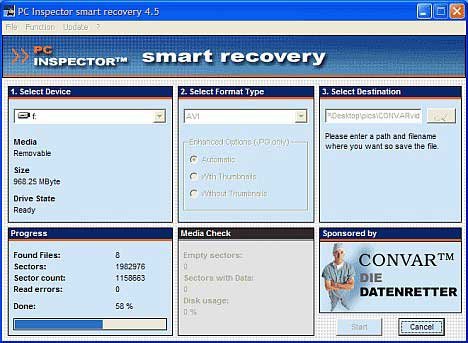
PC INSPECTOR Smart Recovery is a 100% free program, which can recover lost data from not only memory sticks, but also from any kind of memory device available nowadays (for the most part). If you’ve deleted any kind of file, you can usually rely on the software to recreate and reconstruct the file again, with great accuracy. It supports all common picture formats: .jpg, .amr, .tif, .bmp, .gif, Canon .crw , Fuji .raf , RICOH .raw, Olympus .orf (E-XX) etc. Video files in .avi, QuickTime .mov format and audio files in .wav, .dss format can also be recovered.
Connect your memory card, either by a little memory card reader, or hook your camera up to the PC via the data cable. Run PC INSPECTOR Smart Recovery and select the drive which is the memory card. Leave the format type as .JPG. Choose a destination for the recovered files. Press ‘Start’.
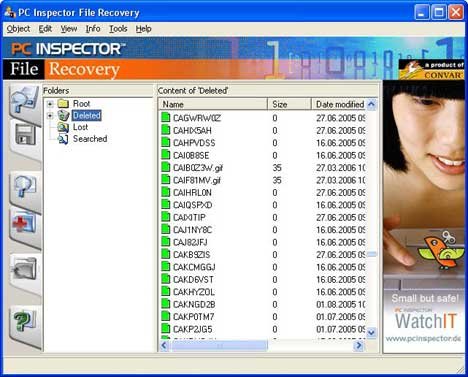
If you are able to recover the picture, but you can’t view it, you may want to perform a search on how to view damaged or corrupted files.
As a test, I deleted some pictures from my Sony digital camera and ran PC Inspector to see if I could get them back. So far, it’s been able to recover the deleted pictures and videos as long as I don’t take any other pictures after the deletion. Good luck!
This is a guest post by Aseem, a technology enthusiast and lead blogger for Online-Tech-Tips.com. You can read more amazing articles on his blog.