
How to Use Free Google Fonts on Your Website or WordPress (2026)
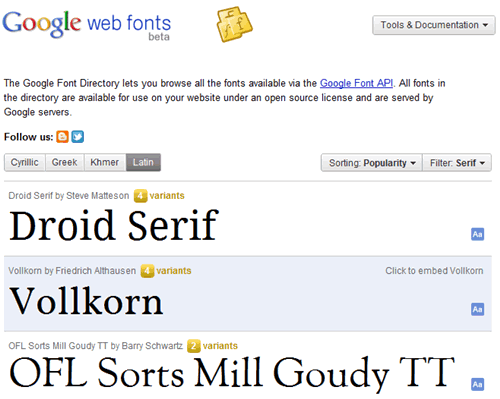
Google Fonts is still the easiest way to add beautiful free fonts to a website. When we first tried it in 2011, we switched our post titles to Droid Serif, then the most popular serif font in the directory, with two lines of code, and it worked in nearly every browser. Today the library has over 1,700 open-source families, many of them variable fonts. Here’s how to use free Google Fonts on any site or WordPress blog in 2026, and how to keep them fast.
Quick answer: Pick a font on fonts.google.com, click Get font and Get embed code, paste the <link> tags into your page’s <head>, and use the font in CSS, for example font-family: 'Inter', sans-serif;. For best speed and privacy, download the font and self-host it, or let WordPress’s Font Library or your theme load Google Fonts locally.
Table of Contents
How to use Google Fonts on any website
- Go to Google Fonts and browse or filter by category (serif, sans-serif, display, handwriting, monospace) and language.
- Open a font and click Get font, then Get embed code. Choose only the weights you need.
- Copy the code into the
<head>of your HTML:
<link rel="preconnect" href="https://fonts.googleapis.com">
<link rel="preconnect" href="https://fonts.gstatic.com" crossorigin>
<link href="https://fonts.googleapis.com/css2?family=Noto+Serif:wght@400;700&display=swap" rel="stylesheet">- Use it in your CSS with fallback fonts in case it doesn’t load:
h1, h2, h3 { font-family: 'Noto Serif', Georgia, serif; }Droid Serif, which we used originally, has since been succeeded by Noto Serif, part of Google’s Noto family that covers almost every language.
How to use Google Fonts in WordPress
- Theme settings: most themes, including Kadence, GeneratePress and Astra, let you pick Google Fonts in the Customizer, and many have a “load fonts locally” option.
- Block themes: since WordPress 6.5, the Font Library in Appearance > Editor > Styles > Typography can install Google Fonts and host them on your own site.
- Plugins: OMGF (Optimize My Google Fonts) downloads and self-hosts the Google Fonts your theme or plugins request.
Keep Google Fonts fast
- Use one or two families and only the weights you need.
- Prefer variable fonts: one file covers many weights.
- Keep
display=swapso text shows immediately in a fallback font. - Self-host fonts as WOFF2 files to avoid extra connections.
More detail in our guide to load Google Fonts faster.
Privacy: self-hosting Google Fonts
Loading fonts from Google’s servers sends each visitor’s IP address to Google. In 2022 a German court fined a website for this under GDPR, so many sites in Europe now self-host fonts. Self-hosting is also usually faster. Download the font files from Google Fonts or use the google-webfonts-helper tool.
Popular free Google Fonts
- Sans-serif: Inter, Roboto, Open Sans, Poppins, Montserrat
- Serif: Noto Serif, Merriweather, Lora, Playfair Display
- Monospace for code: JetBrains Mono, Fira Code, Source Code Pro; see the best programming fonts
Need fonts that work without downloads? Here’s our web safe fonts list.
FAQ
Are Google Fonts free for commercial use?
Yes. They are open source, mostly under the SIL Open Font License, so you can use them on commercial sites, apps and print.
Can I use Google Fonts offline?
Yes. Download the font family and install it on your computer for documents and design apps.
Do Google Fonts slow down my site?
A little, if you load many weights from Google’s servers. Use few weights, swap and self-hosting to keep it fast.
Get our free weekly email: new tech guides and tools, no spam.
New and updated tech guides, a free tool worth bookmarking and one useful pick, once a week. No spam, unsubscribe anytime.
One email a week. Unsubscribe anytime. See our privacy policy.



Amazed by seeing that a simple line of code can make so much differences. I am bored by seeing Arial as my font style. Google web font is giving you a chance to increase the beauty of your websites. I just followed your instruction to modify on the CSS stylesheet and it works perfectly. Thanks for sharing this precious info.
sir ,
I want to print our hand written notes in computer font .Is it possible ?& how?……
I am running Windows 7 Premium on my HP6910 laptop. My browsers are Firefox 3.6 and Internet Explorer 7. If I view the font families webpage using Firefox, every single font-family displays the exact same default font! If I go to the webpage using Internet Explorer, I get a blank page.
Am I missing a plug-in or something? Any suggestions on how to resolve the issues with either or both browsers?
TIA!
Well, the very next forum that I went to had the answer for the Firefox issue! I went to Tools>Options, then selected the Content tab in the popup dialog. In the Fonts & Colors section, I clicked the Advanced button. On the Fonts dialog box, I checked the Allow pages to choose their own fonts… checkbox. After closing the dialog box, I navigated to the Google web font-family page and it’s now displaying the appropriate font for each entry! Posting this for anyone else with the same problem who might end up on this site.
Interesting but does that allow international language font to use with it ?
Well, Googlefonts.com was available so I naturally had to buy it. Once I purchased the domain name I figured I would put it to good use and made this 1-2-3 tutorial on how to use google fonts!
This is lovely. I love these cool fonts. Will check and use it on my blog as well! :)
thank you… i love these fonts
Some of these fonts are really nice.
Google does host some really beautiful fonts.
The font family needs to be edited in the CSS stylesheet or it will not work. Both the fonts in the head tags and CSS should match.
great job for Google
after developing on JS and Jquery, now it starts serving CSS API :-)
Its really incredible. Google makes font embeds real simple.