
Home Office Technology: Dream Gadgets for Your Home Office (2026)
Some people are happy with a pen and paper, and others want every new gadget for their workspace. This guide to home office technology started in 2010 with a fun list of “dream” gadgets. We have updated it with the tech that really makes a home office better today: a good screen, wireless display, smart lighting, your own cloud storage, clean power and a few fun touches.
Quick answer: The most useful home office technology is a large, sharp monitor, a good webcam and microphone for calls, a USB-C dock to connect everything with one cable, adjustable lighting, and reliable backup storage such as a NAS. Add a surge protector or UPS, then finish with a gadget or two that makes the space fun to work in.
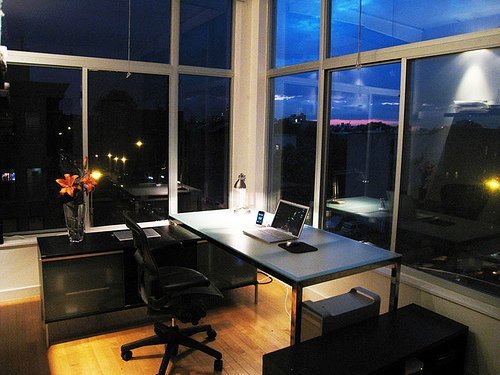
Table of Contents
Home office technology starts with a big screen
In 2010 our guest author suggested a huge flat-screen TV for the home office, and advised skipping the 3D TV hype, which turned out to be good advice. Today, a large, sharp computer monitor is the better buy for work. A 27-inch 4K screen gives room for two windows side by side and keeps text crisp. Browse a 27-inch 4K IPS monitor on Amazon.
Wireless display and one-cable docking
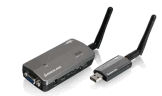
The original article loved wireless USB to VGA adapters for streaming video from a computer to a bigger screen. That idea lives on: most laptops, phones and smart TVs can now cast or mirror wirelessly, which is handy for presentations, video calls and showing off photos.
For a desk setup, a USB-C docking station is the modern upgrade. One cable connects your laptop to the monitor, keyboard, mouse, network and charger.
Cameras and microphones for video calls
Video calls are now a big part of home office work. A good webcam such as the Logitech Brio 4K and a USB microphone like the Blue Yeti make you look and sound far better than a built-in laptop camera and mic.
Smart lighting for your workspace

Back then, flexible light tape was the cool way to light up a work area and colour-code different zones. Today, LED strip lights do the same job, often with app or voice control, adjustable brightness and colour. Put warm light behind your monitor to reduce eye strain, and use a good desk lamp for task lighting.
Your own home office cloud

Our 2010 pick was the Pogoplug, a small box that shared a hard drive over the internet so you could have your own cloud. Today the same idea comes as network attached storage. A NAS drive keeps your files at home, backs up every computer in the house, and lets you reach your files from anywhere. Pair it with an online backup or a free cloud service such as Dropbox for a second copy.
Clean and green power

The solar-powered IllumiCharger was a fun eco gadget that soaked up light and charged USB devices off the grid. Solar chargers and power banks are still useful for charging phones during power cuts. For your computer, a surge protector is a must, and a UPS (uninterruptible power supply) gives you time to save your work when the power fails.
Fun touches for a home office

Every home office needs a clock and a little artwork, and our guest author loved a canvas clock that looked like a painting until you noticed its hands. Small touches like this make a workspace pleasant to spend hours in. Add a plant, a comfortable chair and good cable management, and your home office will be as nice to look at as it is to work in.
If your desktop computer is the slow part of the setup, see our guide on how to upgrade an old desktop PC.
Home office technology checklist
- A large, sharp monitor at eye level
- A USB-C dock for one-cable connections
- A webcam and microphone for calls
- Adjustable lighting
- Backups on a NAS or cloud service
- A surge protector or UPS
FAQ
What technology do I need for a home office?
Start with a reliable computer, a good monitor, fast internet, a webcam and microphone for calls, and a backup plan for your files. Add a surge protector or UPS to protect it all.
Is a TV a good monitor for a home office?
A TV can work for presentations, but a computer monitor is usually better for daily work because it shows sharper text and sits at a comfortable distance on a desk.
Do I need a NAS for a home office?
Not always. If you have lots of files or several computers, a NAS makes backups and file sharing easier. For light use, a cloud storage service may be enough.
How can I reduce eye strain at my desk?
Use soft background lighting behind the monitor, position the screen at eye level, and take short breaks away from the screen.
Originally written by guest author Mike Caldwell of Bari Leather Furniture. Updated for 2026 by QuickOnlineTips. Photo by mkosut on Flickr under CC.
Disclosure: As an Amazon Associate, QuickOnlineTips earns from qualifying purchases.
Get our free weekly email: new tech guides and tools, no spam.
New and updated tech guides, a free tool worth bookmarking and one useful pick, once a week. No spam, unsubscribe anytime.
One email a week. Unsubscribe anytime. See our privacy policy.



home theathers with 5.1 system sounds really great specially if you add those 12 inch subwoofers
home theaters are very common these days with price ranging from several hundred to several thousand dollars*:`
Only a flat screen television that i can imagine how it will use by me. This is because the technology in my country is behind the times and I don’t find out about technology that you mentioned in the post through internet or other media.
I love that Pictionaire Desk, I would love to put one of those at our Home Offices for our small business, that brings new ideas to the table in a big big way.
Wow! That light tape is incredible. And so is that TV I never knew they made 102″ flat screens, that’s a bit over the top!