
Intel Compute Stick: The Tiny Windows PC and Its 2026 Alternatives
The Intel Compute Stick was a complete Windows computer about the size of a USB pen drive. You plugged it into the HDMI port of a monitor or TV, added a Bluetooth keyboard and mouse, and had a working PC. This article covers what the Compute Stick offered when it launched in 2015, what happened to it, and what to buy today if you want a tiny PC.

Quick answer: Intel discontinued the Compute Stick line on July 31, 2020, so you can no longer buy it new. Its low-power Atom chip, 2GB of RAM and 32GB of storage would struggle with modern Windows anyway. If you want a tiny computer today, a palm-sized mini PC is the closest replacement, while a streaming stick suits TV-only use.
Table of Contents
What the Intel Compute Stick offered
When we covered it in 2015, the Compute Stick was one of the smallest Windows computers on the market. Its small size made it useful for people with limited desk space or an outdated desktop to replace. It shipped with Windows 8.1 and was eligible for the free Windows 10 upgrade on July 29, 2015.
The first model had these specifications:
- Intel Atom quad-core processor with Intel HD Graphics
- 2GB of soldered RAM
- 32GB of flash storage, plus a microSD slot for more
- One USB 2.0 port (a USB hub was needed for more accessories)
- Wi-Fi and Bluetooth 4.0
- Power through a micro USB port, not through HDMI as you might expect
After the first setup it was mostly plug and play: a fully working Windows computer on your monitor or HDTV.
The rise and fall of computers on sticks
In 2015 it looked like stick PCs would change the PC market and end the days of the bulky desktop. Intel released second-generation Compute Sticks in 2016 with faster Core m processors, and other makers joined in.

Lenovo announced a similar stick computer, the Ideacentre Stick 300, with comparable specs.
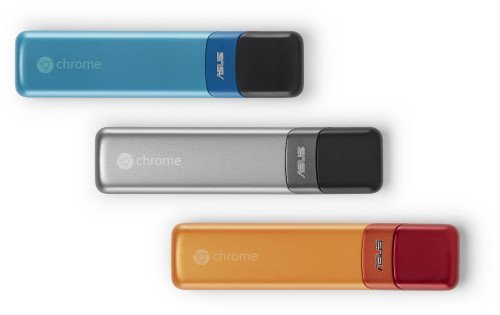
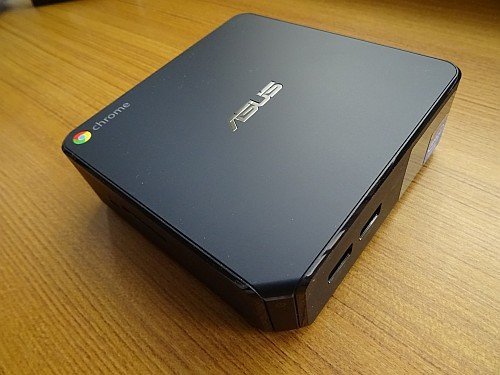
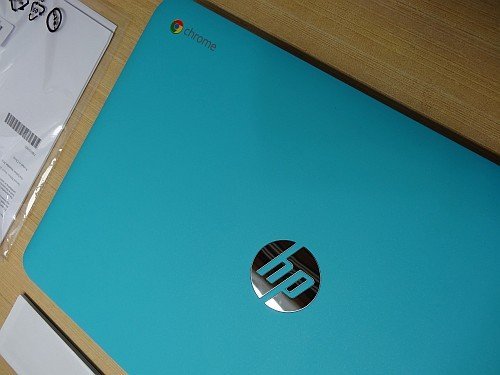
Google and Asus answered with the Chromebit, which packed Chrome OS into a similar stick. After buying the HP 14 Chromebook and Asus Chromebox, I was looking forward to it as my third Chrome device.
The category never took off. Sticks ran hot, had very little memory and storage, and offered few ports. Meanwhile, small mini PCs became cheap and far more capable, and Intel ended the Compute Stick line in 2020.
Intel Compute Stick alternatives in 2026
- Mini PCs: palm-sized desktops that mount behind a monitor or TV. They offer far more RAM, storage and ports than any stick. Browse mini PCs on Amazon and pick one with at least 8GB of RAM and an SSD for Windows 11.
- Raspberry Pi: a tiny, low-cost Linux computer for projects, learning and media use.
- Streaming sticks: if you only wanted the Compute Stick to watch video on a TV, a streaming stick is cheaper and simpler.
- An upgraded old desktop: sometimes the best small upgrade is the PC you already own. See how to upgrade an old desktop PC.
Tips if you still own a Compute Stick
An old stick can still work as a simple display or kiosk computer. Use a good power adapter, keep it in a ventilated spot, and add a microSD card for storage. Check whether your exact model supports the version of Windows you want before upgrading.
FAQ
Is the Intel Compute Stick still sold?
No. Intel discontinued the Compute Stick line on July 31, 2020.
Can the Intel Compute Stick run Windows 11?
The original model has only 2GB of RAM, below the 4GB minimum that Windows 11 requires, so it is not a practical Windows 11 machine.
How was the Compute Stick powered?
Through a micro USB port connected to a power adapter, not through the HDMI port.
What is the best replacement for a stick PC?
A mini PC with an SSD and 8GB or more of RAM gives you a tiny Windows computer without the stick’s limits.
Disclosure: As an Amazon Associate, QuickOnlineTips earns from qualifying purchases.
Stuck on a gift? Try our free Gift Idea GeneratorIdeas for anyone by age, job, interests and budget, with Amazon.com and Amazon.in linksFind gifts →Get our free weekly email: new tech guides and tools, no spam.
New and updated tech guides, a free tool worth bookmarking and one useful pick, once a week. No spam, unsubscribe anytime.
One email a week. Unsubscribe anytime. See our privacy policy.


Hi
Intel Compute Stick is the smallest windows computer This Product Very Well ,Intel Make the product many advanced added..super..
This is really amazing device. I have seen one of this a while ago and its so cool…hmmmm. I wonder how many Chinese’s knockout will come out soon?
Richard
@ P Chandra
in the event that the cost of windows 10 & Intel Compute Stick are comparative. I would go for Intel Compute Stick. It is more helpful and sensible.
regards
rakhi
Such a useful device. You have present new technology here. Felt nice to hear progression in technology..
Thanks for sharing this. Windows should have done this long time ago.
Alice
@Priyanka Michael It is powered by Intel Atom Quad-Core processor and has 2GB soldered single-channel DDR3L RAM. It has a limited 32GB Flash storage
It seems Windows has finally realized the need for small USB sized computers. thanks for sharing.
if the price of windows 10 & Intel Compute Stick are similar. I would go for Intel Compute Stick. It is more convenient and reasonable.
It seems Windows has finally realized the need for small USB sized computers. Linux has been doing this for a while and even Android. There are many USB android devices as well as Android TV boxes so why not do it with windows?
Microsoft Windows 10 Pro | USB Flash Drive – if it really costs $199, I am thinking about going with Intel Compute Stick. Seems like more reasonable and affordable.
nice blog shows what technology became now a days. gadgets became more portable and powerful what next future will be full of more and more surprises thanks for the information P Chandra your blog helps to know that what technology becomes now a days and what we dream for future