
Google Reader Notifier for Firefox: What It Was and RSS Alerts Today
The google reader notifier was a small Firefox extension from 2006 that showed how many unread items were waiting in your Google Reader account. This article explains what it did, why it no longer works, and the best ways to get RSS alerts for new posts in 2026.
Quick answer: Google Reader Notifier stopped working when Google shut down Google Reader in July 2013. To get alerts for new posts today, use a feed reader such as Feedly or Inoreader, or a Firefox add-on like Feedbro that reads RSS feeds directly and can show notifications.
Table of Contents
What the Google Reader Notifier did
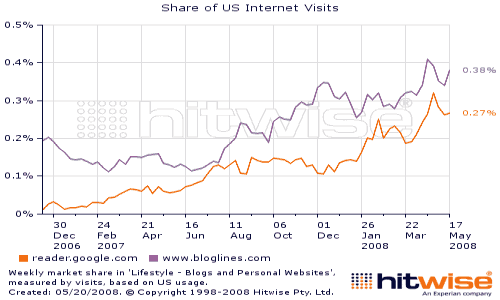
I used Google Reader every day to track and read RSS feeds (I had switched from Bloglines to Google Reader in 2006). The trouble was that I kept going back to the browser tab to check for new articles from my favourite blogs.
The Google Reader Notifier extension for Firefox solved that:
- It showed the number of unread items in your Google Reader account right in the browser.
- One click refreshed the counter, another opened Google Reader.
- You could set preferences such as the auto-refresh time.
- It supported several languages.
It was one of many handy add-ons of that era, alongside the ones I described in my first experiences with Firefox 2.
Why the Google Reader Notifier no longer works
The extension depended entirely on Google Reader. Google announced in March 2013 that it would shut down Google Reader, and the service closed on 1 July 2013. With no Reader account to check, the notifier had nothing to count. Old Firefox extensions of that type also no longer install in modern Firefox, which only supports newer WebExtension add-ons.
Most Reader users moved to Feedly at the time, and I wrote how to switch from Google Reader to Feedly in 1 minute.
Google Reader Notifier alternatives for RSS alerts in 2026
RSS is still the best way to follow sites without an algorithm deciding what you see. These options give you the same “new items waiting” feeling:
- Feedly: the most popular Google Reader replacement, with web and mobile apps that sync your unread counts. See whether Feedly Pro is worth paying for.
- Inoreader: a powerful web feed reader with rules, filters and mobile apps.
- Feedbro: a Firefox add-on that reads RSS, Atom and RDF feeds inside the browser without an online account, and can trigger desktop notifications through its rules.
- Email alerts: many blogs offer an email newsletter of new posts if you prefer your inbox.
For a fuller comparison, read our guide to the best RSS readers in 2026.
How to set up RSS alerts in Firefox
- Install a feed reader add-on from the official Firefox Add-ons site, or sign up for a web reader like Feedly or Inoreader.
- Add your favourite sites by pasting their homepage or feed URL (often ending in /feed/ or /rss).
- Import your old subscriptions if you have an OPML file from another reader.
- Turn on notifications or check the unread count when it suits you.
FAQ
Can I still use the Google Reader Notifier?
No. Google Reader closed in July 2013, so the extension has no account to read, and old-style extensions don’t install in current Firefox.
What replaced Google Reader?
Most users moved to Feedly. Inoreader and other feed readers are popular alternatives.
Is there a Firefox add-on that shows new RSS items?
Yes. Feedbro is a feed reader add-on for Firefox that can show unread items and send desktop notifications.
Is RSS still used in 2026?
Yes. Most blogs, news sites and podcasts still publish RSS feeds, and feed readers remain a popular way to follow them.
Get our free weekly email: new tech guides and tools, no spam.
New and updated tech guides, a free tool worth bookmarking and one useful pick, once a week. No spam, unsubscribe anytime.
One email a week. Unsubscribe anytime. See our privacy policy.



One of my main extensions. Gmail notifier is a must have for gmail users.