
WordPress 2.7: 3 Best Features That Still Matter Today
WordPress 2.7 (codename “Coltrane”, released on 10 December 2008) was the release that gave WordPress the admin layout we still use: a sidebar menu, one-click updates and threaded comments. As a long-time WordPress user, here are the three WordPress 2.7 features I loved most, and how they live on in WordPress today.
Quick answer: WordPress 2.7 introduced one-click core and plugin updates from the dashboard, threaded and paged comments with inline replies, and the collapsible sidebar admin menu with Screen Options. All three are still part of WordPress today. Version 2.7 itself is long outdated, so always run the latest WordPress release.
Table of Contents
What was new in WordPress 2.7
The official WordPress 2.7 release notes list a redesigned admin area, sticky posts, comment threading and paging, inline comment replies, batch and inline post editing, QuickPress drafts on the dashboard, a built-in plugin installer and core updates from the admin panel. These were the three that made the biggest difference to my daily blogging.
1. One-click WordPress upgrades
My biggest grudge was the cumbersome WordPress upgrade. Every time a new release came out, you had to back up your database, run through the whole manual upgrade over FTP, and if something went wrong, run around for support.
The most useful feature in WordPress 2.7 was the one-click upgrade from the dashboard. If you run multiple WordPress blogs, this was the biggest time saver ever. Add the ability to install any plugin directly from WordPress.org with a single click, and what more could you want?
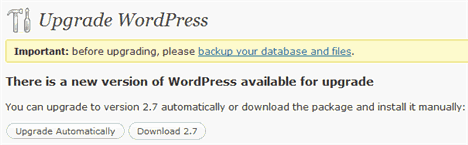

This saved WordPress newbies a lot of hassle with repeated upgrades. Combined with the one-click WordPress installation offered by web hosts like Dreamhost, you might never need FTP to install or upgrade WordPress again.

2. Super easy comment management
The new AJAX interface for comments made it easy to manage and quick edit comments from the admin, and it increased my ability, ease and motivation to reply to readers.

I could now interact more with reader comments by replying from the admin itself, which puts more life into the blog. Moderation was no longer a tedious chore, especially with keyboard shortcuts. On the reader side, comment threading and comment paging gave the blog a proper conversation system. If you use paging, read how to fix duplicate comment pages in WordPress.
3. Easy-access admin menu

All the admin functions were neatly stacked away in an unobtrusive sidebar. You could expand just what you needed in one click. Screen Options let you choose which items to show on each screen and hide the rest, and you could drag and drop dashboard boxes to put what you use most at the top.

WordPress 2.7 features in WordPress today
All three features grew up rather than disappeared:
- Updates: the Dashboard > Updates screen still updates core, plugins and themes in one click. WordPress now also installs minor security releases automatically in the background, and you can turn on auto-updates for individual plugins and themes.
- Comments: threaded (nested) comments and breaking comments into pages are still options under Settings > Discussion, and Reply, Quick Edit and bulk actions remain on the Comments screen.
- Admin menu: the left sidebar menu and the Screen Options tab at the top of admin screens are still there.
- Sticky posts: also new in 2.7, and still useful. See how to use and style sticky posts in WordPress themes.
The editor itself changed the most: the classic editor of 2008 was replaced by the block editor in later versions, though many sites (including QuickOnlineTips) still use the Classic Editor plugin.
Should you still use WordPress 2.7?
No. WordPress 2.7 is more than 15 years old and gets no security fixes. Old versions are an easy target for hackers, and modern plugins and PHP versions won’t run on it. Download the latest WordPress or update from your dashboard, and keep a backup before every major update. Back then, you could also try WordPress 2.7 features on earlier versions with plugins, but today the real thing is always just one click away.
FAQ
When was WordPress 2.7 released?
WordPress 2.7, codenamed “Coltrane” after jazz musician John Coltrane, was released on 10 December 2008.
What was the biggest change in WordPress 2.7?
The redesigned admin area with a sidebar menu, plus one-click core and plugin updates from the dashboard. Both are still part of WordPress.
Does WordPress still have threaded comments?
Yes. Go to Settings > Discussion and enable threaded (nested) comments. Your theme also needs to support them.
Is it safe to run an old WordPress version?
No. Old versions miss years of security fixes. Always update to the latest WordPress release and keep your plugins and themes updated too.
Get our free weekly email: new tech guides and tools, no spam.
New and updated tech guides, a free tool worth bookmarking and one useful pick, once a week. No spam, unsubscribe anytime.
One email a week. Unsubscribe anytime. See our privacy policy.



there is new update wordpress 2.7.1, isn’t it?
I love word press! I once used b2evolution. Boy was I wrong about using that!
After reading this post, I realized that it is time for me to complete an upgrade of my WordPress. :D
now you make me decide to upgrade later.
more better wordpress with more benefits….creating from best wordpress team
I agree with this post, I think that the automatic update function will lead to a broader adoption of WordPress as some people didn’t like having to update their install from time to time. Thanks for the post.
I think allmost everything is better with 2.7, the upgrade feature is a nice improvement.
/Patrik
My two favorite new features of 2.7 are the new post page, which is much cleaner in terms of layout and a whole lot easier to use and I absolutely love the quick edit post feature, just to be able to quickly edit tags, categories, post title, etc. is amazing.
The admin interface is just flat out better. Easy access to drafts is a time saveer and the quick press function is perfect for those on-the-fly posts you want to get out without a lot of tooling around. This is the first upgrade that really makes it feel like an improved product.