
How to Add Font Awesome Icons in Bootstrap 5 (2026)
Want to add Font Awesome icons in Bootstrap themes? When we switched our Bootstrap site from Glyphicons to Font Awesome in 2013, it meant sharp, scalable icons with no image sprites. Bootstrap 5 dropped Glyphicons altogether, so Font Awesome (now version 7) is still one of the easiest ways to add icons to a Bootstrap site. Here’s the current code, with examples you can copy.
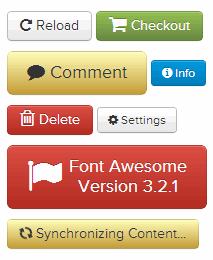
Quick answer: To use Font Awesome icons in Bootstrap 5, add the Font Awesome CSS after Bootstrap’s CSS in your page <head>:
<link rel="stylesheet" href="https://cdn.jsdelivr.net/npm/@fortawesome/fontawesome-free@7.3.1/css/all.min.css">
Then insert icons with an <i> tag, for example <i class="fa-solid fa-flag"></i>. No extra JavaScript is needed.
Table of Contents
Why use Font Awesome icons in Bootstrap?
- Scalable vector icons: icons are a font (or SVG), so they stay sharp at any size and on high-resolution screens.
- Style with CSS: change colour, size and shadows with normal CSS or Bootstrap utility classes like
text-primaryandfs-3. - Thousands of free icons: the free set includes solid, regular and brand icons, including logos for X, WhatsApp, GitHub and more.
- No sprites to manage: one CSS file gives you every icon.
How to add Font Awesome to Bootstrap 5
Here is a complete starter page with Bootstrap 5.3 and Font Awesome 7 loaded from the free jsDelivr CDN:
<!doctype html>
<html lang="en">
<head>
  <meta charset="utf-8">
  <meta name="viewport" content="width=device-width, initial-scale=1">
  <link rel="stylesheet" href="https://cdn.jsdelivr.net/npm/bootstrap@5.3.8/dist/css/bootstrap.min.css">
  <link rel="stylesheet" href="https://cdn.jsdelivr.net/npm/@fortawesome/fontawesome-free@7.3.1/css/all.min.css">
</head>
<body>
  <button class="btn btn-primary">
    <i class="fa-solid fa-download"></i> Download
  </button>
</body>
</html>
Use all.min.css for the simplest setup. It loads the solid, regular and brands styles in one file. If you only need a few icons, see “Load Font Awesome faster” below.
Font Awesome icon examples for Bootstrap
Icon styles
<i class="fa-solid fa-house"></i>      <!-- solid -->
<i class="fa-regular fa-envelope"></i>  <!-- regular (outline) -->
<i class="fa-brands fa-x-twitter"></i>  <!-- brand logo -->
Sizes
Add fa-xs, fa-sm, fa-lg, fa-xl, or fa-2x to fa-10x:
<i class="fa-solid fa-flag fa-3x"></i>Icons in Bootstrap buttons and alerts
<a class="btn btn-success" href="#"><i class="fa-solid fa-check me-2"></i>Save</a>
<div class="alert alert-warning"><i class="fa-solid fa-triangle-exclamation me-2"></i>Check your settings</div>
Bootstrap’s spacing utilities such as me-2 add a gap between the icon and the text.
Spinning and stacked icons
<i class="fa-solid fa-spinner fa-spin"></i>
<span class="fa-stack">
  <i class="fa-solid fa-circle fa-stack-2x"></i>
  <i class="fa-brands fa-github fa-stack-1x fa-inverse"></i>
</span>
Accessibility tips
Font Awesome adds aria-hidden="true" handling automatically when you use its SVG/JS version. With the CSS version, add it yourself to decorative icons, and give icon-only links a label:
<a href="https://x.com/qot" aria-label="Follow us on X">
  <i class="fa-brands fa-x-twitter" aria-hidden="true"></i>
</a>
Load Font Awesome faster
all.min.css plus its font files adds weight to every page. To keep Bootstrap sites fast:
- Load only the styles you use, for example
fontawesome.min.cssplussolid.min.cssandbrands.min.css. - Use Font Awesome’s free Kit to subset icons, or paste individual SVG icons inline.
- Add
font-display: swapbehaviour by preloading the font file you use most.
We share more speed tricks in how to load Bootstrap themes faster.
Font Awesome vs Bootstrap Icons
Bootstrap now has its own free icon library, Bootstrap Icons, with over 2,000 icons that match Bootstrap’s style. Use Bootstrap Icons if you want a smaller, consistent set; choose Font Awesome if you need more brand logos or icon styles. Both work the same way with an <i> tag and a CDN link.
More Bootstrap and Font Awesome guides
- Add Font Awesome icons to any site, without Bootstrap
- Floating social share icons with Bootstrap 5 and Font Awesome
- Load Bootstrap and Font Awesome in the WordPress editor
- Pure CSS social media icons and our original Bootstrap setup
Frequently asked questions
Does Bootstrap 5 include Font Awesome?
No. Bootstrap 5 has no built-in icons. Add Font Awesome or Bootstrap Icons with a separate CSS link.
Why are my Font Awesome icons showing as squares?
The font files didn’t load, or you used class names from an older version. Use the full CDN path to all.min.css and current classes such as fa-solid instead of the old fa or fas.
Is Font Awesome free?
Font Awesome Free is free for commercial use, including the solid, regular (partial) and brand icons. Pro adds more styles and icons.
Do I need Font Awesome’s JavaScript?
No. The CSS version works on its own. The JavaScript/SVG version is optional.
Get our free weekly email: new tech guides and tools, no spam.
New and updated tech guides, a free tool worth bookmarking and one useful pick, once a week. No spam, unsubscribe anytime.
One email a week. Unsubscribe anytime. See our privacy policy.



These fonts are pretty awesome, thank you!
I’m using bootstrap and I added font awesome through Less, overriding the Glyphicons. The icons display OK in chrome but in Firefox i just see boxes.
The best way to add font awesome is through a link via bootstrapcdn
This idea is good to take much more advantages and beside that you can attract visitors as well for your site/blog.
When you are seeking standard icon images, such as for vehicles, certain punctuation characters or graphical charting icons, icon fonts can offer you scalable images that look the same irrespective of the size of the font. This is just as letters and numbers appear the same irrespective of whether you use a size 2 or 5 or a 10 or 24 point font size.