5 Tricks to Load Bootstrap Themes and Templates Faster (Bootstrap 5)
Bootstrap makes building a responsive, mobile-first website easy, but loading the whole framework adds weight your visitors pay for on every page. We used Bootstrap for the core design of this site for years, and these tricks to load Bootstrap faster cut our CSS and JavaScript down to a fraction of the default size. Here are the five that matter most in 2026, updated for Bootstrap 5.
Quick answer: To make Bootstrap themes load faster: (1) drop Bootstrap’s JavaScript if you don’t need modals or dropdowns, or load it with defer; (2) build a custom CSS file with only the components you use via Sass; (3) remove unused CSS with a tool like PurgeCSS; (4) use a lightweight icon set instead of a full icon font; and (5) serve the files compressed from a CDN with long caching.
Table of Contents
1. Remove or defer Bootstrap’s JavaScript
Bootstrap’s JavaScript powers modals, dropdowns, collapsible navbars, tooltips and carousels. Many sites barely use them. If yours doesn’t, don’t load bootstrap.bundle.min.js at all; the CSS works fine on its own.
If you do need it, load it at the end of the page or with defer, so it doesn’t block rendering:
<script src="https://cdn.jsdelivr.net/npm/bootstrap@5.3.3/dist/js/bootstrap.bundle.min.js" defer></script>A simple navbar can even work with pure CSS, without any JavaScript.
2. You no longer need jQuery
In Bootstrap 3 and 4, every plugin needed jQuery, adding another ~30 KB. Bootstrap 5 dropped jQuery completely, so if you’ve upgraded, remove jQuery unless another plugin on your site needs it. On WordPress, see whether you can stop loading jQuery on the front end.
3. Build a custom Bootstrap with only what you use
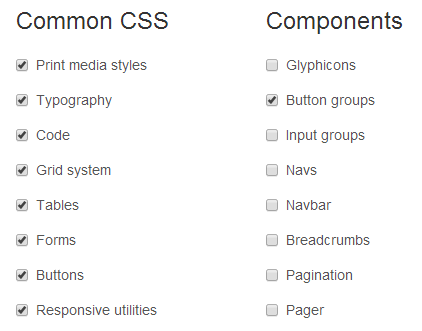
Bootstrap 3 had an online Customize page (above) where you ticked the components you needed. That tool is gone, but Bootstrap 5’s Sass source makes the same thing easy. Install Bootstrap with npm, then import only the parts you need:
// custom.scss
@import "bootstrap/scss/functions";
@import "bootstrap/scss/variables";
@import "bootstrap/scss/maps";
@import "bootstrap/scss/mixins";
@import "bootstrap/scss/utilities";
@import "bootstrap/scss/root";
@import "bootstrap/scss/reboot";
@import "bootstrap/scss/containers";
@import "bootstrap/scss/grid";
@import "bootstrap/scss/buttons";
@import "bootstrap/scss/utilities/api";
Compile it, and you get a much smaller file. Most blogs use the grid, buttons, alerts, cards and utilities, and can skip carousels, accordions, offcanvas, toasts and more. The Bootstrap Sass docs show the full import list.
4. Remove unused CSS (and drop the icon font)
Even a custom build includes classes you never use. Tools like PurgeCSS scan your templates and remove unused selectors, often shrinking Bootstrap CSS by 80% or more. On WordPress, LiteSpeed Cache and WP Rocket have “remove unused CSS” options that do something similar.
Bootstrap 3 bundled the Glyphicons icon font. It was removed in Bootstrap 4, and loading a whole icon font for a few icons is wasteful anyway. Use inline SVG icons, Bootstrap Icons as individual SVGs, or load only the icons you need from Font Awesome.
5. Serve Bootstrap from a fast CDN, compressed and cached
Serve your CSS and JS from a CDN so they load from a server close to each visitor. We used MaxCDN back then; that service has since shut down. Today, use your own CDN (such as Cloudflare or your host’s CDN) for custom builds, or jsDelivr for the standard files. Make sure files are served with Brotli or gzip compression and long cache headers.
Go further by inlining the small critical part of your CSS in the head and delaying non-critical CSS. Here are more tips to load CSS faster.
Or switch to a lighter framework
If you only use Bootstrap’s grid and buttons, a micro framework may be enough. We eventually moved to the 3 KB Chota CSS framework, which uses similar class names and is small enough to inline completely.
Frequently asked questions
How big is Bootstrap 5?
The full minified CSS is about 230 KB (around 30 KB compressed), and the JavaScript bundle about 80 KB (around 23 KB compressed). A custom, purged build is usually far smaller.
Does Bootstrap slow down a website?
Unused CSS and JavaScript add download and processing time, especially on mobile. Trimming it to what you use removes most of the cost.
Is the Bootstrap CDN still available?
Yes. Bootstrap’s docs link to jsDelivr. The old StackPath/MaxCDN BootstrapCDN links are no longer the recommended source.
Get our free weekly email: new tech guides and tools, no spam.
New and updated tech guides, a free tool worth bookmarking and one useful pick, once a week. No spam, unsubscribe anytime.
One email a week. Unsubscribe anytime. See our privacy policy.