How to Recover Deleted Pictures and Files from Memory Cards
July 15th, 2008Guest post by Aseem from Online-Tech-Tips.
Have you ever accidentally deleted pictures from your cameras’ memory card? Or pressed the “Format” button instead of delete button and wiped your card clean?
Perform a search on Google for “recover photos from memory card”, and you’ll find a ton of programs out there for sale. Most people don’t mind paying to recover some important pictures and that’s why those programs exist.
However, there are also a lot of good open source / freeware apps out there that can usually get the job done. And that’s where the nice people at CONVAR come in – offering a program called PC Inspector Smart Recovery, which can recover lost pictures for free. What’s even better is that it’s extremely easy to use and works well (based on my tests).
Please note that after you’ve lost the picture, DO NOT take any more pictures on the memory card, as writing new data to the card lowers your chances of recovering the picture. Also note, that recovering the picture is not 100% guaranteed, but there’s a good chance your picture will be recovered.
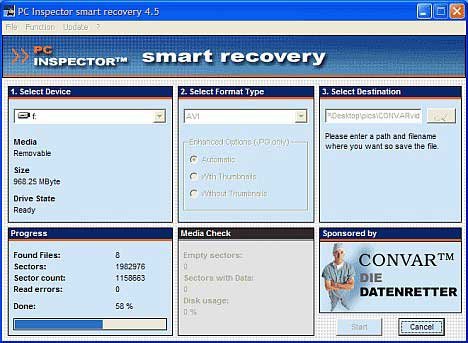
PC INSPECTOR Smart Recovery is a 100% free program, which can recover lost data from not only memory sticks, but also for any kind of memory device available nowadays (for the most part). If you’ve deleted any kind of file, you can usually rely on PC INSPECTOR Smart Recovery to recreate and reconstruct the file again, with great accuracy.
PC INSPECTOR Smart Recovery runs on all Win 9x, ME, NT 4.0, XP and Windows™ 2000 systems and supports the following picture formats: .jpg, .amr, .tif, .bmp, .gif, Canon .crw , Fuji .raf , RICOH .raw, Olympus .orf (E-XX), Olympus .orf (C5050), Nokia 3gp, Kodak .dcr, Minolta .mrw, Nikon .nef (D1H/D1X), Nikon .nef (D2H/D2X), Nikon .nef (E5000/E5700), Sigma – Foveon .x3f, mp4, QuickTime .mov (Konica Minolta). Video files in .avi, QuickTime .mov format and audio files in .wav, .dss format can also be recovered.
Using the software is straightforward and doesn’t need a detailed explanation. Simply plug in your memory device, run the program, and you’re set. But if you really want a step by step instruction, here it is:
Step 1: Download PC INSPECTOR Smart Recovery.
Step 2: Connect your memory card, either by a little memory card reader, or hook your camera up to the PC via the data cable.
Step 3: Run PC INSPECTOR Smart Recovery.
Step 4: Select the drive which is the memory card. It should be the one that has just connected.
Step 5: Leave the format type as .JPG.
Step 6: Choose a destination for the recovered files.
Step 7: Press ‘Start’.

If you are able to recover the picture, but you can’t view it, you may want to perform a search on how to view damaged or corrupted files.
As a test, I deleted some pictures from my Sony digital camera and ran PC Inspector to see if I could get them back. So far, it’s been able to recover the deleted pictures and videos as long as I don’t take any other pictures after the deletion. Good luck!
This is a guest post by Aseem, a technology enthusiast and lead blogger for Online-Tech-Tips. You can read more amazing articles on his blog. If you have a tip to share, write a guest article here.


Thanks for sharing a helpful software
hey . i had accidently done a low level formatting of the photographs .
is there a way to recover ??
i have used softwares way ahead of the above ones and even tried stellar .
they both have said no no no…
any bright ideas ?
PC Inspector Smart Recovery is indeed one of the most helpful free programs I’ve ever had. I’ve been using it for a year or two now and it really doesn’t disappoint me. Use it, too!
hmm.. thank you very much. usefull information
Cool. It took almost a day to find this info. Thanks! Good job. :)
I accidentally deleted pictures of my daughter’s first day of school while trying to move them to another drive. My wife and I were devastated! I did a search and found a few other products that claim to recover files….at a cost. I gave PC INSPECTOR Smart Recovery a try, and it worked. I thank you so very much for recommending this software and helping me to recover such important memories.
Useful guide.I use recover my files software to do this.
You can find a cheaper alternative at http://www.advancedmediarecovery.com only $20 does the same job and has a free trial
There are some OK free file recovery tools, I have found however that they will not work in some scenarios, e.g, to get deleted photos back from formatted camera cards. The best photo recovery program is File Restore Professional. It is a commercial product… but then what value do you put on your memories. You can download File Restore Professional here: http://www.photo-recovery.com
err…
what if I accidentally over-write the memory card by taking more pictures afterward. Can I still save my deleted photos? I’ve already tried this software, and I found a lot of files there, but most of them are corrupted and I can’t open them. Can somebody tell me what to do?
thank you :)
Thank you very much!. I was able to recover all of my pictures on a Sony camera. very useful program.
hey its working dear. but there is a problem, when i recovered my images some of my images were corrupted. Then I tried Recuva. It really worked for me. its a freeware. If pc inspector does not work. do try recuva. you can get it from here :
http://84productions.blogspot.com/2009/02/recover-deleted-files-easily-with.html
Wouldn’t run on Vista 64 bit. missing gifxx.dll
My friend was devastated after taking more than 1600 photos from china. She came back to states and ask my help. I ran the PC Inspector and it work Great!. Got all those missing photos….Now I’m sure i will get a free dinner out of this when i give her a memory stick of all her photos.
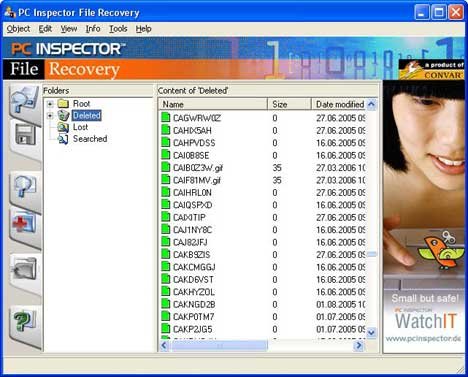
This was such an awesome tool..I was so hopeless and frustrated then when i lost my daughters memorable pictures,I got a memory card error and tried different things just to recover the pix but no luck in doing so..I tried browsing for software on how to recover pix but it only allowed me to view files,i cant save unless i’ll buy it online.And im not really use to in buying online so tried searching for another luckily i found this PC inspector file recovery,i followed the steps and I almost cried when i saw my daughters precious pictures..Thank you so much for everyone in CONVAR..VERY HELPFUL :)
I am not able to find the right drive to point to my memory card on my camera. It i’ve downloaded 2 programs now including this pc inspector one and one that I paid for and each one asks to select the correct drive but my camera comes up without a drive letter,or number, just a picture of the camera??? what do I do now?
I’m not sure if you ever got help, but maybe instead of plugging your camera into the computer try putting your memory card into a card reader. That is what I used, and my card reader was $12 and works great (never any problems). The drive depends on which USB port you plug it in to, you could just check to see which ones are free.
Hope that helps!
wow! i thought i was going to lost the pictures in my digicam. thanks for this. i was able to retrieve the important pictures. thank you!
God Bless!
Many, many thanks for this info. After our HDD crashed and died……I just ran PC Inspector and found all my deleted photos from a recent trip to Amsterdam. What a great tool……thanks again for the tip !!!
Thank you so much for this info! I accidentally deleted about 20 pictures and 2 videos of my son walking. I was crushed. So far this has worked and I’m hoping it will come across the videos. THANK YOU!!!
Nice, report. i really enjoyed throughout the article. This is very useful software (it seems to be). I have also used a photo picture recovery software 4 months ago to recover my marriage photo. Accidentally my brother in law deleted all the file while trying to move from Memory card. Thnks to god, my friend was there at that time and he suggested me a software for recovery. Now i have all my special memorable moments of marriage life.
this program is amazing!! I just recovered 150 pictures that I accidently deleted from a friends camera, now I don’t have to face the wrath!!!
If there any way i cud do d recovery throug my phone
I am on holidays in France and accidentally deleted 300 of my photos! After it happened, I was devastated. I took one more photo but quickly deleted it. I don’t have my USB with me so when I get home, will I still be able to recover my photos?
Thanks
You can easily recovery your lost picture.. download the software from here http://www.photosrecovery.org/
Note: do not take any pictures from your till you recover all your pictures…