
Quick Online Tips
About     Contact

How to Create Pages in Blogger

How can you create pages in Google Blogger blogging platform? Well Blogger introduced the ability to create pages in Blogger recently and now all bloggers can easily create pages.

Pages are a key way to highlight important information pages on your blog and are not published in the blog timeline. WordPress has long had pages and Blogger was lacking in this essential feature for a long time.

On your Blogger dashboard, go to Posting > Edit Pages > New Page

create blogger pages

Unlike unlimited pages that you can create in WordPress, Blogger still lets you create only 10 pages, so you need to chose clearly which pages you want. Then if you need to insert pages in the layout, they have created a new gadget which you can use.

Go to Layout > Add a Gadget >  Pages

pages-gadget

Add the gadget to the sidebar on the side or the navigation bar on the top and you can easily add your pages in the layout. You can change the order of links too.
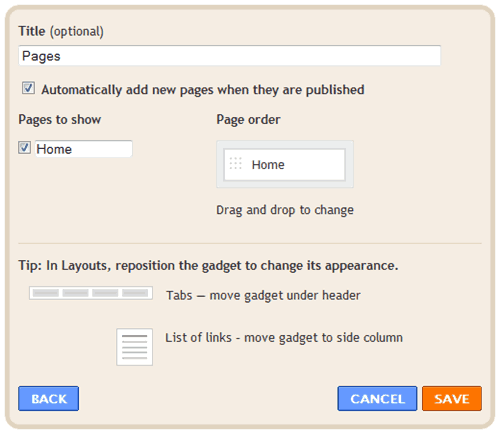
pages gadget

Create pages in Blogger and enjoy.


17 Responses

  1. Hi. Any idea on how can I add more of the pages, ie. aside from just the ‘Home’, e.g. I would like to add ‘About me’

    And I would like to add the Blogger ‘about me’ under that ‘About me’ page which I would like to create. Just like how wordpress does.

    Any idea?
    Hope you can help.

    Thanks in advance.

    Angie Twe posted on 05/02/2010
  2. Blogger is the best, but we can’t use it,because in china using blogspot is impossible.

    Landon posted on 05/02/2010
  3. Go to Posting > Edit Pages > New Page
    and create upto 10 page including About Me as you want.

    QuickOnlineTips posted on 05/02/2010
  4. Then try wordpress.com, tumblr or posterous. They are all easy.

    QuickOnlineTips posted on 05/02/2010
  5. Been waiting for Blogger to add that feature, and finally it’s here! Now I’m somewhat wishing my WordPress blog was on Blogger since they also have all the gadgets and widgets too.

    Tammara posted on 25/02/2010