
About Blogging WP Tutorials Google Apple Computers Downloads SEO Facebook Twitter
  • 05/02/2010    

How to Create Pages in Blogger

Advertisements

How can you create pages in Google Blogger blogging platform? Well Blogger introduced the ability to create pages in Blogger recently and now all bloggers can easily create pages.

Pages are a key way to highlight important information pages on your blog and are not published in the blog timeline. WordPress has long had pages and Blogger was lacking in this essential feature for a long time.

On your Blogger dashboard, go to Posting > Edit Pages > New Page

create blogger pages

Unlike unlimited pages that you can create in WordPress, Blogger still lets you create only 10 pages, so you need to chose clearly which pages you want. Then if you need to insert pages in the layout, they have created a new gadget which you can use.

Go to Layout > Add a Gadget >  Pages

pages-gadget

Add the gadget to the sidebar on the side or the navigation bar on the top and you can easily add your pages in the layout. You can change the order of links too.
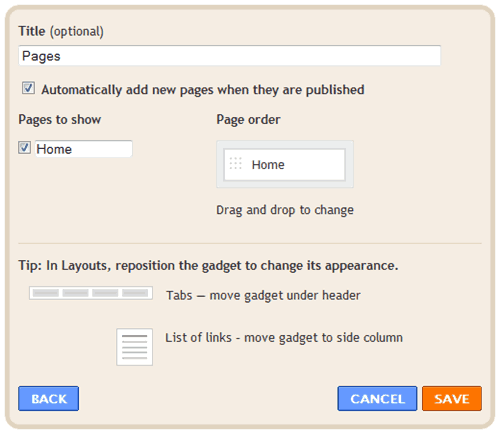
pages gadget

Create pages in Blogger and enjoy.

17 Responses

  1. In your opening paragraph, you said “Well Bloggers introduced the ability to create pages in Blogger recently”. Should read “Well Blogger introduced”.
    Good intro to a long-awaited feature!

    Maskil posted on 25/02/2010
  2. Thanks. Fixed that.

    QuickOnlineTips posted on 25/02/2010
  3. thanks. it obvious that you are a blogger guru, yours in blogger, Haybee

    haybee posted on 11/03/2010
  4. Hi, how do i change my pages into a tab format? Currently it’s a list format and it’s quite ugly.. =((

    Qiuting posted on 14/03/2010
  5. Same as Qiuting. I don’t like the link list format.

    How do we get all pages in tab format on the same line? I am wondering if adding the pages as individual elements, side by side would work.

    Miss SLY!™ posted on 22/03/2010

Leave a Reply to “How to Create Pages in Blogger”

Name Email Site