
Embed Youtube Videos in Iframes
Using iFrames is the new and better way to embed Youtube videos. Youtube has been providing this option to webmasters for some time, especially those who like embedding youtube videos in articles and blog posts, but how many have actually used it.
Check the embed options below Youtube videos –
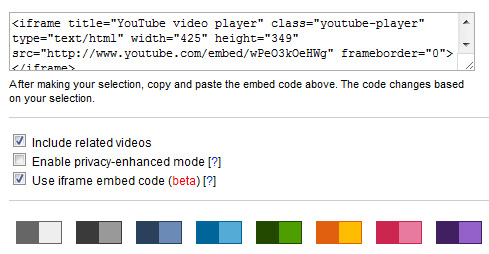
This is how an embedded video code looks like
<object width="425" height="344">
<param name="movie" value="http://www.youtube.com/v/kffacxfA7G4?fs=1&hl=en_US"></param><param name="allowFullScreen" value="true"></param>
<param name="allowscriptaccess" value="always"></param>
<embed src="http://www.youtube.com/v/kffacxfA7G4?fs=1&hl=en_US" type="application/x-shockwave-flash" allowscriptaccess="always" allowfullscreen="true" width="425" height="344"></embed>
</object> Now the iframe code looks looks like this
<iframe title="YouTube video player" type="text/html" width="425" height="349" src="http://www.youtube.com/embed/kffacxfA7G4" frameborder="0"></iframe> Why Use Iframe Embed Codes?
Your viewers will be able to view your embedded video in Flash or HTML5 players, depending on their viewing environment and preferences. HTML5 is the future and if HTML5 isn’t supported by the user, they display Flash. Another futuristic use is that it will finally allow embeds to work on mobile devices, which typically use a built-in player instead of Flash or HTML5.
Do you use iframe codes to embed Youtube videos?