
How to View Word Counts of All WordPress Posts (2026)
WordPress shows the word count of one post at a time in the editor, but what if you want to view word counts of all WordPress posts at once? In 2014 we needed exactly that to find thin posts on our Panda-hit site, and a simple plugin did the job. Here’s that method, a plugin-free code snippet, and how to use word counts sensibly in 2026.
Quick answer: Install a plugin like Post Admin Word Count to add a sortable Words column to Posts > All Posts, or add a short code snippet that does the same. Sort by word count to find your shortest posts, then decide whether each one needs expanding, merging or removing. Google says it has no preferred word count, so focus on usefulness, not length.
Table of Contents
Our 2014 method: a word count column
We used the Post Admin Word Count plugin (external site), which adds a column with the word count of each post in the WordPress admin. The real power is sorting: click the column to list posts from fewest to most words.
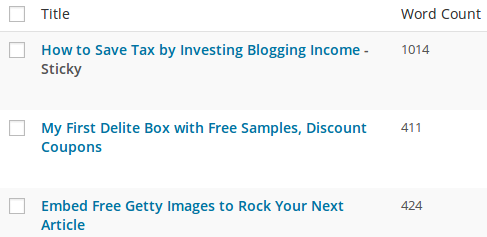
The plugin is still available, but it hasn’t been updated recently, so test it on a staging site or use the snippet below.
Add a word count column without a plugin
Add this to the Code Snippets plugin or your child theme’s functions.php:
// Add a Words column to the All Posts screen
add_filter( 'manage_posts_columns', function ( $cols ) {
    $cols['qot_words'] = 'Words';
    return $cols;
} );
add_action( 'manage_posts_custom_column', function ( $col, $post_id ) {
    if ( 'qot_words' === $col ) {
        $text = wp_strip_all_tags( get_post_field( 'post_content', $post_id ) );
        echo number_format_i18n( str_word_count( $text ) );
    }
}, 10, 2 );
This column isn’t sortable because word counts aren’t stored in the database. For sorting on large sites, a plugin that saves the count as post meta works better.
Other ways to see word counts
- Block editor: open Document Overview (the list icon at the top) and choose the Outline tab to see characters, words and reading time.
- SEO plugins: Rank Math and Yoast show content length in their analysis for each post.
- Site crawlers: tools like Screaming Frog report word count for every URL in a spreadsheet.
Why find low word count posts?
Short posts are often quick news items, video embeds or image posts. Some are fine as they are, but many are outdated or thin. A content audit that starts with the shortest posts helps you decide what to update, merge into a stronger article, redirect or delete.
Is low word count the same as thin content?
No. Google’s guide to creating helpful content (external site) says plainly that it doesn’t have a preferred word count. A short post that fully answers a question can rank well, while a long, padded one can be thin. Use word counts to find candidates, then judge each post by how useful it is.
FAQ
How do I see the word count of a WordPress post?
In the block editor, open Document Overview (the list icon in the top toolbar) and select Outline to see words, characters and reading time.
What is a good word count for a blog post?
There’s no fixed number. Write enough to answer the topic completely and stop there.
Can I export word counts of all posts?
Yes, use a site crawler or a plugin that exports post data to CSV.
Stuck on a gift? Try our free Gift Idea GeneratorIdeas for anyone by age, job, interests and budget, with Amazon.com and Amazon.in linksFind gifts →Get our free weekly email: new tech guides and tools, no spam.
New and updated tech guides, a free tool worth bookmarking and one useful pick, once a week. No spam, unsubscribe anytime.
One email a week. Unsubscribe anytime. See our privacy policy.


Thanks Dear for sharing this update with us. I improved my skills. I will use these suggestions in the future. Excellent blog.again thanks to you.
It’s frustrating that they recommend 2k+ posts for SERPs, but most people prefer reading shorter things, and sometimes just skim through all your hard work. Ours are generally between 600-1200, and seem to work okay when we sift through bounce rates.
Thanks P Chandra for sharing this with us! It makes a blogger’s job easier.
Thanks for sharing this awesome plugin. i will use this in my WordPress website.
Word counts plays on important role in capturing your reader’s attention.thanks
Word counts plays on important role in capturing your reader’s attention.
Thanks for the post
Thanks for the great share! Word counts plays on important role in capturing your reader’s attention.
One more excellent resource to add to our currently in development website – and well described. Thank you for posting.
Nice post, very useful to me as i am currently working on a WordPress site. Useful plugin to have as i have now downloaded it thanks to you.
Thanks for sharing, such a great post about word count plugin, i also use this plugin on my blog
Thank you for sharing this post, very useful information. I am using WordPress for quite some time now, but I didn’t know so many things you have mentioned. Really very useful post. Keep sharing …!!
Thanks for the great share! Word counts plays on important role in capturing your reader’s attention. It is great to have your qualit content to be from 500-700 words. However, it always comes down to on what you’re trying to tell your valuable readers! Different niche has different approach. So all we need to do is just play by trial and error and decide the word counts needed for a specific niche.
Thanks Dear for sharing this update with us. I improved my skills. I will use these suggestions in the future. Excellent blog.
I have a coupon site,as you knew about coupon site,it seems not so much words each of post.So how can i do?
Hello Dear,
Thanks for sharing these suggestions. Personally, I love this awesome post. It will help me a lot in to improve my skills. I like it much. Really superb post.
It actually really helps me in gaining high serp!
Thanks always!
I generally stick to around 800 words per post and so far this has worked well in regard to my rankings. The Post Admin Word Count plugin will definitely be a useful tool to highlight any low count posts I may have . Thank you for the tip.