
7 Hidden Facebook Features Most People Don’t Know (2026)
Facebook keeps adding features that most people never notice. In 2011, when Facebook had 600 million users, a guest writer here shared six lesser-known tricks: friendship pages, downloading your data, your “impact”, photo badges, the friends phonebook and secret chat smileys. Facebook now has around three billion users and most of those features have changed or disappeared. Here are seven hidden Facebook features worth knowing in 2026.
Quick answer: The most useful hidden Facebook features are the Feeds tab with Favorites (a chronological feed of people you choose), Download your information, Your activity off Meta technologies, Memories, Manage posts for bulk archiving or deleting, the hidden Message requests folder, and profile lock in supported countries. Most live under Settings & privacy or in the Accounts Center.
Table of Contents
1. Feeds and Favorites: a calmer timeline
Open the Feeds tab (in the menu or shortcuts bar) to see posts in time order from Friends, Groups, Pages or your Favorites. Add up to 30 people and Pages to Favorites so their posts appear first.
2. Download your information
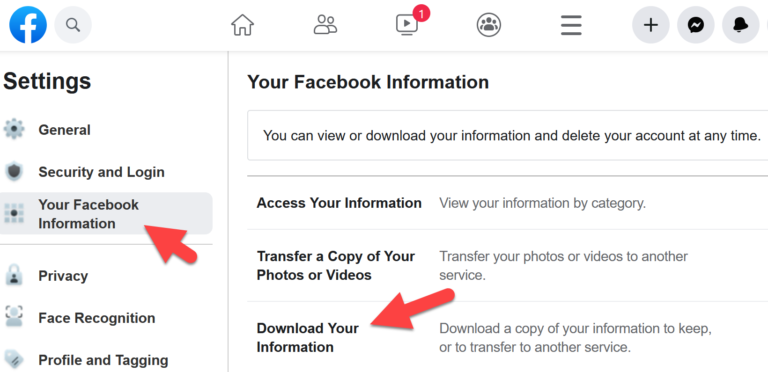
The 2011 tip still applies, with a new location: go to Settings & privacy > Settings > Accounts Center > Your information and permissions > Download your information. Our guide shows how to download Facebook data, photos and messages.
3. See and clear activity from other sites
Under Accounts Center > Your information and permissions > Your activity off Meta technologies, you can see which apps and websites shared your activity with Meta, clear that history and turn off future tracking.
4. Memories
Search for “Memories” in the menu to see what you posted on this day in past years. You can also hide certain people or dates so painful memories don’t come up.
5. Manage posts in bulk
On your profile, open the menu next to “Add to story” and choose Activity log, or use Manage posts to select old posts and archive, delete or change who can see them, many at a time.
6. The hidden Message requests folder
Messages from people who aren’t your friends often go to Message requests (and a further Spam folder) in Messenger, so you may have missed real messages. Check it in Messenger under the menu or your chats list.
7. Lock your profile
In some countries, including India, you can lock your profile from the menu on your profile page. Non-friends then see only a limited version of your profile and can’t zoom in on your profile picture.
How to find more hidden Facebook features
Facebook moves settings around often, so the quickest way to find any option is the search box at the top of Settings. The official Facebook Help Center also lists current menu paths, and the Privacy Checkup tool walks you through the most important privacy and security settings step by step.
What happened to the 2011 tricks?
- Friendship pages (shared posts and photos between two friends) were phased out as Facebook redesigned profiles.
- Facebook Impact and photo badges were retired long ago.
- The friends phonebook is gone; contact syncing moved to the Messenger app.
- Chat smileys became emoji and reactions, used in Messenger.
On a slow phone or connection? Try Facebook Lite. Parents can check our guide to the Facebook age limit.
FAQ
Where are Facebook’s privacy settings now?
Most account and privacy controls moved to the Accounts Center, which Facebook shares with Instagram and Messenger.
Can I see my Facebook feed in chronological order?
Yes. Use the Feeds tab and choose Friends or Favorites.
Is profile lock available everywhere?
No. It’s offered only in some countries.
Originally written by guest author Saket Narayan, who blogged about web apps and cloud computing at TechSplurge. Updated for 2026 by QuickOnlineTips.
Get our free weekly email: new tech guides and tools, no spam.
New and updated tech guides, a free tool worth bookmarking and one useful pick, once a week. No spam, unsubscribe anytime.
One email a week. Unsubscribe anytime. See our privacy policy.


Really nice post… i didnt know Impact feature in Facebook. thanks for that :)
Thanks for the interesting tips! # 1 is especially cool! Glad I stumbled on your post… I will be back!
Friendship and impact page is new for me. Thanks
I never knew you could download all of your media at once. That’s certainly helpful.
Smiley part was good. I learned some new smiley :) Thanks
The Facebook Friends Phonebook is the thing which I wasn’t aware of. Thanks for putting it up here.
Chat smiley was the thing i didn’t know rest all of i am aware, smiley’s too but few are new for me. Thanks for sharing.
Believe it or not, I never use the above thing that you write about. Well i will give it try. Thanks Buddy!
Haha. Thanks for the smilies!
Really cool and different article!
I love the phone book feature.. Though many users find it not so good as it invade privacy but it all depends on how you set your privacy level. Thanks for sharing some nice fb tip here.. Special thanks for smiley’s ;)
You’re welcome ;)
FaceBook has its advantages and disadvantage especially now they can use comments for Ads-Twitter still rocks!
Thats new thing that i come to know about facebook..Thanks to share..
All these tricks are amazing, thank you very much for Share. I’ll try soon.
I had an inportant INSTANT MESSAGE Ihad in 2009. How can I retrieve it?
the most is the smileys :D
Thanks for sharing all this info!
I can´t wait to check them. I´ll try all of them.
Regards
Facebook Impact is new for me. It is really a very useful feature that i have never checked before.
Hi Saket!
Yes I agree with you some of the things you have mention here lesser known. Thanks for sharing the tricks with us :)
OK what am I doing wrong? No. 1 does not work.
Really sorry for my late reply. Will you please show the URL that you’re using?
I love this. Thanks for sharing these Facebook nuggets! I can’t wait to check them out on my page.
Facebook keeps introducing new features which are cool.