Google Virtual Tour: How to Add a Street View Tour of Your Business
A Google virtual tour lets people walk through your shop, cafe or office on Google Maps with the same 360-degree view they get in Street View. This guide explains how Google first offered these business tours, how the old Trusted Photographer program worked, and how you can publish a virtual tour of your business today.
Quick answer: To add a Google virtual tour, capture 360-degree photos of your premises with a 360 camera or hire a professional photographer, then publish them to Google Maps with Street View Studio and connect them to your Google Business Profile. Google itself does not charge to publish the imagery, but photographers set their own fees.
Table of Contents
Why a Google virtual tour helps your business
An interactive tour of your premises wows visitors on Google Maps and lets you show off your business before shoppers ever walk in. If you use Google Street View and love it, imagine how much your visitors will enjoy entering your shop and browsing around it with the same interactivity.
Google’s own Street View for business (external site, opens in new tab) page says photos and virtual tours help people decide to visit a business. An outdoor view can show where to park and what the entrance looks like, and an indoor tour can show shelves, seating and menus.
How it started: Google Business Photos and Trusted Photographers

In 2013 Google offered these tours through Google Business Photos (later called Business View). The first step was to hire a Google Trusted Photographer or Trusted Agency. These were independent professionals, not Google employees, who were certified by Google for their skill. They shot the premises, stitched the photos into a Street View style tour and uploaded it to the business listing.
The photographers charged their own fees, which you had to negotiate and which varied between agencies. At the start they were only available in selected countries and cities, mainly in the US. Photographers with the right equipment could also apply to become Trusted Photographers and win work from local businesses.

Google has since moved the whole process into its general Street View contribution tools, so any business owner or photographer can now publish 360 imagery.
How to create a Google virtual tour today
- Set up your Google Business Profile. Make sure your business is listed and verified on Google Maps first. Our guide on adding your business to Google for free walks you through it.
- Choose who will shoot it. You can buy a 360-degree camera and do it yourself, or hire a professional photographer who makes Street View tours. Ask to see tours they have already published on Google Maps.
- Capture the images. Shoot connected 360 photos or a 360 video from the entrance through each room, keeping the camera at the same height and the lights on.
- Publish with Street View Studio. Upload your 360 imagery with Street View Studio (external site, opens in new tab), Google’s tool for publishing Street View content, and place it at your business location.
- Check it on Maps. Search for your business on Google Maps and confirm the tour appears in your photos and opens correctly on a phone.
Before you upload, read Google’s Street View imagery policy (external site, opens in new tab). It explains how faces and license plates are blurred and how to ask for more blurring.
Tips for a better business tour
- Tidy up and open blinds before shooting; a 360 camera sees every corner.
- Shoot when the business is closed or quiet so customers are not in the frame.
- Start the tour outside so people can recognize the entrance from the street.
- Update the tour after a renovation or a big change in layout.
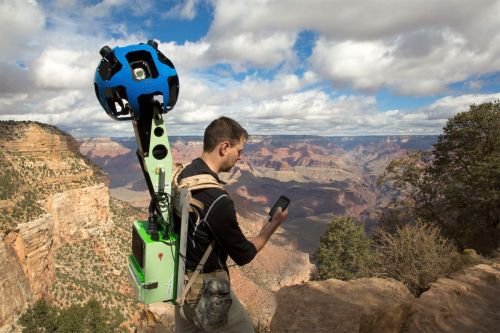
Google has used similar technology to map places cars cannot reach, such as hiking trails with the Street View Trekker backpack.
FAQ
Does Google charge for a virtual tour?
Google does not charge to publish Street View imagery. If you hire a photographer, you pay their fee, which varies by photographer and the size of your premises.
Can I make a Google virtual tour myself?
Yes. With a 360-degree camera you can capture the images yourself and publish them through Street View Studio.
What happened to Google Business Photos?
It was Google’s 2013 program for business tours shot by Trusted Photographers. Today businesses publish tours through Google’s Street View contribution tools instead.
Where does my tour appear?
Published tours appear on Google Maps at your business location and with your business photos, so people can open them from your listing.
Subscribe to our weekly tech newsletter
🎁 Free 100 Tech Terms ebook when you subscribe. Unsubscribe anytime. Privacy