
How to Setup Feedburner MyBrand on Your Domain
Feedburner MyBrand is a Pro feature for showcasing your feedburner feed on your own domain name. Recently Feedbuner MyBrand became free and now bloggers can easily change the feedburner url to a more professional url with your domain branding. Check out how I got this feature working on my Dreamhost web hosting in a few minutes.
I tried lots of tricks to set up Feedburner MyBrand on my Dreamhost Webhosting, but it was more complex than it seemed. However, after some trials, my Feedburner feed has a new quickonlinetips.com url and you can also easily set it up (without all the DNS experiments I went through!)
Feedburner Settings
Sign into FeedBurner, click the “My Account” link in the upper left-hand corner, and then click “MyBrand”. Now it is a simple one step process – Specify the domain name to use (e.g. I use feeds.quickonlinetips.com) and click Activate. All done here!
Dreamhost Settings
Dreamhost lets you edit your domain name DNS records easily. In your web panel, go to Domains > Manage Domains. Select the domain name to use and click DNS beneath it. You can then perform custom changes to your DNS information.
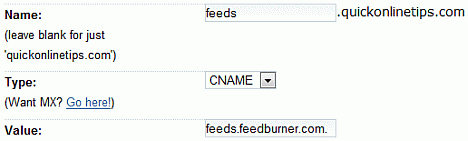
Above is a screenshot of how I filled the form on the DNS settings page for my domain name.
Name – type feeds
Type – use CNAME
Value – type feeds.feedburner.com. (remember to add trailing period.)
Click “Add Record Now” and all is done.
You now have a custom DNS entry like this
feeds CNAME feeds.feedburner.com.
New Feedburner MyBrand Feed
Remember if you have a feed at feeds.feedburner.com/myfeed,
it will now also be available at feeds.mydomain.com/myfeed
So my current feed feeds.feedburner.com/QuickOnlineTips
is now also available at feeds.quickonlinetips.com/QuickOnlineTips
The best part is that MyBrand works on all the feeds in your account. MyBrand lets you use your own domain name to host your feed instead of feeds.feedburner.com and puts you in even greater control of your own content. The original feed also keeps working since the new feed is merely a CNAME DNS change.
WARNING: Please perform these DNS changes at YOUR OWN RISK. I am not responsible if your site goes offline due to DNS misconfiguration or error on your part (and there is a very high chance this will occur if something goes wrong). This article merely shares my experience about setting up Feedburner Mybrand on Dreamhost. If you’re not sure what’s going on here then you definitely do not want to make any changes.
UPDATE: Since all Feedburner accounts are now migrated to Google accounts, you need to update your CNAME in DNS records of your domain name to keep your Feedburner Mybrand feed working.