
How to Create Multiple Dynamic Sidebars for WordPress Widgets
This tutorial explains how to create multiple dynamic sidebars to add various combinations of widgets to customize your wordpress theme even more. I suggest you read how to Widget-Enable WordPress Themes in 3 Easy Steps before reading further as examples will be quoted in the same context.
Step 1 – Create Multiple Dynamic Sidebars
The functions.php code which helped to widgetize your wordpress theme and support a single dynamic sidebar, now needs to be edited (using any text editor like Notepad) to support multiple sidebars. You remember we had modified the default function.php from
<?php
if ( function_exists('register_sidebar') )
register_sidebar();
?>
to the new code below to support our customized template with h4 subtitles and non-default unordered lists in the sidebar. REMEMBER you need to edit functions.php to match your wordpress theme or it will not work.
<?php
if ( function_exists('register_sidebar') )
register_sidebar(array(
'before_widget' => '',
'after_widget' => '',
'before_title' => '<h4>',
'after_title' => '</h4>',
));
?>
To support multiple sidebars, I simply need to specify that multiple sidebars be used and name them as I like. In our case I use Sidebar1, Sidebar2 etc and as many as you like. The code now looks like this –
<?php
if ( function_exists('register_sidebar') )
register_sidebar(array('name'=>'sidebar1',
'before_widget' => '',
'after_widget' => '',
'before_title' => '<h4>',
'after_title' => '</h4>',
));
register_sidebar(array('name'=>'sidebar2',
'before_widget' => '',
'after_widget' => '',
'before_title' => '<h4>',
'after_title' => '</h4>',
));
?>
I personally have extended this capacity to 6 dynamic sidebars on this blog. Here is how it looks like on top of admin panel.
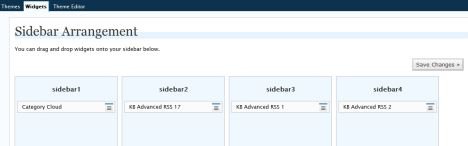
Now you can drag and drop widgets of your choice to different sidebars and customize the options. Remember to Save Changes or else all customization is lost.
Step 2 – Add Dynamic Sidebars to WordPress Template
Now you need to place the code in the wordpress theme template where you want the relevant wordpress widgets to work. Instead of the previous code, you can place the different dynamic sidebars in different areas of the template.
Sidebar1 code goes like this
<?php if ( !function_exists('dynamic_sidebar')
|| !dynamic_sidebar('sidebar1') ) : ?>
<?php endif; ?>
Sidebar2 code goes like this
<?php if ( !function_exists('dynamic_sidebar')
|| !dynamic_sidebar('sidebar2') ) : ?>
<?php endif; ?>
Save the template and watch your widgets go live. You can add lots of dynamic sidebars with various widget combinations and have truly unique web design concept.