
Quick Online Tips Home | About | Guestblogging | Advertise | Themes | Photoblog | Jobs | Contact
08/12/2009
 
ADVERTISEMENTS

The Google Chrome Extensions have finally arrived and you can download Google chrome extensions and add extra functionality to the speedy Google Browser. Extensions let you customize Google Chrome with features you like, while keeping your browser free of clutter that you don’t use.

However, though I was running the latest updated version of Google Chrome on PC, I was unable to install any Google Chrome Extensions. I got this message “Extensions are not yet supported in this version of Google Chrome. Please download the Beta Channel of Google Chrome to install extensions.”

chrome-reject

Well it seems to use Google chrome extensions, first you need to download Google Chrome Beta, which works only on Windows Vista/XP SP2+. This Beta version will let you preview the latest features, give early feedback, and keep getting Beta updates, however, they warn you can only have one version of Google Chrome at a time.

So I went ahead and installed the Google Chrome beta, and tried the new functionality. There are lots of extensions to choose from. I tried downloading a few, but most of them have major warnings associated with them, which scared me away!
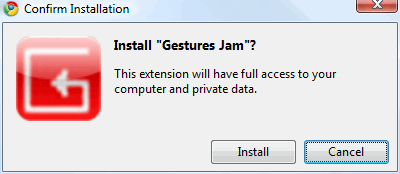
install-chrome-extension

But I am sure I will install a few popular Google Chrome extensions as I finish writing this…

Like this article?
Tags: #Downloads   #Google   #Software

writeWrite a guest article - Get free links, SEO, traffic, readers for your site. 250+ guest bloggers cant be wrong! Join the team.
Free subscription: Subscribe RSS feed or get daily tips in your email
* Click confirmation link sent in email * Don't see the email, check spam folder

6 Responses

  1. It’s great. It looks like Chrome’s extensions are more useful and a lot more than Opera’s. I have one question to you that I need page rank and alexa rank checker, how do I actually install these addons.

  2. Chrome is nice, but isn’t compatible with some website functionality, which Firefox is. I’ll stick with FF for now.

  3. Kunal says:

    It will all depend on which browser gets the developer’s interests and at this point in time i would it will be Google in the future.

  4. Before almost 6 months, I have downloaded the Google Chrome. I really found it very handy, easy to use and much more beneficial and just because of its simplicity, I became a regular user of this. More better things about Google chrome is its automatic data collection, that you don’t have to be very cautious to remember most of the things. After that when this extension launched, and came to know about this, I have even downloaded it and believe me its just amazing..

  5. blueshell says:

    I like to use Chrome for its fast speed but it doesn’t have that many add-ons like FireFox which make my browsing experience personalized. Now I use both Chrome and Firefox and I hope Chrome will have more extensions.

  6. amin says:

    i lik this google

Leave a Reply to “Download Google Chrome Extensions”

Loading

Free Subscription

* Click confirmation link sent in email

Join the top bloggers and new media experts in the world at BlogWorld Expo 2010