Download Rupee Font Installer Free
Want to use India Rupee font in your documents? Download Rupee font installer, and it will install the rupee font in a few clicks for instant use on your Word documents.
Download and Install Rupee Font
1. Download the latest rupee font zip file (.rar) created by Foradian labs and open with any free unzip software like 7-zip

2. Click on the Rupee_Font_Installer.exe file and allow the installation to continue. Agree to install.

3. Once the font is installed, the restart is not required.

4. Open Microsoft Word, and select the rupee Foradian font in the dropdown menu.

5. Click the ` key (above the Tab key) and the Rupee symbol will be printed.

Windows Rupee Font Installation
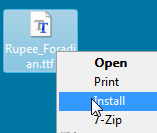
Alternatively, you can extract the Rupee_Foradian.ttf file from the zip file to your desktop, right click and Install Font in 1-click.