
Best AdSense Placement for Blogs and Forums (2026)
What is the best AdSense placement for blogs and forums in 2026? In 2011 the AdSense team shared recommended layouts based on tests across millions of sites, with 728×90 leaderboards, 160×600 skyscrapers and link units. Today most visits come from phones, link units are gone and responsive ads fit any screen, so the best placements have shifted. Here’s what works now, plus Google’s original 2011 recommendations for comparison.
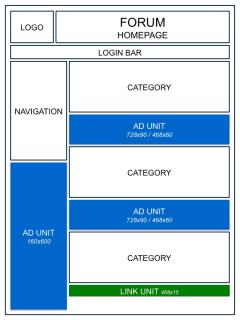
Quick answer: The best AdSense placement for blogs is a responsive in-article ad after the first or second paragraph, another mid-way through long posts, and a sticky 300×600 or 300×250 ad in the desktop sidebar. On forums, place a responsive ad after the first post in a thread and between topic lists. Add anchor ads on mobile with Auto ads, and test every change with AdSense experiments.
Table of Contents
Best AdSense placement for blogs
Article pages (where most earnings come from)
- After the first or second paragraph: readers have started engaging, so an in-article or responsive display ad here earns well without blocking the opening. We explain the code in how to insert AdSense ads inside post content.
- Mid-content on long posts: one more ad every 600 to 800 words keeps ads in view as people scroll.
- End of the article: a responsive or multiplex unit before comments or related posts catches readers who finished the post.
- Desktop sidebar: a 300×600 large skyscraper that sticks as you scroll has high viewability.
Homepage and archives
Place a responsive ad after the first two or three post summaries and another further down the list; see how to insert ads between posts. A 970×90 large leaderboard under the header can work on desktop, but keep the top of mobile pages clean.
Best AdSense placement for forums
- Thread pages: after the first post, and again after every 5 to 10 replies on long threads.
- Forum index and category pages: between topic lists rather than above them.
- Mobile: rely on responsive units and anchor ads; sidebars usually disappear on phones.
Always check that user content follows AdSense policies, because ads on threads with prohibited content can be restricted.
Use Auto ads with manual placements
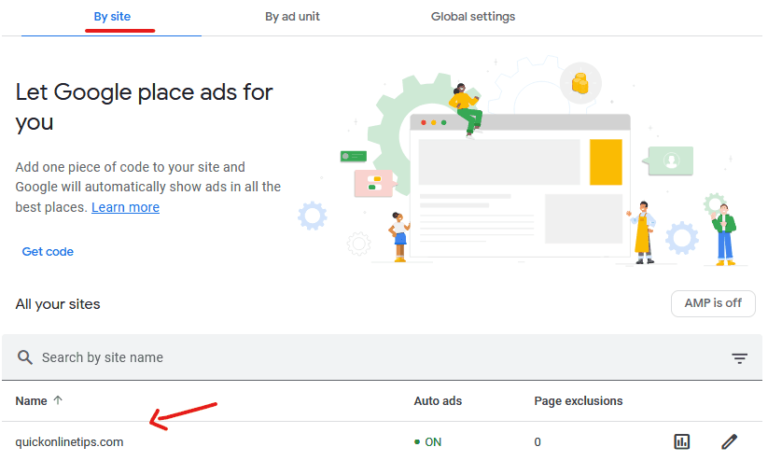
AdSense Auto ads can add anchor and vignette ads on mobile and fill gaps you missed. Many publishers combine a few manual units in their best spots with Auto ads set to a lower ad load. Then run AdSense experiments (Optimization > Experiments) to compare layouts on real traffic.
Placement rules that protect your site
- Don’t overload the first screen: Google’s page layout signals and the Better Ads Standards penalise pages where ads push content below the fold.
- Reserve space for ads with a minimum height, so content doesn’t jump (Cumulative Layout Shift).
- Keep ads away from buttons and menus to avoid accidental clicks, which AdSense treats as invalid.
- Don’t label ads misleadingly or place images right next to them to draw clicks.
Google’s 2011 AdSense placement recommendations
In 2011, AdSense recommended 728×90, 160×600 and 300×250 units on blog homepages, 160×600 and 336×280 units on article pages, and a 728×90 leaderboard plus link units on forum pages:


The principle still holds: put ads where readers are already looking, near the content. What changed is the format (responsive instead of fixed sizes) and the screen (phones first). More advice from Google’s own team is in our takeaways from an AdSense optimization expert.
Frequently asked questions
Where do AdSense ads get the most clicks?
Usually inside the content, just after the introduction, and in sticky sidebar units on desktop.
How many AdSense ads can I put on a page?
There’s no fixed limit, but ads must not outweigh your content. Most blogs earn best with 3 to 5 well-placed units on long posts.
Are AdSense link units still available?
No. Google retired link units in 2021; use responsive display or in-article ads instead.
Should I use Auto ads or manual ads?
Both work. Manual ads give you control over the best spots, and Auto ads fill extra formats like anchors on mobile.
Stuck on a gift? Try our free Gift Idea GeneratorIdeas for anyone by age, job, interests and budget, with Amazon.com and Amazon.in linksFind gifts →Get our free weekly email: new tech guides and tools, no spam.
New and updated tech guides, a free tool worth bookmarking and one useful pick, once a week. No spam, unsubscribe anytime.
One email a week. Unsubscribe anytime. See our privacy policy.


Thanks For Sharing the Best Place for adsesne article, i Tried many tricks to get Decent CTR, but Now i know the Real place to Get Most out of it. Thank For The Info :)
Hey Friend ! Google Adsense is all about Number or it is game of number. if you have big number and will get higher chances to earn big number of digit and vise versa.
Well its not so easy to make money with blog and website,but yes its true that if you are on right track that means if you are working with adsense and also have unique contents along with proper SEO you can earn a good income but it takes time,you can have a look at my blog regarding proper SEO methods
what best plugin for placing best place of google ads?
Great information to help newbies like me optimize brand new sites for best ad placement. Never would have thought ad placement would make such a difference.
Thanks for sharing this nice tip . better placement of ads on blog may increase your CTR and good CTR means good earning
They’re good suggestions to start, but mover them around and compare the CTR for each placement and size.
Make sure to take the time to customize the look for your site as well. Ad blindness isn’t nearly as bad if it looks like it belongs there.
Always post ads on the place that catch you reader mind . When they see the add the the chances on click will increase and you will get money
This is so helpful. The fun part about this is to try them and discover a better and better way to place.
Thanks for sharing this trick . But where to post adsense link unites ?
A Search Engine Optimization, ranking, and placement services company, Networld Online SEO is the solution for SEO tools and advice, including Multiple full service marketing programs
Thanks for sharing your ideas about where to place adsense on your page or on your blogs. This will surely help especially to internet marketers.
I thought the best place for on the homepage all the way to the top.
Ooops it seems you need to run spell-checker “banner is by far the best choice when used [wiht] link units”
Thanks. I think the ad units from the second picture will work best for my cat cartoon blog. It’s always a challenge to put the ads in efficient places without making your blog look ugly.
What makes a site look better placement of ads, relevant content…great!
I think that most important tips for Adsense is how ads are implemented in web site look. Placement is debatable, sometimes there is no rules and positions what are less attractive gets more results.
Nice info..but i think most of time 728×90 ad units working best for geting high CTR……
I always rejected when I sign up to google adsense,,,,
Nice Tips.
I have the homepage1 but instead of the top ad of 728×90 i use the 365×250 it works better in my case.
Excellent placement tips…I am using the placements 1 and 3 combined on my blog.
Hi friends please tell me that whether we can mix adsense with other Ad Programs Like Adbrite ? and what is google approved networks ?
Thanks, I.K. Sachdeva.
Good info thanks.
What plugins do you use to place your adsense?
I need post because i am new..i dnt know where top place adsense..my questions is can we put adsense code just above the contents below the heading of article..Thanks in advance.
actually my question is that : “can we put the Adsense Code in BETWEEN (inside) our POST” but as i remember if we put the adsense code in between our post as well as top and bottom as well —– so- will it comes under the terms of voilatin ? because more then 3 Banner Ads not Allow ?
You can put your adsense ads inside posts, before posts and after posts. Inside posts has best CTR. More than 3 banners not allowed / will not work.
Thanks QuickOnlineTips…. it is good to know that “Inside Post has best CTR”…. Thanks for shairing valuable tip.
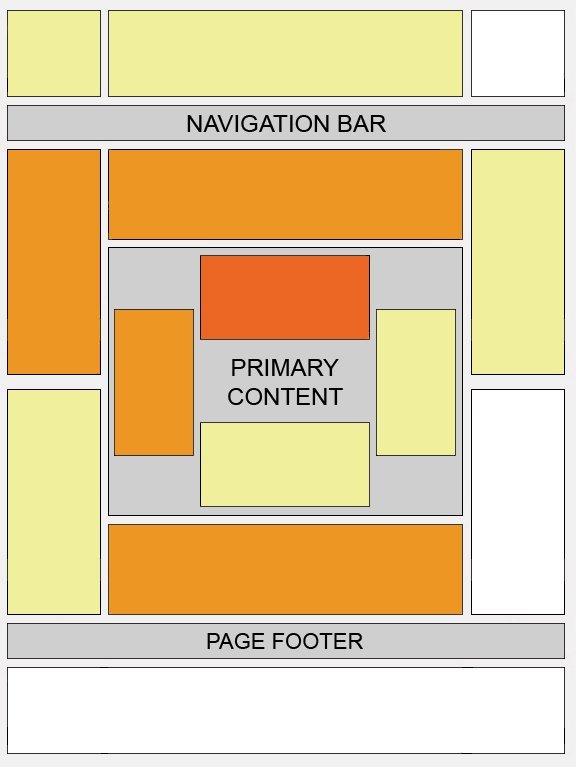
Thanks for the post, this actually makes me feel better, as my site does not have anywhere to place an opt-in box above the fold OR to place ads on the right hand side, which usually convert better than ads on the left hand side. But there is a lot of area in the middle of the page that I can use for ads which, apparently, is also a good placement!
In the end it all depends on the design of a particular site.
Good Article, but most of the blog templates cant provide us Centre Ad placement, does any one tell me that – “is it ok to put the ad code in between our Post / Posts ?
Finally it depends as every website has a different design. If center palcement gets you good CTR, go for it.
I have tried this and it work well. But the problem is we have add the code manually
Otherwise the site won’t look good. If you are premium adsense user, then it is good to have a unit with the same width of post content. we can find such examples @ physorg.com and sciencedaily.com
Well premium Adsense users can have all the fun in Adsense placement.