
Moleskine Smart Notebook: The Adobe Sketchbook and Smart Options Today
The Moleskine Smart Notebook was a paper sketchbook made with Adobe in 2014 that let you photograph your drawings and turn them into editable vector files in Adobe Creative Cloud. This article explains how it worked, what replaced it, and the best ways to digitise handwritten notes and sketches today.
Quick answer: The 2014 Moleskine Smart Notebook used special page marks so a phone app could photograph a sketch and convert it into a vector file for Photoshop or Illustrator. Today Moleskine’s smart products use the Pen+ Ellipse smart pen, special notebooks and the Moleskine Notes app instead. For turning sketches into vectors, Adobe Capture now does the job with any paper.
Table of Contents
How the Moleskine Smart Notebook worked
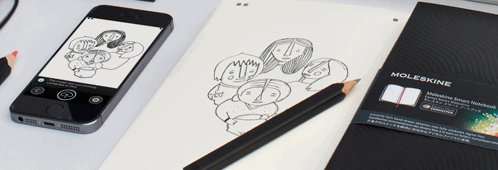
Moleskine is famous for its classic notebooks, and in November 2014 it announced a “Creative Cloud connected” Smart Notebook made with Adobe. You could not simply photograph any page with any app: the notebook’s pages had special marks at the corners. These marks helped the companion iPhone app find the page, straighten the photo and process it correctly.
The app then turned your drawing into a vector (SVG) file and synced it to your Adobe Creative Cloud account, which required a membership. From there you could open and edit the sketch in Adobe Photoshop CC or Adobe Illustrator CC. The notebook itself was a hardcover with a custom Adobe design and a red ribbon bookmark.
For designers who sketch on paper first, it promised a much faster route from a rough drawing to a digital file.
Moleskine’s own video showed it in action:
Moleskine Smart Notebook options today
The Creative Cloud notebook was a product of its time. Moleskine’s current smart range is built around the Smart Writing Set:
- Pen+ Ellipse: a Bluetooth smart pen with a tiny camera that reads a dot pattern printed on the page, so it records your strokes as you write.
- Paper Tablet notebooks and smart planners: the special paper the pen needs. Ordinary Moleskine notebooks don’t work with it.
- Moleskine Notes app: shows your pages on your phone, can convert handwriting into typed text and can export pages, for example as PDF.
You can find the set on the Moleskine website or browse the Moleskine Smart Writing Set on Amazon.
How to turn paper sketches into vectors today
You no longer need special paper to vectorise a drawing. Adobe Capture is a mobile app that turns a photo of an image into a clean, scalable vector and saves it to your Creative Cloud Libraries, ready for Illustrator, Photoshop and other Adobe apps.
- Draw on plain white paper with a dark pen or marker for good contrast.
- Photograph the page in even light, without shadows.
- Open Adobe Capture and choose the vector (shapes) option.
- Adjust the detail and clean up stray marks.
- Save it to a library and open it in Illustrator to edit.
Other ways to digitise handwritten notes
- Scan with your phone: scanning apps can straighten a page and create a PDF, and many can recognise text. See our guide to document imaging software.
- Use a paper tablet: e-ink devices such as the reMarkable 2 paper tablet feel like paper but save everything digitally.
- Write on a tablet: an iPad or Android tablet with a stylus lets you sketch directly in apps like Illustrator or Procreate.
FAQ
Is the Moleskine Smart Notebook still sold?
The 2014 Creative Cloud connected edition was a launch product of its time. Moleskine’s current smart products are the Smart Writing Set and its compatible Paper Tablets and planners.
Do I need a special notebook for the Pen+ Ellipse?
Yes. The pen reads a dot pattern printed on Moleskine’s smart paper, so regular notebooks won’t work.
Can I convert a sketch to a vector without a smart notebook?
Yes. Adobe Capture can turn a photo of any drawing into a vector for use in Creative Cloud apps.
Did the 2014 Smart Notebook need a Creative Cloud membership?
Yes. The vector files synced to Adobe Creative Cloud, so you needed a membership to edit them in Photoshop or Illustrator.
Disclosure: As an Amazon Associate, QuickOnlineTips earns from qualifying purchases.
Get our free weekly email: new tech guides and tools, no spam.
New and updated tech guides, a free tool worth bookmarking and one useful pick, once a week. No spam, unsubscribe anytime.
One email a week. Unsubscribe anytime. See our privacy policy.


another example showing that paper and digital can get along!