
Increase Monitor Refresh Rate: Reduce Eye Strain, Headaches
Ever have headaches after staring at your screen? Maybe your computers monitors screens refresh rate is too low and your screen flickers. Many users are used to the flicker, or your eyes are not sensitive enough to detect it, but the flicker is there. And till it flickers, it will irritate your eyes and cause eye strain. Higher refresh rates are less likely to cause eyestrain
What is the refresh rate?
The refresh rate (or frequency) refers to the number of times per second that the video board redraws the entire screen.
Change Monitor refresh rate In Windows 10
- Right click on desktop wallpaper > Display Settings
- Scroll down and click ‘Advanced Display Settings’
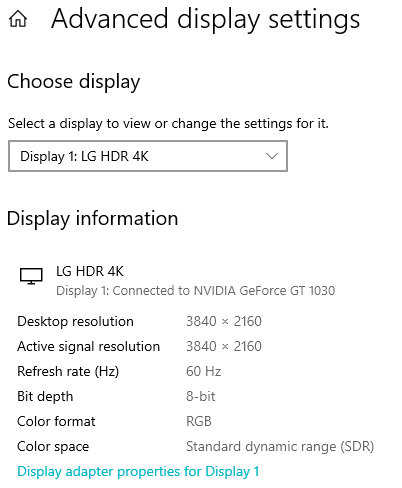
Click on ‘Display Adapter Properties‘ > This will open the screen refresh rate options supported by your monitor.

Choose and apply. Most users agree it should be 60 Hz or more for optimal results. My 4K monitor was set to 60 Hz, the maximum by default.
Change Monitor refresh rate In WindowsXP
- Go to Control Panel>Display
- In Settings> Advanced>Monitor
- Always Check the box for ‘Hide modes that this monitor cannot display’ to avoid hardware disputes. This will then give a drop down list of refresh rates that your monitor safely supports and you may set it up without error. You may also check your manufacturer’s documentation for information about the settings that your monitor supports.
- And then increase the monitors refresh rate.
Note: If you specify a refresh rate that is too high for your monitor, your screen may become unusable and your hardware may be damaged. Also note, Some monitors flicker at higher rates and some of the higher resolutions and color depths may be unavailable at the higher frequencies.
In my older monitor, it displayed resolutions from 60Hz to 200Hz. When I clicked the ‘Hide modes that this monitor cannot display’ box, the choices were only few from 60-80Hz. So I was glad I did not mess up by selecting a higher value which my very old CRT monitor did not support. I had selected the recommended 75Hz on that monitor. Increasing the refresh rate setting has made a marked improvement and got rid of my headaches and has been ergonomically a wise step.





hi,
am using samsung syncmaster 923nw monitor and i hav 9500gt nvidia geforce graphic card.. my monitor does not support more than 60hz. my monitor flickers heavily.. please HELP me… :(
For some reason, when I navigate to the said window and went to the drop-down box, 60 HZ is the only option, even when I set my monitor on the lowest res possible. I don’t know why.
Many thanks, I increased my screen resolution because I couldn’t see the bottom of a windown and when I changed it back again the screen was flickering badly when before it didn’t.
Your tip has helped me increase the refresh rate and now it is stable!
I’ve been able to get the Clear Type Tuning to work before, however my PC stopped working this morning. Once it was back up and running, everything is blurry again. i.e., the CTT feature no longer works. I tried to re-run it but it will not take effect. What else can I try?
If you have not already bought then you should really ask or read up and try and get a monitor that runs 50Hz to 85Hz or perhaps 60Hz to 75Hz.
Don’t just go for the cheapest one your vendor has on the counter.
Have just installed an iiyama 24 inch which cost me £150 in UK.
It supports 60Hz to 75Hz which is enough for most uses.
At 60Hz the iiyama has no flicker and is perfectly behaved.
When gaming I might turn it up to 75Hz as the game demands a bit more.
I have a 22 inch wide screen flat panel, at higher resolution the refresh rate is always 60, can I do anything, even at lower resolutions the refresh rate is still 60
Lowering your desktop resolution will enable you to increase your refresh rate.
just got a new dell 22″, can’t go above 60hz or check the hide modes etc box. anyway to get around this?
Bravo for the detailed explanations! However, unfortunately, I am not allowed to check the box for “Hide modes that this monitor cannot display”. Could you please offer some advice on how to overcome this?
em… Thanks a lot. it’s very helpful for me, now I can leave my office without full of tears in my eyes…
This is brand new 19inch Monitor/PC that I have just purchased from Dell for work. Are you actually saying that the 60 Hertz max it will allow is normal for a brand new bit of kit from Dell?
Why do ppl still use crt?
Luis – beacuse Crt monitors are still cheaper.
Will a high refresh rate decrease performance?
the only refresh rate i can choose is hardware default settings. please help
Some people here really should do some research first.
First of all, the Maximum refresh-rate of your monitor depens totally on your monitor and graphics card. Software updates cannot change what’s in the hardware, only make the OS or other software co-operate better with the specific hardware.
Some monitors can’t go above 60Hz no matter what, or if you try to force it the image will get screwed up. This is often the case with most older monitors and with many current HD-TVs if you’re using those as your monitor. Also on some older OS ‘s there may only be option for max 50 or 60hz, since those were the best values available at the time.
So next time you’re planning to get a monitor, pay attention to these specs:
1) Maximum resolution ( X-pixels x Y-pixels, often the higher the better )
2) Response time ( X milliseconds, the lower the better)
3) Max refresh rate ( xx Hz, the higher the better)
4) Connectors ( such as VGA, DVI, HDMI… the more it has these the higher the chances of using it with more graphicscards or even as a TV)
5) Contrast value (tells how many colors and their shades the screen can display well, also often used to compare how bright white or dark black it can show)
My monitor (DELL 19″ wide flat panel) can only go as high as 60 hertz refresh rate. How can I increase it to 75? Do I need a driver to change it?
Hey…thanks for the tip…it worked and I set it to 75 first and there was a bit of flickering and then I increased it to 85 and now its very stable..thanks once again for saving my eyes!!! :)
regards
Harish
Simply select the maximum rate that is supported by your monitor. Higher frequencies will already be grayed out and you cannot select them.
why not set it to 85Hz? why 75Hz? im just confused, what should it be if ur screen is 1024 x 768 resolution?
CRT Company manufacture should create 100 hz or more as a monitor standard. It is hard to create monitor with minimum 100 hz?
If you can find a solution on how to reduce flickering at 60Hz that would be great. Maximum resolution of my screen is at 1280×1024 and 60Hz is the only available refresh rate.
i had clicked on ‘Hide modes that this monitor cannot display’ check box. my monitor shows something like “Hz” which rolls down from left top cornor to right bottom cornor when i wish to play some games, what may cause it? can i again have that check box as default? my processor is Pentium IV 3.00Ghz and RAM is 512 Mb and my board is Intel(R) 82945GCCR
i am unable to change my monitor refresh rate from 60Hz to any other.At this arte , image is flickering .So can you give me solution .
Os-XP sp2
Monitor : SAMSUNG sync master 892 MG
processor AMD ATHLON DUal core 4200+
Hi,
Thanks, the screen is much more crisp, and I’m sure it will help alleviate the headaches caused by staring at the screen for hours.
M
my pixels slider in contrtol panel is stuck. it doesn’t move and when i try to, the screen says ‘…not able to change your displays refresh rate’
i use windows98 second edition. oddly that has changed to windows98(!)
i don’t get (reccommended-)75Hz(?) option, only ‘optimal’ i can’t even download because pixels won’t change(!)
i tried stuff and it didnt work
i can change the rate till 100, but my screen still flickering too much. is it from the voltage around my room ? how can i solve it please ?
i can only choose a refrsh rate of 50hz or 60hz even when i uncheck the box why is this?
I have installed Windows 98 and Intel(R) 82810E Graphics Controller.
I am unable to change the refresh rate as stated above. Is there any other method available to change the refresh rate.
another gr8 post. thanks!