Are you getting Google Sorry and ‘We’re Sorry’ automated queries error pages and blocked all search results, I tried Google search today from a college friend’s computer. They labeled it as an automated search, banned the IP, and only after correctly answering the captcha twice, the normal Google search could be restored... temporarily.
Google We’re Sorry Error Page
Here is what the complete error message looks like
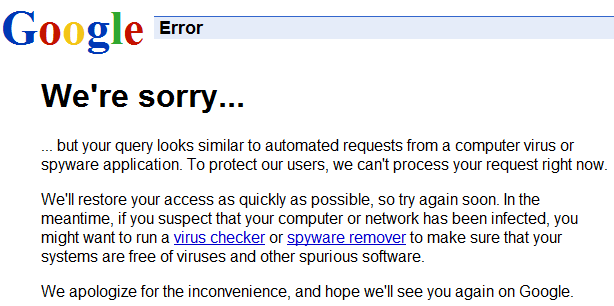
We’re Sorry … but your query looks similar to automated requests from a computer virus or spyware application.
Another similar message is
We’re Sorry … but your computer or network may be sending automated queries. To protect our users, we can’t process your request right now.
Google advises that they error so because they think it is similar to automated queries like those from viruses or spyware! They advise that users should run antivirus software or spyware remover, but it the error persists then deleting Google cookies will help
Well, it was not over yet, after a few search results, the Google search was blocked again. I was tested again for the captchas twice, and the cycle continued like this over till I was online.
Remembering how Google search had marked the entire web as malware earlier, first I thought maybe it was a new bug affecting Google search. But the We’re Sorry error page is a well-identified spam blocking technique from Google Search.
Google Automated Queries and IP ban
This message appears when Google detects automated queries from an IP address, which causes a quick traffic spike on google.com. Google explains some possible ways to fix the issue, remove the IP address ban, and restore Google search results as usual.
When a computer in the network runs automated queries, it violates Google’s Terms of Service. This includes using any software that sends queries to Google to determine how a website or webpage ranks on Google for various queries, ‘Meta-searching’ Google, or performing ‘offline’ searches on Google.
Remove Google Sorry Errors
Step 1: Deleting Cookies
I tried the first and easiest way of deleting cookies from my browser.
If you use Firefox – Go to Tools > Options > Private Data > Clear Now > Check Cookies > Clear Private Data Now
And behold, all the errors were gone and the issue was fixed for me.
Step 2: Check Malware
If that does not fix the issue, then download any popular anti-malware software like Lavasoft Adaware, or Spybot Search and Destroy, MacScan (for Mac), and run a full system scan to find and remove spyware and malware which could be triggering those automated queries to Google.
Step 3: Solve ReCAPTCHA
Mostly now Google will show you see a reCAPTCHA and you will need to solve it to show you are a human and not a robot. It will basically show you a pop up of images and you need to identify some object in it. Don’t worry if you are wrong because the CAPTCHA can be difficult to solve sometimes, as that is the way it is meant to be to trick bots vs intelligent humans. If you fail, it will give you a new test.
After you solve the reCAPTCHA, there is a high chance the issue will be resolved and you can use Google.
Step 4: Google Feedback
If you tested and your computer and network are secure, but you continue to get the Google errors, then send feedback to Google about the “Unusual traffic from your computer network” and they will investigate your report and fix the issue.