
This Site May Harm Your Computer: The 2009 Google Glitch and Fixes Today
On 31 January 2009, every single Google search result was labelled “this site may harm your computer“, including Google’s own sites. This article covers what I saw that morning, why it happened, and what the warning means for searchers and site owners today.
Quick answer: The 2009 glitch was human error: a “/” was added to Google’s list of harmful sites, and because “/” matches every URL, all results were flagged for about 40 minutes. Today the label is real and specific. Google shows it when Safe Browsing finds malware or a hacked site, and owners fix it by cleaning the site and requesting a review in Search Console.
Table of Contents
The day Google flagged the whole web
I first noticed it when I searched for Yahoo! and tried to open its front page. Google marked the result as harmful:
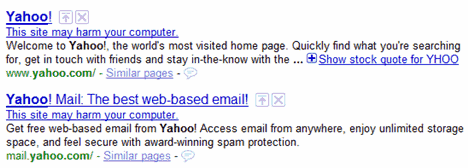
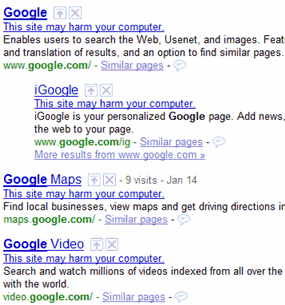
Then I realised it was affecting every website, and Google had even marked its own properties as malware. Clicking any result led to a warning page instead of the site, so Google Search was practically useless until the problem was fixed.
The warning page told visitors to check Google’s Safe Browsing diagnostic page for the site or, if they owned it, to request a review through Google’s webmaster tools.

Within minutes, many other users were reporting the same thing on Twitter:



Why it happened: a single “/”
Google soon fixed the issue and published an official explanation. The list of harmful URLs was maintained by humans, and an update that morning mistakenly included the value “/”. Since “/” expands to all URLs, every result got the warning. Google’s on-call team found the problem and reverted the file. For any one user, the problem lasted about 40 minutes.
It remains one of the best examples of how a tiny configuration mistake can break a service used by millions of people.
What “this site may harm your computer” means in 2026
The warning still exists, but now it appears only on sites Google actually considers dangerous. Google’s Search Console help lists labels such as “This site may harm your computer” and “This site may be hacked” in search results. In general:
- This site may harm your computer means Google has detected malware or harmful downloads on the site.
- This site may be hacked means content has been placed on the site without the owner’s permission, often spam pages or links.
Browsers that use Google Safe Browsing, such as Chrome, can also show a full-page red warning before you open a flagged site.
What to do as a searcher
- Take the warning seriously and don’t open the site, especially if it offers a download.
- Look for the same information on another trusted site.
- Check a site’s status with the Google Transparency Report (Safe Browsing site status). Our guide to checking Google Safe Browsing status for any website walks through it.
- Keep your browser and operating system updated so built-in protection stays current.
How site owners remove the warning
If your own site shows the label, follow these steps:
- Verify your site in Google Search Console and open the Security Issues report to see what Google found.
- Clean the site. Remove injected code, spam pages and bad links, update your CMS, themes and plugins, and change all passwords. Our guide on finding malware links on your website can help.
- Close the hole the attacker used, so the site doesn’t get reinfected. See these server security steps for your VPS.
- Request a review from the Security Issues report once the problem is truly fixed, and describe what you cleaned.
Google says malware reviews take a few days, while reviews for spam-hacked sites can take several weeks. If the Security Issues report shows nothing, the detection was automatic, and Google will notice the fix on its next crawl.
FAQ
Why did Google say every site may harm your computer in 2009?
A “/” was mistakenly added to the list of harmful URLs. Because “/” matches every URL, all search results were flagged until Google reverted the change, about 40 minutes for each user.
Is it safe to visit a site with this warning?
It’s best not to. Today the label appears only when Google has found malware or hacked content on that site.
How long does it take to remove the warning?
After you clean the site and request a review in Search Console, Google says malware reviews take a few days and spam-hack reviews can take several weeks.
Can a site be flagged by mistake?
It can happen, as the 2009 incident showed. If you’re sure your site is clean, check the Security Issues report in Search Console and request a review.
Get our free weekly email: new tech guides and tools, no spam.
New and updated tech guides, a free tool worth bookmarking and one useful pick, once a week. No spam, unsubscribe anytime.
One email a week. Unsubscribe anytime. See our privacy policy.
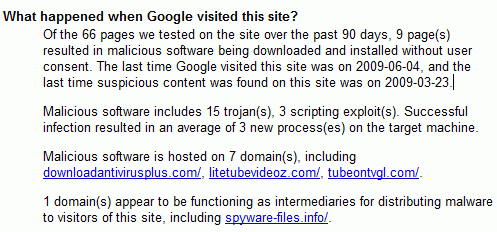


Google’s diagnostic page:
https://transparencyreport.google.com/safe-browsing/search?url=google.com
It’s refreshing that even Google can suffer from human error in these times of corporate technology. I was looking at the BBC weather pages once and there was a sandstorm set to hit my hometown at 4pm ! I wrote to the BBC with a screenshot and they admitted that there had been human error … I wonder how many people started to make plans to bunker in ?
Google definitely implemented extra precautions to make sure this would never happen again. Something like this will make people permanently switch to Yahoo’s browser.
Unfortunatley there must be an error OR my site’sbeen hacked… so i’m on the run to figure this out o_O;;
Interesting, I have never really run across this problem…knock on wood!
Human error on Google’s part, PEBCAK error.
By late this morning they had it fixed. I wondered if it had to do with yesterday’s critical windows update that I downloaded. Maybe Microsoft caused the error.
Restart your router and solve the problem!
@QuickOnlineTips, I suspect that because all Google queries showed the StopBadware.org warning, in effect Google had performed a DOS attack on StopBadware.org — pretty much every site (except Google, Yahoo, etc) would fall in situations like this.
Brendon.
stopbadware.org is now back online. I guess something might have gone wrong there.
I would also like to hear from Google about what had happened, who screwed up, why, etc. ;)
Sounds a lot like the “Antivirus 2009” trojan. Yikes!
That was interesting this morning… I too thought I had picked up an critter.