
How to Find Pages Losing Traffic in Google Search Console (2026)
In 2014 I found a quick way to spot pages losing traffic in Google Webmaster Tools: show Top Pages, switch to “With Change”, and sort by the change column. It revealed which pages had dropped most and where to start fixing. Search Console looks different now, but finding pages losing traffic is still quick. Here’s the 2026 method.
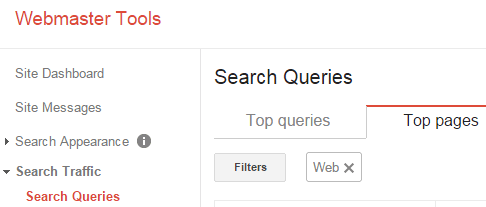
Quick answer: In Search Console, open Performance > Search results, click the Date filter and choose Compare (for example last 3 months vs previous 3 months). Open the Pages tab, then sort by Clicks Difference to list the pages that lost the most traffic. Check each page’s queries to see whether it lost rankings, impressions or click-through rate.
Table of Contents
Step-by-step in Search Console
- Go to Performance > Search results.
- Click Date > Compare and choose two equal periods (avoid comparing different seasons when possible).
- Select the Pages tab and tick Clicks and Impressions.
- Sort by Clicks Difference (smallest first) to see the biggest losers.
- Click a page, then the Queries tab to see which searches dropped.
Why pages lose traffic
- Lower rankings: competitors improved or a core update changed results.
- Fewer impressions: lower search demand or seasonality.
- Lower CTR: AI Overviews, featured snippets and other SERP features taking clicks.
- Technical issues: noindex, broken redirects or slow pages.
- Outdated content: old facts and screenshots lose trust.
What to do next
- Refresh outdated posts with current facts, a clear answer up top and better structure.
- Merge overlapping posts that compete for the same keyword.
- Improve titles and meta descriptions if impressions are steady but clicks fell.
- Check the Manual actions report if many pages dropped at once.
More free tools: best free Google SEO tools.
FAQ
Can GA4 show pages losing traffic?
Yes, compare date ranges in Reports > Engagement > Pages and screens, filtered to organic search.
How far back can I compare in Search Console?
Up to 16 months of data.
Should I delete pages that lost traffic?
Usually refresh or merge them first; delete only pages with no value.
Stuck on a gift? Try our free Gift Idea GeneratorIdeas for anyone by age, job, interests and budget, with Amazon.com and Amazon.in linksFind gifts →Get our free weekly email: new tech guides and tools, no spam.
New and updated tech guides, a free tool worth bookmarking and one useful pick, once a week. No spam, unsubscribe anytime.
One email a week. Unsubscribe anytime. See our privacy policy.





I couldn’t make to the steps shown in the article. May the new the webmaster setup has changed. If so please update the article accordingly. Thanks
I didn’t know that we can able to track loss traffic also. Thanks it’s really helpful.
Ive noticed a significant loss in traffic
It sometimes feels like someone switched a switch
I am new in blogging so thanks for this post , its really helpful because traffic play important role in blogging
is very difficult to find high traffic websites
SEO article reviews were pretty much. And now I realized how good way to bring traffic from search engines. So nice to share with us, Thank you for the article. This article has been helpful to many. Will benefit a lot for me.
Great Tip! GWT has so many functions that it is impossible to keep track and knowledge of everything. Hope they also start mentioning the reason why your website got hit and tips for the same.
Web traffic is the amount of data sent and received by visitors to a web site. Since the mid-1990s, web traffic has been the largest portion of Internet traffic.
Web traffic is the amount of data sent and received by visitors to a web site. Since the mid-1990s, web traffic has been the largest portion of Internet traffic.[1] This is determined by the number of visitors and the number of pages they visit. Sites monitor the incoming and outgoing traffic to see which parts or pages of their site are popular and if there are any apparent trends, such as one specific page being viewed mostly by people in a particular country. There are many ways to monitor this traffic and the gathered data is used to help structure sites, highlight security problems or indicate a potential lack of bandwidth not all web traffic is welcome.
Thanks buddy, exactly waiting for this. now i can easily notice my traffic. thanks a lot.
Exactly waiting for this. Thanks budddy. i can easily notice my traffic now
I appreciate the time you spend behind this amazing post.Great job.
This is a great tip. Quick and easy! It’s great that there are people out there who are willing to share these little lifehacks lol :)
I guess am having some traffic loss in my blog.Thanks for this post.