
6 Apps to Create Free iPhone Ringtones
Convert your favorite audio file or an mp3 to iPhone ringtones? Here are some handy applications which enable you to create iPhone ringtones from different audio formats MP3, WAV, WMA and MP4 etc., for free.
Create Your Own iPhone Ringtones
iRinger: Free iphone Ringtone Maker Software.
It allows any iPhone user to customize their iphone ringtones. It’s a handy ringtone maker solution that does not require any ” jailbreak” for your iphone. You can customize the ringtones with a variety of features supported by iRinger. It runs on all the versions of Microsoft Windows including Windows Vista. It requires iphone firmware 1.1.2 or newer, iTunes software 7.5 or newer, also works with the new iphone 3G.

ToneShop: Free iPhone ringtones maker (Windows).
ToneShop is an free software utility which allows us to make ringtones from MP3, WAV, WMA and MP4 audio formats. It’s very simple to use, just we need to select the input file, define the audio snippet you want ringtone of and select the desired output format according to your cellphone. Using ToneShop you can create ringtones in MP3, WAV and AAC formats. The Apple iphone M4R (AAC) format is the latest addition to it. ToneShop Works on Windows 2000, XP and Vista PCs (32 bit and 64 bit)

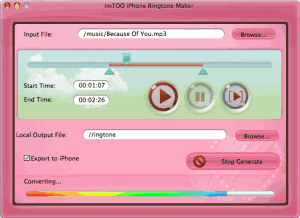
imTOO: iPhone Ringtone Maker for Mac.
It provides an easy way to create iPhone ringtones from video or music and transfer it to iPhone directly. This Mac iPhone ringtone maker software supports converting almost all video/audio formats and trimming video/audio to make the most colorful clip as your iPhone ringtone.
Xilisoft: iPhone Ringtone Maker for MAC.
Xilisoft allows us to convert music files like WMA, RA, WAV, M4A, MP3 formats to M4R iPhone Ringtones. It even allows you to convert file formats like AVI, WMV, DivX, MP4, AVCHD, MKV, RM, MOV and MPEG to M4R for making background music as your iPhone ringtone. You can also create ringtone clip from any video/audio and turn it into iPhone ringtone. It allows you to transfer ringtones to iPhone directly and set as iPhone ringtone after iPhone ringtone creation is done. This ringtone software provides several interface languages to choose like English, German, Japanese and Chinese.
Garage Band: Create free iPhone ringtones using Mac.
Apple introduced a simple and free way to create and sync your own custom ringtones to the iPhone using GarageBand. Download and install the latest update of GarageBand. If you’re using a song from your iTunes library, just open GarageBand, open iTunes, and simply drag and drop the song from iTunes to a new track in GarageBand.

Fission: Create iPhone ringtones.
Using Fission, you can crop audio down to your desired snippet, fade the ends in and out and save all in just a few clicks. Add the files to any phone that accepts MP3 or AAC audio files for ringtones. Fission can edit AAC and MP3 files without any loss of clarity. It’s always been great for creating ringtones.

Guest blogger Srikanth writes on Tech Inspiration blog at ekoob.com about tips, gadgets, and technology.