
How to Embed Facebook Videos
It is easy to embed Youtube videos, but how to embed Facebook videos on your site / blog. Facebook videos have links to share the Facebook video on your wall / friends wall, but does not provide an embed code. Here is how to do it.
1. Go to Facebook Video Page
When you are viewing a Facebook video in your news feed / profile and reach the end, these are the options offered.
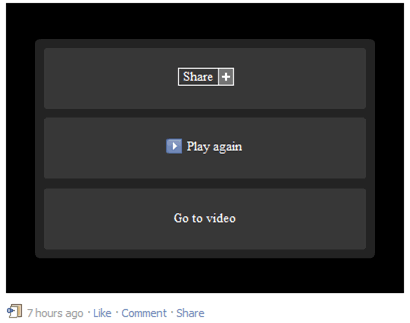
Click on the “Go to Video” link and you are directed to the Facebook video page.
2. Find Facebook Video Url
Now look at the long url address in the browser location bar. It will look something like this
http://www.facebook.com/video/video.php?v=123456789012345
This is the url of the Facebook video page and cannot be embedded. We have to edit / shorten this url to get the actual Facebook video url to embed. So this is the shorter url we need (note the changes, number stays same)
2. Get Facebook Video Embed Code
If you look at the old style embed code for any Youtube video, you find it looks like this
<object width="500" height="314">
<param name="movie" value=""></param>
<param name="allowFullScreen" value="true"></param>
<param name="allowscriptaccess" value="always"></param>
<embed src="" type="application/x-shockwave-flash" width="500" height="314" allowscriptaccess="always" allowfullscreen="true"></embed>
</object>
This is a standard embed code for shockwave flash video. We have highlighted the embedded youtube urls. Now replace those youtube urls with the Facebook urls.
<object width="500" height="314">
<param name="movie" value=""></param>
<param name="allowFullScreen" value="true"></param>
<param name="allowscriptaccess" value="always"></param>
<embed src="" type="application/x-shockwave-flash" width="500" height="314" allowscriptaccess="always" allowfullscreen="true"></embed>
</object>
Paste in html mode in your post, and your Facebook video is embedded! Enjoy!
IMPORTANT NOTE: All Facebook videos are NOT in the public domain. Videos posted by Facebook users maybe copyrighted, personal, private, and may NOT be permitted for distribution or illegal to use without permission. So before you go ahead and embed any Facebook video, ALWAYS seek permission from the video owner / creator.