
How to Type Upside Down Text: ʇxǝʇ pǝddılɟ (Copy and Paste, 2026)
Want to write ʇxǝʇ uʍop ǝpısdn like this? Upside down text (also called flipped text) is a fun way to stand out in social media bios, chats and comments. When we first saw it back in 2007 it seemed like magic, and people wondered which software made it possible. The secret is simple: special Unicode characters that look like upside-down letters. Here’s how to type it in 2026 on any device.
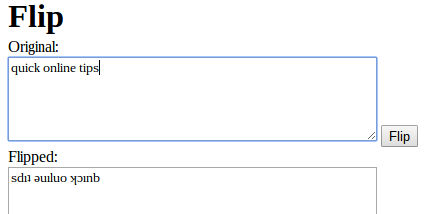
Quick answer: Open a free flip text generator, type your text, and copy the upside-down result. Paste it into Instagram, WhatsApp, X, Facebook, Discord or almost anywhere that accepts text. No app or special font is needed, because the tool swaps each letter for a Unicode character that looks flipped.
Table of Contents
How to type upside down text
- Open an upside down text generator in your browser.
- Type or paste your text into the box.
- The flipped version appears instantly, usually reversed so it reads correctly when the screen is turned upside down.
- Copy it and paste it wherever you like.
For example, quick online tips flips to sdıʇ ǝuıluo ʞɔınb, and flipping it again brings back the original. Lowercase letters usually flip more cleanly than capitals.
Free flip text tools
- UpsideDownText.com: flips, reverses or mirrors text with one click.
- LingoJam Flip Text: a simple translator-style box that flips as you type.
- Keyboard apps: some third-party phone keyboards include fancy and flipped text styles.
How does flipped text work?
Computers store text as Unicode characters, and Unicode includes thousands of symbols from many alphabets. Some look like upside-down Latin letters: ɐ for a, ǝ for e, ɥ for h, ʇ for t and ʎ for y. A flip tool simply replaces each letter with its look-alike and reverses the order. Because they’re real characters, not images, you can copy and paste them like normal text.
Where you can use upside down text
- Social media bios and captions
- Usernames in games and Discord
- Chat messages for fun
- Email subject lines (use sparingly)
Related text tricks
- Backwards text: reverses the order of letters without flipping them (stxet sdrawkcab).
- Mirror text: flips letters left to right so they read correctly in a mirror.
- Fancy fonts: other Unicode ranges give bold, italic, script or bubble-style letters that also copy and paste anywhere.
- Small caps and superscript: handy for stylish usernames and short labels.
Tips and limitations
- Not every letter has a perfect match, so a few characters may look slightly odd.
- Screen readers may read flipped text as gibberish. Don’t use it for important information or names people need to find.
- Search won’t match flipped words, so avoid it in titles you want people to search for.
- Some fonts or older apps show unsupported characters as boxes.
Like playing with symbols? Learn how to type the Indian Rupee symbol ₹ on any keyboard.
FAQ
Is upside down text a font?
No. It uses ordinary Unicode characters that resemble flipped letters, so it works without installing any font.
Can I flip text on my phone?
Yes. Open a flip text website in your phone’s browser, copy the result and paste it into any app.
How do I turn flipped text back to normal?
Paste it into the same flip tool; flipping it again restores the original letters.
Get our free weekly email: new tech guides and tools, no spam.
New and updated tech guides, a free tool worth bookmarking and one useful pick, once a week. No spam, unsubscribe anytime.
One email a week. Unsubscribe anytime. See our privacy policy.

Thanks for the post! By the way for some reason most of your upside down text appears in “?” in my browser. Anyways, I’d recommend linking to Upside Down Letters
that site works much better than the one u listed and it give HTML.
Think if I did this people would consider me a geek? Looks like fun!
I’m having great fun with this tool. Loving it.
BTW, the new colour scheme over here on QOT.. a bit bluish.. is really cool. :D
Easy tools,only for english
That goes the rest of today then….