
Google Reconsideration Request: When and How to File (2026)
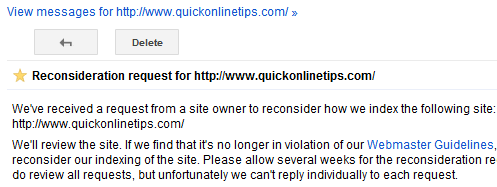
Thinking of filing a Google reconsideration request? In 2012, while trying to recover QuickOnlineTips from the Google Panda update, I looked at reconsideration requests as a last resort after cleaning up the site. What I learned then still matters in 2026: a reconsideration request only helps if your site has a manual action from Google’s team. It does nothing for algorithmic drops like Panda, which is now part of Google’s core ranking systems. Here is when and how to submit a Google reconsideration request today.

Quick answer: A Google reconsideration request (now called a review request) is how you ask Google to lift a manual action after you fix the problem. Open Search Console, go to Security & Manual Actions > Manual actions, fix every affected page, then click Request Review and explain what was wrong, what you fixed and the results. If the Manual actions report says “No issues detected”, you cannot file a request, and any traffic drop is algorithmic.
Table of Contents
Manual action or algorithm drop?
- Manual action: a Google reviewer found a spam policy violation, such as unnatural links, thin or scraped content, cloaking or user-generated spam. It appears in Search Console’s Manual actions report, and you can request a review.
- Algorithmic drop: rankings fell after a core update, spam update or helpful content changes. No manual action is listed, and there is nothing to request. You recover by improving the site and waiting for Google to reassess it.
How to submit a Google reconsideration request
- Sign in to Google Search Console and open your verified property.
- Go to Security & Manual Actions > Manual actions and read the issue and sample URLs.
- Fix the problem on every affected page, not just the examples. Partial fixes are not enough.
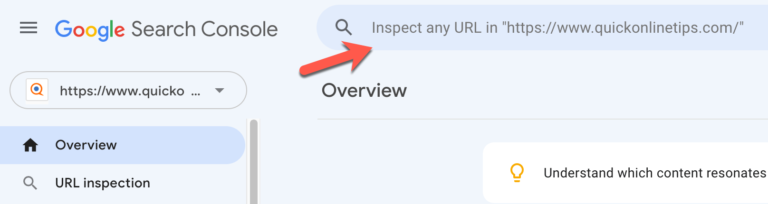
- Make sure Google can reach the fixed pages (no login, paywall, robots.txt block or noindex). Use URL Inspection to check.
- Click Request Review.
- Explain the exact issue, the steps you took and the results, with evidence such as lists of removed links or rewritten pages.
- Wait for Google’s emails. Reviews can take days or weeks. Do not resubmit while a request is pending.
Google’s Manual actions report help lists every action type and what to fix.
Tips for a successful reconsideration request
- Be honest: admit what went wrong, even if an SEO agency did it.
- Show your work: share a spreadsheet of links removed, contacted sites, or pages rewritten or deleted.
- For link penalties: remove as many bad links as possible first, then disavow the rest.
- For content penalties: improve, merge or remove thin and copied pages.
- Explain prevention: describe how you will stop it happening again.
What about Panda recovery?
In 2012 I hoped a reconsideration request could speed up our Panda recovery, and Google’s quality team even published videos on writing good requests. But Panda was always algorithmic. The real fix was what we did on the site: pruning thin posts, improving content and fixing technical issues. See how we tried to fight Google Panda and Penguin. The same approach applies to recovering from core updates today.
FAQ
How long does a Google reconsideration request take?
Usually from several days to a few weeks. Google emails you when the review is complete.
Can I submit a reconsideration request without a manual action?
No. The Request Review button only appears when there is a manual action on your site.
What if my request is rejected?
Read Google’s reply, fix the remaining problems thoroughly, and submit a new request with more evidence.
Will traffic come back right after a manual action is lifted?
Not always fully. Rankings return over time, and pages that relied on spammy links may not regain their old positions.
Get our free weekly email: new tech guides and tools, no spam.
New and updated tech guides, a free tool worth bookmarking and one useful pick, once a week. No spam, unsubscribe anytime.
One email a week. Unsubscribe anytime. See our privacy policy.





The method of reconsideration is helpful, but Is Google checks every blog or it releases the Google bot for checking the websites that contains copied contents.
It takes a lot of time !! i don’t think google will consider it again :-(
should i delete the posts that are not getting good traffic?
Well explained article
Everyday lots of request are going to Google for reconsider their sites. Still I am uncertain if Google check every site manually or again use Google bot
Dude Panda is not a manual penalty it is algorithmic so sending in a reconsideration request is UESLESS. Reconsideration requests are only for manual actions.
you still have 3200 articles, maybe too many low quality articles among them. I’ve deleted close to 70% of my articles 1 month ago. I hope it will work, will keep you posted.