
How to Send Self-Destructing Text Messages in 2026 (WhatsApp, Signal, Telegram, Snapchat)
Want to send self-destructing messages that delete themselves after they are read or after a set time? In 2005 we wrote about StealthText, a paid UK service that sent SMS messages which could be viewed only once. Plain SMS still can’t do that, but today the messaging apps you already use have built-in disappearing messages, for free. Here is how to turn them on in each app.

Quick answer: Use the disappearing messages feature in a messaging app: WhatsApp (24 hours, 7 days or 90 days per chat), Signal (a timer per chat, from seconds to weeks), Telegram (secret chats with a self-destruct timer, or auto-delete in any chat) or Snapchat (chats delete after viewing by default). Normal SMS texts can’t self-destruct.
Table of Contents
Why SMS can’t self-destruct
An SMS is delivered to the other phone’s messaging app and stays there until the recipient deletes it. Services like StealthText needed a special app on both phones and worked only in one country. Modern chat apps control the app at both ends, which is why they can delete messages automatically.
WhatsApp disappearing messages
WhatsApp lets you set messages in a chat to disappear after 24 hours, 7 days or 90 days.
- Open the chat and tap the contact’s or group’s name.
- Tap Disappearing messages and choose a time.
- To use it for every new chat, go to Settings > Privacy > Default message timer.
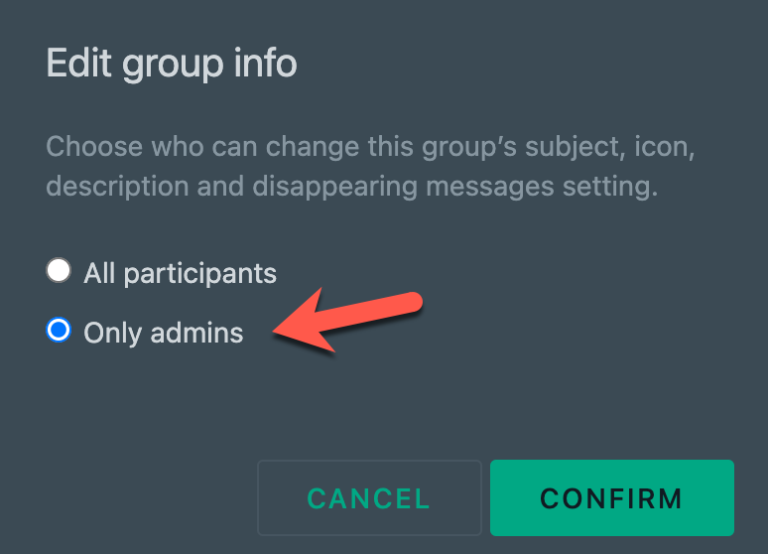
For a single photo, video or voice message that can be opened only once, use WhatsApp View Once: see our guide to WhatsApp View Once. Group admins can also control who turns on the timer; see how to stop group members turning on disappearing messages.
Signal disappearing messages
Signal, the privacy-focused messenger, lets you choose a timer for each chat, from a few seconds to several weeks, or a custom time.
- Open the chat and tap the contact’s name.
- Tap Disappearing messages and pick a time.
- Set a default timer for new chats under Settings > Privacy > Disappearing messages.
Telegram secret chats and auto-delete
Telegram offers two options:
- Secret chats: end-to-end encrypted chats on one device, with a self-destruct timer for messages after they are read.
- Auto-delete: in any normal chat, set messages to delete automatically after a chosen time (such as a day, a week or a month) from the chat’s menu.
Snapchat chats
On Snapchat, snaps and chats are deleted after they are viewed by default. You can change a chat to keep messages for 24 hours after viewing instead. Snapchat also tells you if someone takes a screenshot in the chat.
Limits of self-destructing messages
- Screenshots and cameras: the other person can still take a screenshot (some apps block or report this) or photograph the screen with another phone.
- Forwarding and copying: text can be copied before it disappears.
- Backups and notifications: a message may appear in a notification preview or be saved in a backup before it is deleted.
- Trust matters most: only send truly sensitive information to people you trust, whatever the timer.
FAQ
Can I send a self-destructing SMS?
Not with standard SMS. Use a messaging app with disappearing messages instead.
Which app is best for disappearing messages?
Signal is the most privacy-focused and lets you set any timer. WhatsApp is the easiest if your contacts already use it.
Do disappearing messages delete from both phones?
Yes. When the timer runs out, the app deletes the message for everyone in the chat, though copies made before that (screenshots, forwards) remain.
Can someone screenshot a disappearing message?
Usually yes. Some apps block screenshots of view-once media or notify you, but nothing stops a photo of the screen.
Stuck on a gift? Try our free Gift Idea GeneratorIdeas for anyone by age, job, interests and budget, with Amazon.com and Amazon.in linksFind gifts →Get our free weekly email: new tech guides and tools, no spam.
New and updated tech guides, a free tool worth bookmarking and one useful pick, once a week. No spam, unsubscribe anytime.
One email a week. Unsubscribe anytime. See our privacy policy.



Will this work with a cell registered in the US?