
September 24th, 2007

How to Fix Error 0X80070052 on USB Flash Drives


I use a 2GB Transcend USB Flash drive or memory stick to store my office data. Today when I tried to copy some data from my Computer to the memory stick, an alert popped up with Error 0X80070052, and “the directory or file can not be created”. Here is my experience in fixing the error…

Checking my USB Flash Drive

I had shared my experience about fixing flash drive errors earlier, but I was determined to try all means to figure out what went wrong before I would format the pen drive (and all data is deleted forever!). I googled some forums for support and the problem was not uncommon. Most people suggested some FAT to NTFS problem, something about not correctly formatting your disk when used the first time, fake pen drives (standard tech support answer) and the ultimate (and simplest) solution to format your disc and erase all data.

Here is what I did, and maybe you would have too - I used the “Safely remove hardware” option, stopped the flash drive, reinserted it into the USB port. All my files were listed well and could be opened. I could easily transfer data from the USB drive to the computer (So I transfered all data, just incase all data got corrupted by my experiments - always back up your data, ALWAYS while it is still working).

When I tried creating a new folder, it did manage to create some corrupted folder, which would not open, nor could it be deleted. Here is a comparison of the corrupted new folder on the left and the way a normal new folder displays in Window Vista.

Corrupt New FolderNormal New Folder

The first thing that struck me was that since more data was not getting stored on the pen drive, the maximum storage capacity must have been reached. But the usb drive was only at 25% capacity. So the problem has to be something else.
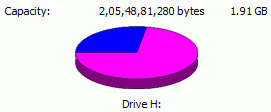
Free Disk Space

Maybe it was a bad virus which had infected the pen drive. I went to My Computer and right clicked to right clicked to scan with Norton Internet Security (my trusted antivirus tool, though these free antivirus software would work as well). No Viruses or malware.

Maybe it was bad sectors on the disk. Then I right clicked the Removable drive, went to propeties, then tools and I scanned the drive for bad sectors and selected the error checking option.

Scan for Errors

Then I selected both options to Automatically fix file system errors and also scan and attempt recovery of bad sectors. But there were no errors.

Check Disk for Errors
However, I could still not create any folder on the pen drive, nor could transfer any data from the computer to the flash drive. I looked around the fiorums where most of them suggested to back up all data and format flash drives.

Fixing Error 0X80070052

When I looked into the contents of my usb flash drive, I had around 15 folders and over a 120 word documents, 30 Pdf files and a few zip and image files stored in the root of the pen drive. Since new folders were not being created, I thought maybe there were too many files in the root area, so I moved all these individual files to a pre-existent folder (remember we cannot create a new folder). Now I had 15 folders and no single files in the root of the flash drive.

And guess what happened (I would not be writing this had it not worked!) - The flash drive is back to normal (I do not need to format it after all, though I was getting prepared for it). Now the Error 0×80070052 is gone, I can easily create new folders (that strange corrupted folder is still there!) and easily transfer files to and fro from the computer. So maybe it has something to do with keeping files in folders… maybe some geeky person can share their knowledge about the issue.

I hope you try this simple solution to Error 0×80070052 before formatting your flash drive. It worked for me, may work for you.

Bookmark this article on   Del.icio.us or Stumbleupon or Digg or Fark
Continue getting our new articles by RSS or email

Related articles
How to Fix Errors and Format USB Flash Drives
Top Posts of September 2007
1GB USB Flash Drive from Victorinox Swiss Army Tools
Skype Preloaded on SanDisk Cruzer U3 Smart Drives
Portable Firefox on USB Drive

Comments

RSS feed for comments on this post.
  • 1. No Worries | 25/09/07  #

    If you have formatted your usb drive with FAT16, there is a limitation on how many files you can have on the root of each drive. That limit is 512 files and folders.

  • 2. dorear | 26/09/07  #

    Exactly what my problem was. Thank you - this saved me hours of investigating!!

  • 3. giri | 11/10/07  #

    hi… i have a 4GB usb flash… when the files or folder size exceeds 700 to 800 mb all the data gets mixed up nd i cant delete or copy the files can u tell me u r idea about it….

  • 4. mama_lr | 14/10/07  #

    Wow thanks for your help! I had this problem with my MP3 player. Now I can download more songs on it. Thanks again!

  • 5. Jim N | 14/10/07  #

    Great advice, it worked.

  • 6. Should Worry | 15/10/07  #

    The limit is not 512, but rather 255 (16*16=256). I had the same issue and for Windows purposes, I format it to FAT32. In my digital cameras I use FAT16. The cameras will take care of the 255 file limitation.

  • 7. yoe | 16/10/07  #

    it really works!!!!
    thank you very much=W=~~~!!!!

  • 8. John Bannister | 24/10/07  #

    Re Error 0X80070052
    I had exactly the same error as you describe on my Tescos 1G Technika flash drive. I had copied ~100 files and could not copy any further files but had only used 100M of memory. I was thinking about taking it back. However, I followed your fix and it works! You saved me a trip and a product exchange which would not have solved the problem.
    The user manual for this product is clearly inadequate. Ill bet that Tescos are getting a lot of unnecessary product returns!
    Many thanks for your very useful fix - why not tell Tescos - they should reward you!

  • 9. fared | 2/11/07  #

    I can help you. go to vendor website search and download utiliti software for you USB drive.you can format USB drive and repair USB drive System

  • 10. batteries not included | 6/11/07  #

    thanks for this. was beginning to think my 2gb SD was a fake. very useful!!!

  • 11. Polly | 6/11/07  #

    Oh, thank you so much! You helped me a lot! :*

  • 12. ben | 19/11/07  #

    thanx hepes good job mate

  • 13. esamlioglu | 19/11/07  #

    Your solution also solves my problem. Thaks a lot.

  • 14. Michael Metz | 1/12/07  #

    format the SD Card or USB drive in Fat32 before you use it or save you data and then fornat the little bugger. Workd like a charm for me,

    MSM

  • 15. Testrup | 6/12/07  #

    Ohh.. Dudes.. Actually there is a more simple solution to this particular problem.

    Simply format the pen-drive in FAT32 instead of FAT.

    I indexed all my files into folders after reading this little fix, but tried, by my self, to format the drive in FAT32, and now I can have as many files as I like in the root of the pen-drive.

    //Testrup

  • 16. janfrancis | 7/12/07  #

    i had 150 mp3 files on my M2 SD card and it didnt want to sinc with windows media player. i just transfered the 150 mp3’s to my desktop ofcourse made a folder. then i erased all data on the card. then i made 3 folders music videos pictures
    started putting them back and now its working perfectly… dang sd cards have limits on their root drive

  • 17. DeWanto | 16/12/07  #

    I have Creative Nomad MP4 Player Flash Disk. My Computer detect it as Removable Disk if i plug in computer, but i can not format it, because capcity 0 kb. How is it ? How to format and fixed or repaired it ? Thank’s

  • 18. Mandy | 17/12/07  #

    Worked great, thank you.

  • 19. Lisa | 23/12/07  #

    i am trying to copy about 800 photos onto a 2GB SD card. It is limiting me to 300 pics but still says it has over 3/4 of memory left. i get the 0×80070052 error. any thoughts? i plan on putting the card into a digital photo frame.

  • 20. Josefine | 27/12/07  #

    HI! I have the same problem, but I dont have a pre-excistens folder. So how can I fix this problem now?
    Help me!

    Josefine

  • 21. Di Lafin | 30/12/07  #

    I transfered everything off the 2GB SDcard into a new folder on the desk top which left the card totally empty. I then added more photos to the folder and transfered the new folder back to the SDcard. It worked with no problems.
    Thank you very, very much.

  • 22. Nero | 8/01/08  #

    When i try to transfer any folder that has many subfolders (containing different types of files) to my 4gb flash disk, the contents of these subfolders do not copy.

    also, one time i copied music folders and the files were ok, and working. but when i try to add more folders containing music files, the CONTENTS of the previously copied folders disappear.

    maybe it’s a fake? it would help to know really. i’ve tried formatting it before.

  • 23. naiomi | 14/01/08  #

    i have a error 0×80070052 how to fix it

  • 24. huz | 20/01/08  #

    when i try to copy a file to my mp4 it says can not copy the directory or file can not be created

  • 25. Devon | 20/01/08  #

    Thankyou

    Fixed my problem in a second with a 2GB Sandisk SD card.

  • 26. Thaei_tammai | 21/01/08  #

    Good job!!!! My flash drive can copy file again!!!
    Thank You!!!!

  • 27. Dr Shyam Jamalabad | 25/01/08  #

    Great!! You’re a genius! Solved my problem in a blink! How can I ever thank you enough?
    Keep up the good work!

  • 28. Dr Shyam Jamalabad | 26/01/08  #

    Dear Testrup or anybody else who’s listening,

    I read testrup’s post much later about “Simply formatting the pen-drive in FAT32 instead of FAT.”
    I need some clarification, though.
    I have one PC which still runs Win 98SE (Don’t ask why) Will I still be able to sync with that PC if the pendrive’s formatted in FAT32?
    I haven’t tried for the simple reason I don’t know if a flashdrive once formatted in FAT32 can be brought back to FAT.
    Any expert opinions appreciated.

  • 29. Curtis Glenn | 28/01/08  #

    Hey guys, I too had that error problem about the fat 16 and 32’s. Now, though, I can only copy 552 files to my usb storage system, which has a 1g capacity. There is still over three fourths space left. How can I copy more to it????
    Thanks,
    C.G.

  • 30. TIR | 2/02/08  #

    Hey man thanks!!! Sharing this was amazing… thank you for your time, dedication and non-selfish feeling!!!!

  • 31. DAS | 3/02/08  #

    Your solution was perfect!

    Thank you for sharing it

  • 32. BigAl | 8/02/08  #

    Created folders, works a charm.Thanks.

  • 33. zak | 10/02/08  #

    that was great all done. thanks for the effort u put in!!!

  • 34. Kharen | 14/02/08  #

    After trying everything else posted on this page, I formatted the memory card from FAT to NTFS and presto - it worked like a charm! (Ofcoarse I made a backup of the files first!)Great tip!
    THANK YOU SOOOOOOOOO MUCH!!!! You are a computer GOD!

  • 35. ND | 18/02/08  #

    Hey dude !! Thanks a lot. It indeed is a great tip. Saved me the hassle of formatting the disk. I use a 2 GB imation and the data was super critical. Thanks again. God bless.

  • 36. Tony | 18/02/08  #

    THANK YOU! Had same problem but with a mp3 player and music. I couldn’t put any more music on and it was only half full. I went to make a new folder to put it in like you said, and it wouldn’t let me.. so I removed one song, made the folder, put all my music in… and it worked fine! Thanks!

  • 37. Roberto | 27/02/08  #

    I have another method:

    I had this same problem with my thumbdrive and after read this forum and having the same idea about some corrupted folder or file.

    I listed all files from my USB drive using the “Windows Explorer” with the “Date modified” view, and based on the date I deleted the latest 2 files that were created (I’m not sure which one was the problem) but after that I can create again folder & files.

  • 38. Brett | 6/03/08  #

    Thanks for the help!

  • 39. Nathan | 10/03/08  #

    Excellent! It worked perfectly, cheers mate.

  • 40. Kelly | 22/03/08  #

    I think I love you! Same thing with technika mp3 player from tescos, was about to take it back…luckily I found your advice,

    Thankyou so much for taking the time to do this!

  • 41. shoaib | 22/03/08  #

    hi thanks for the tip it solved the problem when i formated my flash drive with FAT32 formate.i created a folder after formate then all files got easly copied in it.

  • 42. angel | 25/03/08  #

    great job;)

  • 43. Ben | 29/03/08  #

    Thank You!!!!!

  • 44. eko | 31/03/08  #

    good job my friend got exactly the same problem and thank to you i figured it out. Thanx a lot man

  • 45. Yanir | 2/04/08  #

    Thank you so much - exactly what I needed to fix the problem like magic!
    A well written great solution!

  • 46. Scott | 5/04/08  #

    Bought another flsh drive as reformatting didn’t work when I first had this problem. Was so frustrated as I had the same problem with the new drive. This solution was fantastic. Such a simple solution. Thanks for sharing. Wish I had googled this in the first place.

  • 47. Bruno Lana | 8/04/08  #

    WOW! Thank, really, really much!!

    I created the new folder and transfered some archives, and the pen drive is working again!!!

  • 48. Suzy Garrison | 8/04/08  #

    BOY>>>>Does this work!!!! THANK YOU THANK YOU It was late and needed those files for work. I searched for a solution, but your solution was the easiest and quickest of the lot. Cannot thank you enough. YAY!!!!

  • 49. Deon | 9/04/08  #

    BIG thank you - It worked like a bomb. I moved the files to a folder and now I can add more data.

  • 50. Alyssa | 14/04/08  #

    thank you so much! My small HD size means I don’t want a bunch of music files on it so I’ve been using a USB & it stopped working, but now that I moved it all into a “music” folder it works like a dream. Thanks!!!

  • 51. DJ Jazzy L | 14/04/08  #

    Wow! A miracle happened! What had become a minor irritant is a thing of the past. You’re a genius! All other “fixes” in other forums should be “unGoogled”! :-))
    Thanks for doing the legwork.

  • 52. Calogero Algeri | 15/04/08  #

    This was exactly the same problem that i had. thankyou heaps!

  • 53. Mrk | 18/04/08  #

    Awesome - thanks for this!

  • 54. zeke | 20/04/08  #

    Thanks for this dude. Worked perfectly for me. Now my girlie thinks I’m a frikking genius….time for me to collect my prize :) cheers!!

  • 55. A.Anand Srinivasan | 23/04/08  #

    it is a cool solution… it worked for me… i copied a lot of mp3s to the usb and it was giving this error… i created a folder called song and moved the files… and the usb became normal…

  • 56. fadi aoun | 27/04/08  #

    hi please i need help
    i have many photos about 500 on my usb and still have many space durint a travel trip
    everything was ok until suddenly an error occured and said that it must be formatted and i dont have back up
    the strange thing is that on apple pc it shows items but with error and it shows the capacity as it is with the photos
    please i need help urgent urgent urgent

  • 57. Renesisapex | 27/04/08  #

    Thanks for your solution, “No Worries” it makes perfect sense…reformat to a better File System.
    Same error code for me: I had 170 items in the root of my 1GB Flashdrive. If I removed one file/folder I could insert another but no more, limit therefore is 170, in my case the FAT format was used. I backed up the contents of the drive to a temp location and reformatted using NTFS, and hey, Presto! problem solvered!
    So why do these drives come formatted in anything other than NTFS? According to one suggestion it’s, as usual, a matter of time and money during production/testing. FAT is the simplest to format and easiest to test…..!
    So even if you haven’t yet encountered this problem but want to avoid it, backup the drive data and reformat to NTFS (Providing your system is capable of handling it - anything less than 10 years old should be OK).
    If you want to read the techie stuff about this try this URL: http://tinyurl.com/b5ovn

  • 58. Leah | 29/04/08  #

    I reformatted the Flash drive, but that didn’t solve the problem, either.

    I don’t have any folders on my drive, but got the same error when I had both 1 and 2 folders. About 1/3 of the files would transfer, and the rest generate the error code.

    Suggestions?

  • 59. Leah | 29/04/08  #

    Sorry - I read through more of the comments and reformatted in FAT32. That solved the problem.
    Thanks!

  • 60. BM | 2/05/08  #

    I have been facing this same problem, repeatedly receiving the0×80070052 error on both my Transcend JetFlash 4G and Transcend SD 2G.

    In the case of the latter it was a 150 root file limit.

    Thought it was a problem with Vista, perhaps a permissions issue, since I had no such problem with XP.

    Nothing worked. Though, as the author of this thread discovered, creating a subdirectory and copying all the music there, or copying a subdirectory, from another source, with all files worked.

    But I wanted to have all the files on root, not in any subdirectories. So followed those who advised formatting with FAT32 and it worked no problem!

    I have little doubt that formatting with NTFS will work just as well.

    Thanks to all who assisted.

  • 61. Juli | 9/05/08  #

    thank you thank you! This was driving me crazy and this fixed the error in a flash…pun intended! Thanks again :)

  • 62. xeraboo | 10/05/08  #

    this was brilliant - worked immediately!! i was just about to start checking out file formats… thank god i thought of googling this up first! thanks mate ;)

  • 63. psy | 11/05/08  #

    Thank you a lot never thought the answer would be so simple. it worked perfectly

  • 64. Victoria | 12/05/08  #

    had the same problem w/ Kodak 1 and 2 GB SD mem cards. same problem - would only accept so many files. i formated to FAT32, created folders and moved over data to pre-existing folders. EXCELLENT solution. thanks so much. you’re an asset to the electronic world!

  • 65. Julia | 13/05/08  #

    THANK YOU, THANK YOU, THANK YOUUUUU!!!!

  • 66. Christine | 14/05/08  #

    And the thanks keep pouring in! You saved me so much grief by pointing out the “too many files in the root area”. You are a genius. Thanks.

  • 67. Don (Colony 14 Author) Fredrick | 15/05/08  #

    Thanks for the help. Formatting my 2 GB SD card with FAT32 allowed me to copy 300 songs to it. Prior to the formatting, I had to set up three folders with 100 songs to get it to work.

    Thank goodness for sites like this to help others resolve their problems! Needless to say, when I bought the SD card it did NOT come with instructions advising, “By the way, this card won’t actually work right until you format it with FAT32.” A few words like that on the package would save a lot of people a lot of aggravation!

  • 68. powerman666 | 23/05/08  #

    I got this same error in windows vista using a USB Hard drive. When I tried to move a file to a folder already containing 26,991 files. So i took some of the file out that folder and then was able to add new files. But I cannot add more than 26,991 file into any folder.

  • 69. powerman666 | 23/05/08  #

    BTW the drive is formated in FAT32 so according to this 255(16*16) formula as mentioned above I should be able to store 65535 file on one drive. But i cannot put this many in one folder? why is that?

  • 70. Avishek | 26/05/08  #

    Thanks man…….

    THIS WORKS.

  • 71. Stephen | 30/05/08  #

    This did the trick, thanks for your help, very useful, and oddly enough it works, and i still have my data :[)

  • 72. ozy | 31/05/08  #

    yeah yeah yeah it worked!!!

  • 73. tainain2000 | 31/05/08  #

    Brilliant solution! Thanks!

  • 74. Stu | 1/06/08  #

    Thanks! Found this after wasting almost three hours trying to figure it out, solved my problem right away. Huge help!!!

  • 75. Dee | 11/06/08  #

    Thanks ever so much for help! Now my mp3-player is working again and I’m able to load it full. Thank you! :)

  • 76. zeelihaa | 11/06/08  #

    thanks!! my usb has same error and till I read your sharing, I couldn’t make it work…
    thank you so much again:))

  • 77. pr0nn | 18/06/08  #

    Damn, really thanks dude!

  • 78. Joe | 19/06/08  #

    If in doubt GOOGLE it, thats how I found out fix to the problems I was having, thanks to whoever started this thread!

  • 79. GRAYSTONE | 21/06/08  #

    Thanks a lot for your help! Great respect!

  • 80. Praveen | 22/06/08  #

    Thanks !!!!!!1 worked for me

  • 81. mp3man | 24/06/08  #

    Just create a new folder and call it Music on your flash/memory stick.

    Then just drag all your mp3’s into that folder and you’ll be able to fill up the remaining space.

    Simple :>

  • 82. Maryam Mgeni, Tanzania | 24/06/08  #

    Thank you so much, Your sharing has saved my time, I cant deny I struggled for the past two days and I thought I had damaged my flash drive.

  • 83. Robert | 25/06/08  #

    Great big thanks…deleted 1 file added one folder moved all under the folder..good to go.

  • 84. Damir Swee | 26/06/08  #

    I WILL LOVE YOU FOR THE REST OF MY LIFE FOR THIS. YOU HAVE NO IDEA HOW MANY HOURS OF SUFFERING I’VE BEEN THRU! THANK YOU!!!!!!!!!!!!!!!

  • 85. Inger from Sweden | 1/07/08  #

    Thanks so much for this excellent tip! Fixed my problem in a second!

  • 86. Rob | 4/07/08  #

    THAT WORKED, THANK YOU, AFTER MESSING AROUND WITH THIS FOREVER IT WAS SO SIMPLE TO FIX.

Articles Linking Here


Comment on “How to Fix Error 0X80070052 on USB Flash Drives”