
5 Apps to Wow The Average PC User
Every other day, we read about plenty of new software that promises to get rid of our woes and improve our experience as PC users. We read about such apps, download them, try and then move on. However, the following apps would really make any average PC user say “Wow”. Sometimes, even the power users might be astonished and go gaga over them. Have a look:
Table of Contents
#1. LemonScreen – Your face is your password
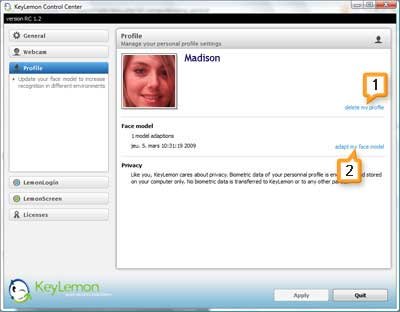
LemonScreen works with your webcam and uses face recognition technology to lock down your computer immediately when you step away from your desk. You needn’t type your password again to log in. It automatically makes out that you’re in front of your computer with inputs from your webcam and unlocks your computer in no time.
#2. Tunatic – Identify Song Title With Just The Audio

There’s a song playing on your local radio station but nobody is telling you what that song is. If you’ve got a microphone, place it near the audio source and pass the audio via Tunatic. It can help you identify that song. Yes, then you can really go buy that song (or rather, download it) :P
#3. Songsmith – Got only Vocals? Add some music, baby!
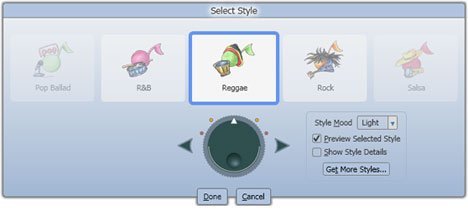
If you think you can only sing and not compose music, try the Songsmith app from Microsoft that automatically adds background music from any of 30 different styles to accompany your voice. The results may not be as mind-blowing, but you have to realize it’s a product that’s probably in its nascent stages.
#4. Shock Desktop 3D – Make your Desktop a 3D Playground
With this utility installed, it will seem like 2D Desktops are so passe. Shock Desktop 3D gives your desktop a very cool 3D look. Your icons actually look like cubes and you can play with them as if they were objects on a real table. Watch the video to believe. There are quite a few drawbacks when you compare it with the much-hyped, invite-only beta Bumptop, though.
#5. Unshredder – Reassembles Shredded Papers
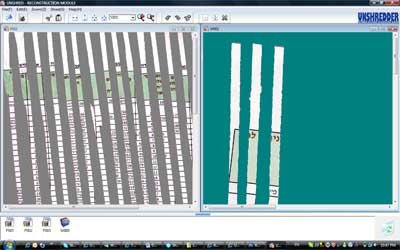
If you think no one can reproduce confidential company information from papers that you shredded using a document shredder, think again. Unshredder can easily put together all these shreds (yep, after you’ve scanned all those pieces) and make them readable again.
Guest Blogger Shankar Ganesh writes on KillerTechTips.com, where he covers tech tips ranging from essential windows utilities to how to make windows faster. You can also share your tips by writing a guest article on QOT.
Get our free weekly email: new tech guides and tools, no spam.
New and updated tech guides, a free tool worth bookmarking and one useful pick, once a week. No spam, unsubscribe anytime.
One email a week. Unsubscribe anytime. See our privacy policy.





Can i use lemon screen for multiple set of users?
Haha! Lemon Screen is hilarious! Hours of fun. The others are great too. Thanks!
Wow the first app really did impress me quite a lot, the other apps are good too.
Definitely great stuff. Tunatic is something I’m always in need of. I hear a song, really like, and wish I knew what it was called. I don’t really see the point of Songsmith, though. Who has only the vocals of songs and not the music to it?
These are really funny applications. I liked it very much. Thank you for sharing the applications.
I think LemonScreen is not quite suitable as it will be difficut to get passed if we gain few extra pounds :)
they are very funny on the destktop
Tried downloading stuff from the – Shock Desktop 3D Website and it was reporting a trojan in the downloaded file. Check it out and if possible remove the link to the download.
Well, these are even kind of rather interesting if not mind-blowing for savvy computer and internet users.
Great selection!
Some funny apps
instead of that shock 3D , i think this one rocks https://bumptop.github.io/
nice list.
So how well does Unshredder work when it was shredded with a cross-cut shredder? I mean…do they even *make* strip-shredders anymore?
hehe some cool stuff there might have to give them a go!
Great set of apps, however I’d be worried about LemonScreen if I got fat, had an accident or decided to grow a beard on holiday ;)
And as for Unshredder, wouldn’t it be faster to assemble hem yourself rather than scan them all in, especially with documents such as the one shown in the screen grab which have a clear pattern to work from?