
Google Logo Photo Mosaic: How It Was Made and How to Make Your Own
A photo mosaic is a large picture made from hundreds or thousands of small photos. One of the best-known examples was a giant Google logo built by Googlers in London in 2010. This article covers that project and shows how you can make your own photo mosaic today.
Quick answer: In 2010, Google staff in the UK built a Google logo photo mosaic from 884 printed 4×6 photographs of people, places and things around the UK, on a 10×20 foot wall in the London office. To make your own photo mosaic now, collect a large set of photos, pick a strong main image, and use free mosaic software or an online mosaic maker to arrange the tiles.
Table of Contents
The Google logo photo mosaic
Googlers in the UK created a huge Google logo using 884 individually printed 4×6 photographs, all taken by Googlers around the UK. Google’s London office proudly hosted the finished logo on a 10×20 foot wall.
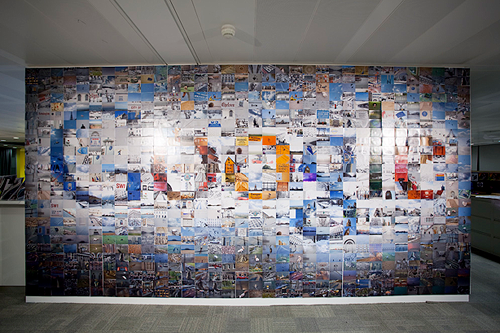
Googler Clay Bavor filmed the build with a camera taking a photo every 7 seconds for about 5.5 hours, and turned it into a time-lapse video. Play it in HD and full screen to see the individual photos.
Just one of the cool perks of a Google job!
How to make a photo mosaic
You don’t need a Google office to make one. A photo mosaic works well as a gift, a team wall, a wedding or birthday display, or a poster.
- Collect tile photos. The more photos you have, the better the result. Hundreds of images give a good effect; a few dozen will repeat a lot.
- Choose the main image. Pick a simple picture with strong shapes and contrast, such as a logo, a face or a bold word. Fine detail gets lost in a mosaic.
- Use mosaic software. The software matches each tile photo to the colour of a small part of the main image and places it there.
- Adjust the settings. Set the number of tiles, how often a photo may repeat, and whether to blend the main image lightly over the tiles.
- Export at high resolution. For printing, export a large file so the small photos stay sharp up close.
Tools to make a photo mosaic
- AndreaMosaic: free desktop software for building detailed photo mosaics from your own photo collection.
- Mosaically: an online photo mosaic maker. Creating and sharing is free; high-resolution downloads and prints are paid.
- Picture Mosaics: a company that designs custom photo mosaics, murals and event mosaics if you want it done for you.
Short of photos? See our list of free images and stock photo sites. If you like giant images, you may also enjoy our look at gigapixel photography.
FAQ
How many photos were in the Google logo photo mosaic?
884 printed 4×6 photographs, taken by Googlers around the UK and mounted on a 10×20 foot wall in Google’s London office.
How many photos do I need for a photo mosaic?
More is better. A few hundred photos usually give a good result; with fewer, the software repeats images more often.
Can I make a photo mosaic for free?
Yes. Free desktop software such as AndreaMosaic works with your own photos, and some online mosaic makers let you create and share for free.
What makes a good main image for a mosaic?
A simple image with bold shapes and strong contrast, such as a logo or a close-up face, works best.
Stuck on a gift? Try our free Gift Idea GeneratorIdeas for anyone by age, job, interests and budget, with Amazon.com and Amazon.in linksFind gifts →Get our free weekly email: new tech guides and tools, no spam.
New and updated tech guides, a free tool worth bookmarking and one useful pick, once a week. No spam, unsubscribe anytime.
One email a week. Unsubscribe anytime. See our privacy policy.




This is surly a appreciable job done by these guys. :)