
McAf.ee Secure URL Shortener: What It Was and Safer Short Links Today
Looking for a secure URL shortener that checks links before people click? In 2010, antivirus maker McAfee launched McAf.ee, a short URL service that screened every link against its threat database. This article explains how McAf.ee worked, what happened to it, and how to make and check short links safely today.
Quick answer: McAf.ee was McAfee’s secure short URL service, which checked each link against McAfee Global Threat Intelligence and warned visitors before risky sites. It was criticized for missing a known phishing link while in beta, and its mcaf.ee links no longer work. Today, use a well-known shortener for your own links and check unknown short links with a link scanner or expander before you open them.
Table of Contents
What was McAf.ee?
McAf.ee was a short URL service powered by security company McAfee (external site, opens in new tab). At the time, many short URLs were cloaking and redirecting to dangerous malware sites to trick users, and McAfee pitched its shortener as the safe alternative.
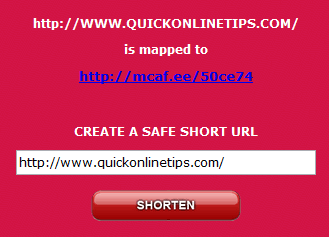
When you created a short link, it looked like any other short URL. When we tried it, clicking the link showed a top frame with McAfee’s review of the destination site:

How the McAf.ee secure URL shortener worked
McAf.ee was powered by McAfee Global Threat Intelligence. Each destination was checked against McAfee databases of known spam, dangerous, malware hosting and bot control sites before it was shown:
- Red (most dangerous): blocked; you had to type the long URL yourself to visit.
- Yellow (suspicious): a warning page, with an option to go back or click through.
- Green (safe): displayed instantly.
McAfee also offered a Google Chrome extension, the McAfee Secure URL Shortener, to create McAf.ee links in one click.

What happened to McAf.ee?
While McAf.ee was still in beta, Help Net Security (external site, opens in new tab) reported that security researchers shortened a phishing link that Facebook already blocked, and McAf.ee did not flag it. The phishing page even appeared with a “safe” badge. The lesson: a security label on a short link is not a guarantee. The mcaf.ee domain no longer works, so old McAf.ee links are dead.
How to use short links safely today
Short links are still everywhere: in social posts, text messages, QR codes and emails. Scammers like them because they hide the real address. There is no need for a special “secure” shortener, though. These habits protect you and your readers:
- Check before you click: paste an unknown link into VirusTotal (external site, opens in new tab) or Google’s Transparency Report (external site, opens in new tab) Safe Browsing site status check.
- Expand it first: see where a short link leads before opening it. Our guide on how to expand short links safely shows how, and how to check short links before you click covers more tricks.
- Use a reputable shortener: for your own links, choose an established service from our list of the best free URL shorteners, or a branded short domain you control.
- Keep browser protection on: modern browsers warn about known dangerous sites, and security suites add link checks too.
- Don’t trust strangers’ links: confirm with friends before opening unexpected short links, even from their accounts.
FAQ
Is McAf.ee still working?
No. The mcaf.ee domain no longer works, so old McAf.ee short links don’t open.
What is a secure URL shortener?
One that checks the destination of each link against databases of malware and phishing sites and warns or blocks visitors before risky pages.
How can I check if a short link is safe?
Expand it to see the real address, then scan it with a tool like VirusTotal or Google’s Safe Browsing site status before opening it.
Are short links dangerous?
Not by themselves, but they hide the real destination, which scammers can abuse. Check unknown short links first.
Subscribe to our weekly tech newsletter
Free: 100 Tech Terms ebook (worth $2.99)
Unsubscribe anytime. Privacy

McAfee is a trusted name in the world and i feel that by doing this the company had made our life simpler in a way or 2.
I would have never expected a product idea, much less a complete program/application like this, to come from a company like McAf.ee – really doesn’t make much sense to me
A program that has features making it one of the first anti-virus programs.
But the shortcut links already service does not rise to the level of the program.
The search for viruses in the sites is rather beautiful..
I’ll call this rather stupid of McAfee to bring up such weird initiative. URL shortener from such a big brand, that too with spam scan – sounds good, stupid in practical.
I have a similar program right now. I will be getting a new one in a few months. I will have to do some checking up to see if, I want to change or not. It sounds like a good thing. I can use all the help I can get. Thanks for the heads up.