
How to View Adsense Earnings Reports in Your Currency
Now you can see the Adsense Earnings and performance reports in your own currency. Till now I could always see the Adsense earnings and performance parameters in US dollars, though I get paid in Indian rupees. Every time I used to convert my USD earning into Indian Rupees in my mind and get an approximate value. But no more …
Choose Adsense Currency
The new Adsense currency feature allows you to visualize Adsense reports in your own country currency!
How to get your own Currency reports? Login to Adsense > Go to Performance reports > Select Columns > Select Currency in the drop down list. Most popular currencies are listed in the column. Choose and Save.
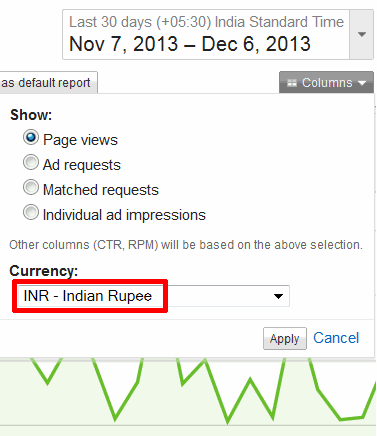
Note that Adsense will warn if the currency selected is different from the payment currency. It does not change the currency of the cheque in which you receive your Adsense earnings. Also it is good to remember that due to currency rate fluctuations, the currency conversion might not be totally accurate.
Its a great idea and I have been wondering for so many years why they could not implement this feature. Suddenly the Adsense reports make so much more sense.






Now I can easily view my currency and calculation, thank you so much.
Hi,
I just used this feature today and I liked it very much. It helps to find out how much you have earned in your local currency without doing any calculation.
wow it’s amazing sir thanks a lot for sharing this to us what a amazing thing which i don’t know thank you again
Our Indian currency changes regularly according to Dollar rate ah? then reports change everyday according to dollar rate?
Hi Chandra,
Nice post and sincerely I didn’t know how to go about all these. I used to check it as it appears but this has helped me. Best of regards for sharing.
Hi,
I just used this feature today and I liked it very much. It helps to find out how much you have earned in your local currency without doing any calculation.
My page impression is hardly 40 to 50 and click only 4 to 5 per day for my newly build blogsite. How did you earn 51858 Rs. ?. Please give me tips so that i can apply them on my blog.
Blog Management Service
It’s really an awesome and useful feature implemented by Google. It will help users to estimate their earning in their own currency .
Nice tip for newbie i did not know about thanks google have develop great option for indian bloggers so they can check their earning in home country because many people did not know what is current conversion rate of currency and what google will pay next month nice tip thanks.
Well, its good to know that Adsense has introduced this feature for marketers. However, its still thoughtful of the guys at Adsense to help make the view in the preferred currency of the user. Talk about improving user experience?