
How to Change Google SafeSearch Settings (Filter, Blur or Off)
Want to block adult content in Google search results for yourself or your kids? Google SafeSearch does exactly that, and in 2026 it has three settings: Filter, Blur and Off. Here’s how to change Google SafeSearch settings on a computer or phone, which setting to choose, and how to lock it so children can’t switch it off.
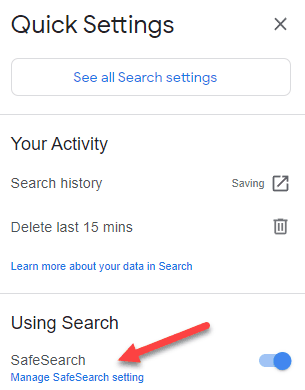
Quick answer: Go to google.com/safesearch, sign in to your Google account and choose Filter to block explicit results, Blur to blur explicit images, or Off to see everything. To stop children changing it, lock SafeSearch with Google Family Link.
Table of Contents
What is Google SafeSearch?
SafeSearch is Google’s filter for explicit content, such as pornography and graphic violence, in Search, Images and Videos results. Google explains the options on its SafeSearch help page:
- Filter: blocks explicit images, text and links. This is the default for users under 18 and children’s accounts.
- Blur: blurs explicit images, but explicit text and links may still appear. This is the default for most adults.
- Off: shows all relevant results, even if they’re explicit.
SafeSearch isn’t 100% accurate, but it removes most adult content from Google results. It works in Google Search, Google Images and the video results, and the same setting applies across your devices when you’re signed in to your Google account.
How to change Google SafeSearch settings on a computer
- Open google.com/safesearch in your browser. (You can also go to Google, click Settings at the bottom right and choose Search settings, or click the quick settings icon on a results page.)
- Sign in to your Google account so the setting is saved for you on every device.
- Choose Filter, Blur or Off. The change is saved immediately.

How to turn on SafeSearch on Android and iPhone
- Open the Google app.
- Tap your profile picture, then Settings, and look for SafeSearch (called Hide explicit results on some versions).
- Choose Filter to block adult content.
In Chrome or Safari on your phone, simply visit google.com/safesearch and choose your setting.
How to lock Google SafeSearch
The old “Lock SafeSearch” button that used to sit in Google’s search settings is gone. Today you lock SafeSearch in these ways:
- Google Family Link: parents who manage a child’s Google account with Family Link can keep SafeSearch on Filter, and the child can’t change it.
- School and work accounts: Google Workspace administrators can enforce SafeSearch for all users.
- Your home network: routers and DNS filtering services (or pointing google.com to Google’s forcesafesearch address) can force SafeSearch on every device connected to your Wi-Fi.
- Parental control apps on Windows, Mac, Android and iPhone can also enforce SafeSearch.
If you see a message that your SafeSearch setting is locked, one of these is in control. Ask the parent, school or network administrator to change it.

Why SafeSearch isn’t enough on its own
SafeSearch only filters Google results. Children can still reach adult content through other search engines, direct website links, social media and video apps. For better protection, also turn on filters in the other services your family uses:
- Change Bing SafeSearch settings
- Block adult content on YouTube
- Block adult content on Netflix
- Block adult content on Amazon Prime Video
Frequently asked questions
Why can’t I turn off SafeSearch?
Your setting is probably locked by Family Link, a school or work account, or your network. Accounts that Google believes belong to someone under 18 also stay on Filter.
Does SafeSearch work in incognito mode?
In incognito you’re signed out, so Google may use its default setting instead of the one saved in your account. A network-level lock or parental control app still applies, which is why it’s the safer choice for children’s devices.
What is the difference between SafeSearch Filter and Blur?
Filter removes explicit images, text and links from results. Blur only blurs explicit images, so explicit text and links can still appear.





Who do you write for — readers or browsers? It is important to know your audience’s reading habits so you can dish out the kind of posts that they’ll enjoy digesting.
This is pretty easy to use google safe search..anyway thanks sir.