
PayPal.Me Link: How to Create and Use Your PayPal Link to Get Paid (2026)
A PayPal.Me link is a short personal web address, like paypal.me/yourname, that lets anyone pay you through PayPal in a couple of taps. Instead of sharing your email address or phone number, you send one link by chat, email or social media, and the payer picks an amount and pays. This guide shows how to create a PayPal.Me link, choose a name you won’t regret, share it, and stay safe while getting paid.
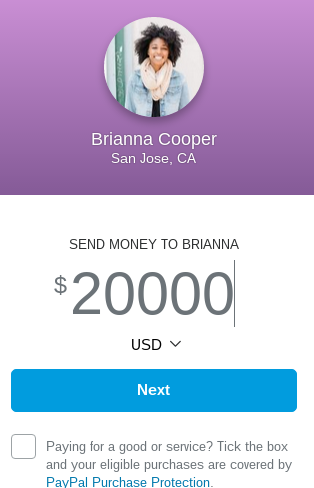
Quick answer: Go to paypal.me, log in to (or sign up for) your PayPal account and choose your link name, using up to 20 letters and numbers. Your link is also shown under your profile in PayPal’s settings. Share it anywhere; payers open it, enter an amount and pay. Creating a link is free, but you can’t change the name yourself later, so choose carefully.
Table of Contents
How to create your PayPal.Me link
- Open PayPal.Me (external site) in a browser.
- Log in with your PayPal account, or sign up for a free account.
- Pick your link name. PayPal allows only letters and numbers (no spaces, dashes or symbols), up to 20 characters. Links are not case sensitive and are first come, first served.
- Add a profile photo and confirm. Your link is ready to share.
You can also find your link later under your profile in the PayPal app or website settings.

Choosing a good link name
- Use your real name or business name so payers trust they are paying the right person.
- Keep it short and easy to spell.
- Avoid nicknames or jokes, because you can’t edit the name yourself later. To change or delete it, you need to contact PayPal.
- Each PayPal account can have only one PayPal.Me link.
How people pay you
Payers open your link, enter an amount, and pay with their PayPal balance, bank or card. You can also add an amount to the end of your link (for example paypal.me/yourname/25) to pre-fill a request, which is handy for splitting bills.
Ways to use your PayPal.Me link
- Splitting a dinner bill, trip or gift with friends.
- Getting paid by freelance clients for small jobs.
- Accepting tips or donations on a blog, stream or social profile.
- Selling items to people you know.
Fees and safety tips
- Fees depend on the payment type and country. Personal payments between friends are often free within a country, while payments for goods and services usually carry a seller fee. Check PayPal’s current fee page for your country before relying on it. Business accounts can receive goods and services payments only.
- Use goods and services for purchases. Buyer and seller protection generally applies only to goods and services payments, not to friends and family payments.
- Beware of scams: never send money back to someone who “overpaid” you, and ignore messages asking you to log in through a link. Our guide to spotting fake PayPal phishing emails shows what to watch for.
- Check availability: PayPal.Me works in many countries but not all, and some countries have extra rules. In India, for example, PayPal has restricted personal payments for years; see our post on PayPal India purpose codes.
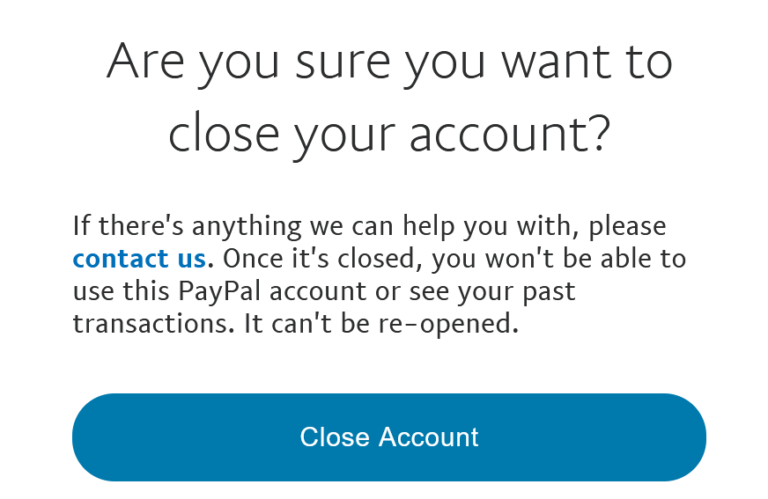
If you ever want to stop using PayPal entirely, here is how to close a PayPal account.
What changed since 2015
We first wrote about PayPal.Me when it launched in September 2015, when the free vanity links were available in 18 countries and you claimed yours at paypal.me/grab. The paypal.me address now redirects to PayPal’s own PayPal.Me pages, the feature is built into the PayPal app, and PayPal has published clear naming rules and fees by country. The screenshots above show the original 2015 interface; the screens look different today, but the basic idea is unchanged.
FAQ
Is PayPal.Me free?
Creating a PayPal.Me link is free. Receiving payments may involve fees depending on whether it is a personal or goods and services payment, and on your country.
Can I change my PayPal.Me name?
Not by yourself. PayPal says links can’t be changed once created; contact PayPal support if you need to change or delete it.
Does the payer need a PayPal account?
Payers use PayPal to complete the payment, and can create an account if they don’t have one. Options vary by country.
Is it safe to share my PayPal.Me link publicly?
Yes. The link only lets people send you money; it doesn’t expose your password or bank details. It may show your name and photo, so share it where you are comfortable.
Stuck on a gift? Try our free Gift Idea GeneratorIdeas for anyone by age, job, interests and budget, with Amazon.com and Amazon.in linksFind gifts →Get our free weekly email: new tech guides and tools, no spam.
New and updated tech guides, a free tool worth bookmarking and one useful pick, once a week. No spam, unsubscribe anytime.
One email a week. Unsubscribe anytime. See our privacy policy.

I have been using PayPal for a number of years, and I did not even know this existed. I need to sign up for this. Anyone have any comments on how they like it?
Paypal is the good choice to pay and receive money from overseas, I am using it since one year, one of my friend is staying in he always insists on using Paypal, I think I have to convey this message to him so that he can use this short link URL service of Paypal.
I hope soon Paypal will bring this option to other countries also including India, thanks for sharing the information.
Finally paypal also on the way to google. they both use now .me or similar domain and great feature now fianlly launched by paypal.