AdSense Side Rail Ads: Pros, Cons and How to Turn Them Off
Have you noticed ads sticking to the empty left and right edges of websites on big screens? Those are AdSense side rail ads, one of the overlay formats in Google AdSense Auto ads. When we first tested them on QOT in 2022 they were brand new and switched on by default. Here’s how side rail ads work in 2026, their pros and cons, and how to turn them on, off or show them on just one side.

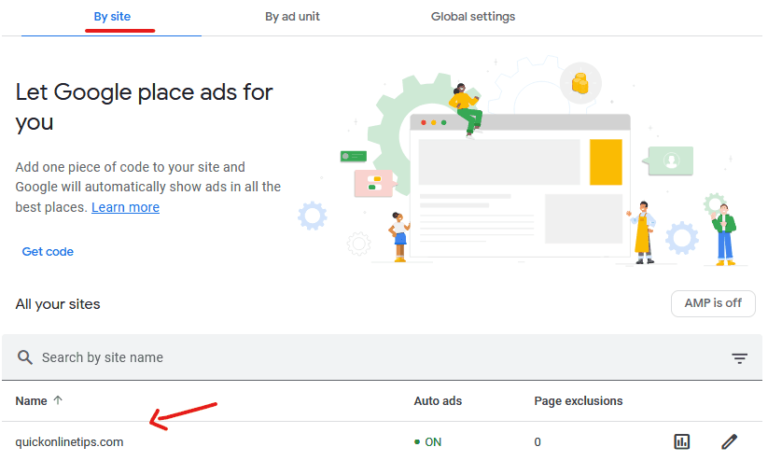
Quick answer: AdSense side rail ads are sticky ads that sit in the side margins of a page on wide desktop screens. You control them in AdSense under Ads → By site → edit your site → Auto ads → Overlay formats → Side rails, where you can turn them off or choose to show them on both sides, the left only or the right only.
Table of Contents
What are AdSense side rail ads?
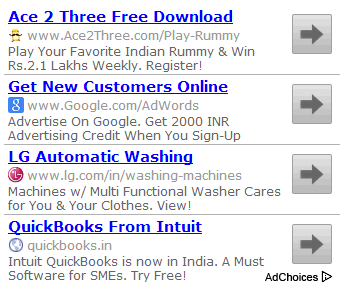
Side rail ads fill the empty space on either side of your content when a page is viewed on a widescreen device such as a desktop monitor. They stay fixed while the visitor scrolls, so they remain visible through long articles. They’re part of AdSense Auto ads only, so you can’t place them manually as ad units. See our guide to using AdSense Auto ads for the full setup.
AdSense Auto ads now has three overlay formats:
- Anchor ads: stick to the top or bottom of the screen, mainly on mobile.
- Side rails: stick to the left and right edges on wide screens.
- Vignette ads: full-screen ads shown between page loads.
Advantages of AdSense side rail ads
- Extra income from unused space. Wide monitors often show large empty margins, especially on sites with a narrow content column. Side rails turn that space into ad inventory.
- High viewability. Because they’re sticky, they stay on screen as readers scroll, which can mean more impressions and clicks.
- Allowed stickiness. Normally AdSense policies don’t let you make ads sticky with your own code. Side rails are Google’s own approved sticky format.
- No effect on mobile layout. They only appear when the screen is wide enough, so phone readers don’t see them.
Disadvantages of side rail ads
- Ad clutter. Combined with anchor ads, vignettes and in-article ads, two side rails can make a page feel crowded and cause banner blindness.
- Design clash. On sites with a wide layout or a sidebar, rails can feel squeezed or distracting.
- Uncertain earnings. Their value varies by niche and audience. Check AdSense reports to see what they actually earn.
How to turn off or adjust AdSense side rail ads
- Sign in to Google AdSense.
- Go to Ads, then By site, and click the edit (pencil) icon next to your site.
- In the Auto ads settings panel, open Overlay formats.
- Switch Side rails off to remove them, or open the advanced options to show them on both sides, the left only or the right only.
- Click Apply to site. Changes can take up to an hour to show.

Google added the left-only and right-only positioning choices in 2025. In April 2026 it also replaced the old Auto ads “ad load” slider with separate controls for the maximum number of in-page ads and the minimum distance between them, which helps keep pages using side rails from feeling overloaded.
Should you use side rail ads?
When we tested them, side rails blended in well on wide screens and added income without hurting mobile readers. Our advice: turn them on, watch your AdSense earnings and your site’s engagement for a few weeks, and keep them only if they earn enough to justify the extra ads. If you show many other Auto ads, try one side only. If some ad spaces stay blank, see how to hide unfilled AdSense ad spaces.
Frequently asked questions
Do AdSense side rail ads show on mobile?
No. They only appear on widescreen devices with enough empty space beside the content, such as desktop and large laptop screens.
Can I place side rail ads manually?
No. Side rails are only available through AdSense Auto ads. You can, however, turn other Auto ad formats off and keep only the overlay formats you want.
Are AdSense side rail ads against the sticky ads policy?
No. They’re Google’s own approved format, so they’re allowed even though you can’t make regular ad units sticky with your own code.
Stuck on a gift? Try our free Gift Idea GeneratorIdeas for anyone by age, job, interests and budget, with Amazon.com and Amazon.in linksFind gifts →Get our free weekly email: new tech guides and tools, no spam.
New and updated tech guides, a free tool worth bookmarking and one useful pick, once a week. No spam, unsubscribe anytime.
One email a week. Unsubscribe anytime. See our privacy policy.