
How to Modify AdSense Code for Responsive Design (2026)
Want to modify AdSense code for responsive design so ads fit every screen, from phones to wide monitors? In 2013 Google first allowed publishers to change their ad code for responsive sites, and we shared the JavaScript trick it recommended. That old show_ads.js code no longer works. Today AdSense has responsive ad units built in, and Google officially lets you fine-tune them with CSS. Here’s how to do it in 2026.

Quick answer: Use an AdSense display ad unit with the default responsive code (data-ad-format="auto" and data-full-width-responsive="true"). If you need exact sizes, Google allows you to remove data-ad-format, give the <ins> tag a class, and set its width and height with CSS media queries. You can even hide the unit on small screens with display:none.
Table of Contents
Why responsive AdSense code matters
Most sites now use a responsive theme design, so the same page adapts to any screen width. A fixed 728×90 banner on a 390-pixel phone screen causes sideways scrolling, hurts Core Web Vitals and annoys readers. Responsive ads resize to fit the space, so you don’t need separate code for mobile.
Method 1: Use the default responsive ad code
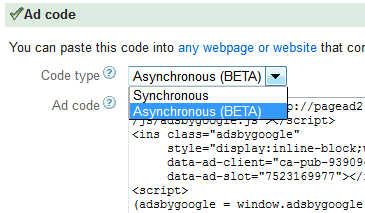
In AdSense, go to Ads > By ad unit > Display ads, keep the size as Responsive and copy the code. It looks like this:
<script async src="https://pagead2.googlesyndication.com/pagead/js/adsbygoogle.js?client=ca-pub-1234567890123456"
     crossorigin="anonymous"></script>
<ins class="adsbygoogle"
     style="display:block"
     data-ad-client="ca-pub-1234567890123456"
     data-ad-slot="1234567890"
     data-ad-format="auto"
     data-full-width-responsive="true"></ins>
<script>
     (adsbygoogle = window.adsbygoogle || []).push({});
</script>
AdSense reads the width of the container and chooses the best ad size. Make sure the parent element has a width; ads can’t load in a zero-width container.
Method 2: Set exact ad sizes per screen width
If you want a specific size at each breakpoint, Google’s help page on how to modify your responsive ad code allows this pattern:
<style>
.qot_responsive_ad { width: 320px; height: 100px; }
@media (min-width: 500px) { .qot_responsive_ad { width: 468px; height: 60px; } }
@media (min-width: 800px) { .qot_responsive_ad { width: 728px; height: 90px; } }
</style>
<ins class="adsbygoogle qot_responsive_ad"
     style="display:inline-block"
     data-ad-client="ca-pub-1234567890123456"
     data-ad-slot="1234567890"></ins>
<script>(adsbygoogle = window.adsbygoogle || []).push({});</script>
Note the changes: display:inline-block, a custom class, and no data-ad-format attribute. The ad loads at the size set for the screen width when the page opens.
Method 3: Hide an ad unit on small screens
To skip a sidebar ad on phones, add a media query with display:none:
@media (max-width: 400px) { .qot_responsive_ad { display: none; } }When the unit is hidden this way, AdSense doesn’t request an ad, so it’s allowed. Don’t hide ads with JavaScript after they load, or cover them with other elements.
What changed since 2013
- The old
google_ad_width/show_ads.jsJavaScript is retired. Replace any old ad code with the current asynchronousadsbygoogle.jscode. - Responsive display ads are now the default, and Auto ads can place ads for you.
- Unfilled slots can be hidden with
data-ad-status="unfilled"; see how to hide unfilled AdSense ad spaces.
Testing different placements still helps; our older guide on A/B testing AdSense for higher CTR explains the idea, and AdSense now has built-in experiments too.
Frequently asked questions
Is it allowed to modify AdSense code for responsive design?
Yes, within Google’s documented changes: setting sizes with CSS media queries, changing data-ad-format, or hiding units with display:none. Other edits to the ad code aren’t allowed.
Do responsive ads change size when I rotate my phone?
No. The size is chosen when the page loads. Rotating or resizing the window doesn’t reload the ad.
Why is my responsive ad not showing?
Usually the container has no width, the ad is inside a hidden element, or there was no ad to fill the slot.
Should I use Auto ads instead?
Auto ads are easiest, but manual responsive units give you more control over placement. Many sites use both.
Stuck on a gift? Try our free Gift Idea GeneratorIdeas for anyone by age, job, interests and budget, with Amazon.com and Amazon.in linksFind gifts →Get our free weekly email: new tech guides and tools, no spam.
New and updated tech guides, a free tool worth bookmarking and one useful pick, once a week. No spam, unsubscribe anytime.
One email a week. Unsubscribe anytime. See our privacy policy.





Hey Chandra,
These codes really worked for me!!
Thanks for the code and a must needed video!! Cheers!
I think there are a new responsive codes offered by default from google and there are no need to edit or modifying any code
Responsive Ads are really the next big thing.. Now you don’t have to make different types of Ads for mobile and desktop.Google automatically takes care of it.
Sir, My Blog traffic is mostly Mobile.I really need responsive ad design….Google insisted to design responsive by giving requirements like width, slot etcc….I did it but ads are not apperaing…….and then i found official adsense plugin…Activated and arranged ads placement. Now seeing ads ……..And checked code too every ad created with plugin is responsive………Is it good to use plugin in place of re-designing code
Thanks for sharing this tips dude i never knew their is any such code which make non adsense unit responsive i will give it try hopefully it will give me bit bit in CTR too.My blog has very low CTR i tried all most all except the one you mentioned here.
Using responsive adsense units is the best solution, don’t waste time to make non responsive ones into responsive, just copy and paste the code that Adsense itself provides for better impressions.
Responsive ads are best for increasing CTR. but is it ok if we change the code??
most of my website viewers are mobile. I just resentfully made my site responsive with adsense thanks to this article. thanks!
Great post..So lucky to come across your excellent blog. Your blog brings me a great deal of information.. Good luck with the site.
yes.easily understandable. But if you add a video for this it will be more effective about exactly AdSense Code edits. Any Way Thanks.
Hey P Chandra,
These codes really worked for me, you made my work man!
Thanks for the code and a must needed video :)
– Morgan
Responsive ads are best for increasing CTR. but is it ok if we change the code??
The responsive ads from Google are best part of adsense as they help in getting better CTR and CPC.
the new adsense makes this a little bit easier to set up. someday soon they will just be “ads” not “responsive” ads. ditto on websites
Google has been constantly working to make adsense better and better and result is here infront of everyone. It is way ahead of any other ad network
The responsive ads from Google are best part of adsense as they help in getting better CTR and CPC.
Its is not companion to use only responsive design adds. In blogging there is readership so that we can get better response from these adds
According to me the responsive adds are better than the others and the leader board also works well.
Responsive ads are make more $ because of visibility. You posted very detailed article about this topic. I am also running one tech blog, Your posting is very informative to me. Thanks
Hi chandra, There are certain circumstances when modifying Adsense code would be beneficial. Google has now updates their policy explaining how and when code can be modified.
First thanks for sharing this article related to adsense. Now we can create responsive adsense code directly from our dashboard. I am also using, n feel that ctr is really nice in responsive adsense code.
Yes Google Adsense allows to modify Adsense ad code to meet responsive design requirements and i have got the idea how to modify Adsence code properly.
I have not known this fact, and this information will prove to be very useful for me. Thanks for this helpful information, I have really liked this blog as I get more information in simple and brief content.
Tanks it was very clear for me.
I have not known this fact, and this information will prove to be very useful for me. Thanks for this helpful information
Yes Google Adsense allows to modify Adsense ad code to meet responsive design requirements and i have got the idea how to modify Adsence code properly. Thanks For Sharing.
Have been little confused about responsive ads, being non technical…this has helped…Thanks..would be posting if face issues
Thank You for sharing this post.You have explained the things in a simple way.
Now even Google recommends you use a responsive design instead of creating a separate mobile site to meet specifications of mobile browsers.
Soo brilliant this post . Love the metaphor tip. I catch myself using them alot in real life interactions (everything in my world is like childbirth) but it’s great to see this laid out as a point to consider for blog posts.
Hey About 40% of my website viewers are mobile (about half). I just resentfully made my site responsive with adsense thanks to this article. Hope I will get reply.
Well, Adsense codes can’t be modified easily in responsive design but although I appreciate your efforts, You have saved my time even time for those who wanted to modify there adsense code in responsive sites
I have not known this fact, and this information will prove to be very useful for me. Thanks for this helpful information, I have really liked this blog as I get more information in simple and brief content. Keep writing.
Responsive ads are good, but depends on where do you place it. I was one of the very few publishers who was allowed to use responsive ads on their website. Google allowed me to play with the ad and gave me freedom of my custom ad sizes. That was very good.
Hey thanks for these inputs, will implement this on my site once I get approved by Google Adsense.
his is very good feature as many people are going for mobile and tablet day by day.
Well, Adsense codes can’t be modified easily in responsive design but although I appreciate your efforts, You have saved my time even time for those who wanted to modify there adsense code in responsive sites
Thank You for sharing this post.You have explained the things in a simple way. It is good that ads work in any screen size.
This is really wonderful. This absolutely suits for any Flexible theme in wordpress blog. I appreciate it. Thank you
Responsive ad is good for various devices but I think that is an important feature that ad size should change according to the screen orientation. Yet this is very good feature as many people are going for mobile and tablet day by day.
Thanks,
Ankita
Responsive ads are essential now as most site visitors access via tablets and mobile devices.
ya its true, if you want to increase the adsense income then you should use responsive template, but don’t ever modify the ad code. it leads to your adsense ban.
Hey Admin thanks for sharing such a great article while googling how can i modify my adsense code i found my result here really you have explained all the terms in a better way .
Thanks keep sharing like this…
I haven’t tried Adsense Responsive ads yet but I would surely like to know that what have you experienced with your earning? It increased or decreased?
Responsive ads lead to higher earning as responsive ads blend better with mobile designs.
Awesome post Chandra, now a days after the mobile and tablets trend on up graph responsive ads are much more needed for better user interference, as well which looks nice when viewing from a smartphone or tablet. So over all Responsive Ads are useful for both visitors and publisher as well…
Awesome post buddy and really ad sense ad spoils layout of site as they are non responsive but this post has helped me a lot once again Thanks bro :)
Thank you for this article. Responsive design help me also in my ads revenue. It’s more considerable to have a website build in responsive design
This is a great news for adsense users like me. I’m planning to migrate my actual wordpress theme to responsive design. As a blogger.
Many thanks, I’ve been searching for advertising of which works about my site. I’m reasonably fussy about being confident that the end user experience is usually good around all gadgets. It’s good to view that responsive can work for gives too!
Thanks a lot for this post, using really nice themes can really give you a really important speed!
Thank you for this article.Now i know how to modify adsense code for more revenue.Great post.Keep it up
I’ve been using other sources of income so far. Just got approval by Google Adsense, and will be implementing your tip to get the code placed in responsive theme of my blog. Thanks for this useful info.
I am sure you will find Adsense a great source of blog income.
I recently started using Adsense on my blog. Since I’m using responsive design, so this tip is meant for me. It’s time for me to implement this and see the results.
Thank you for clearing my doubts and problem regarding adsense modification.It such help me to modify my adsense odes.Thank you for the great post
Responsive ad is good for various devices but I think that is an important feature that ad size should change according to the screen orientation. yet this is very good feature as many people are going for mobile and tablet day by day.
Hey Buddy,
You know what i was not knowing about this that we can make our ads responsive as well,
Just for this reason i removed my adsense from my site as its was looking crap when i was trying to open it on ipad, or and handheld smartphone.
At last appreciated, and good write
That is a great news for adsense users like me. I’m planning to migrate my actual wordpress theme to responsive design. As a blogger. I’m excited to see the difference.
Responsive ad is good for various devices but I think that is an important feature that ad size should change according to the screen orientation. Yet this is very good feature as many people are going for mobile and tablet day by day.
The adsense size does not change right now if your rotate the screen … though they promise to implement it soon.
First of all thanks. Why people not trying adsense optimized themes like ctr & adssticky?? They are automatically modify it.
The themes maybe responsive, but for the ads to be responsive you need to get the adsense code. We are also using responsive adsense ads.
Thanks for the great tips mate. thanks for sharing such an informative tutorial with your loyal readers. Not many people shares their code with others but you don’t seems to be among those many. I really appreciate it.
Hi,
Thanks for giving the customization tip for turning Adsense ad blocks into responsive blocks. It is essential if we are expecting diversified traffic.
Thanks for this post, using really nice themes can really give you a really important speed!
Yup ! It’s true Prakash. Responsive Ads helps in increasing revenue and site load time too. And now you can generate Responsive Ads directly from your Google Adsense Dashboard.
using Responsive adsense ads is really important it make users really happy
Apart from making better UI, Responsive Ads improves Ad Revenue too.
I am full agree with you because now a days mostly users using tablets and mobiles for surfing.
Nice sharing Thanks for this!
i was already suffering from the same problem!!
i will try these codes now
really very helpful, add placement in better way also increase your revenue to
Thats very nice and informative The tutorial was nice and it is indeed a great news that now we do have the options to modify the ads as per to our theme requirements.
To credit of Google, it has finally started to be flexible in issues when it comes to their Adsense Program.
This is really wonderful. This absolutely suits for any Flexible theme in wordpress blog. I appreciate it. Thank you
Great tutorial! The responsive ads are awesome in use with the responsive theme as well. Sometimes you can set the code width at 100% using a responsive theme and the ad will set back correctly as well.
Really an awesome tutorial!! Have been all over the internet but never such an detailed guide on Adsense and its small techniques. Wonderful !!
Well, now using Responsive adsense ads is really important as it makes users really happy!
yes prakash, responsive ads are a new trend and they too have high CTR… experienced a ctr of 5% on one of my blog…
Wow! That is a great CTR for Adsense ads.
About 40% of my website viewers are mobile (about half). I just resentfully made my site responsive with adsense thanks to this article. thanks!
Clearly explained. Thanks for this simple solution. Will try it soon.
Nice sharing Thanks for this!
i was already suffering from the same problem!!
i will try these codes now, Keep sharing
The tutorial was nice and it is indeed a great news that now we do have the options to modify the ads as per to our theme requirements.
To credit of Google, it has finally started to be flexible in issues when it comes to their Adsense Program.
Thanks for this!
i was already suffering from the same problem!!
i will try these codes now
Wont my adsense account get banned after i modify the adsense code?
Adsense officially allows you to modify ad code for responsive design only. And this is the only acceptable way it can be done.
I do not know about it, You have explained the things in a simple way. It is good that ads work in any screen size.
I have not known this fact, and this information will prove to be very useful for me. Thanks for this helpful information, I have really liked this blog as I get more information in simple and brief content. Keep writing.
It is very essential to get the right ad sizes for great responsive designs.
Thanks, I’ve been trying to find advertising that works on my site. I’m fairly fussy about making sure the user experience is good across all devices. It’s good to see that responsive can work for adds too!
Thanks for sharing these details which will be work for those people who all are involve in online marketing.
Hi Chandra, I remember of having read about modifying the AdSense code for responsive we designing but did not go in depth but you article has come at right time for me as I am going to use different ads for various screen sizes. Thanks for this useful info.