
How to Remove WordPress replytocom URLs from Google (2026 Fix)
Seeing URLs like yourpost/?replytocom=12345 in Google or in Search Console? WordPress used to add a replytocom parameter to every comment “Reply” link, creating a separate URL for each comment, which can mean hundreds of duplicate copies of the same post for search engines. Here’s how to check if your site still has the problem in 2026 and how to remove replytocom URLs for good.
Quick answer: Make sure every post has a canonical tag (Rank Math and Yoast add it automatically), and make your comment Reply links point to #comment- anchors instead of ?replytocom= URLs, using an SEO plugin setting or the small code snippet below. Don’t block replytocom in robots.txt.
Table of Contents
What is replytocom?
When threaded comments are on, each comment has a Reply link. In older WordPress setups that link looked like this:
https://example.com/my-post/?replytocom=12345#respondIt’s meant as a fallback for browsers without JavaScript. But to a search engine, every ?replytocom= value is a different URL showing the same post, so a post with 200 comments could appear as 200 duplicate pages, wasting crawl budget and creating “Duplicate without user-selected canonical” warnings.
How to check your site
- Open any post with comments, right-click a Reply link and copy the link address.
- If it ends in
#comment-12345or#respondwith no?replytocom=, you’re fine. - In Google Search Console, open Pages (indexing report) and look for URLs containing
replytocomunder the excluded reasons.
On QuickOnlineTips today, our reply links already use clean anchors like #comment-915835, and every post has a canonical tag pointing to the main URL, so Google ignores any old replytocom URLs it finds.
How to remove replytocom URLs
1. Make sure canonical tags are in place
Rank Math, Yoast SEO and most themes add a <link rel="canonical"> tag pointing to the clean post URL. Check your page source. With this in place, Google treats replytocom URLs as duplicates of the main post and drops them from search.
2. Use your SEO plugin’s crawl cleanup
Yoast SEO has a Remove ?replytocom variables option in its crawl optimisation settings. Rank Math users can rely on canonicals and the code below. Turn on whichever your plugin offers, then clear your cache.
3. Or change the Reply links with code
Add this to your child theme’s functions.php or a code snippets plugin. It rewrites each Reply link to a simple #respond anchor, while WordPress’s comment-reply script still moves the comment form into place:
add_filter( 'comment_reply_link', function( $link ) {
    return preg_replace(
        '/href=(["\'])[^"\']*replytocom=\d+[^"\']*\1/',
        'href="#respond"',
        $link
    );
} );
Test it by clicking Reply on a comment. The form should still appear under that comment, and the link should no longer contain replytocom.
What not to do
- Don’t block replytocom in robots.txt. If Google can’t crawl those URLs, it can’t see their canonical tag, and they may stay in the index as URL-only results.
- Don’t look for Search Console’s URL Parameters tool. Google retired it in 2022. In 2011 we fixed this by setting replytocom to “Ignore” there, but that option no longer exists, and Google now handles parameters automatically.
- Don’t noindex your posts to fix this. You only want the duplicate parameter URLs gone, not the post itself.
How we found the problem in 2011
Back then, Google Webmaster Tools flagged duplicate title tags on our posts, and a site search showed Google indexing replytocom URLs:

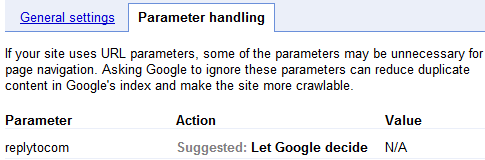
Setting the parameter to “Ignore” fixed it at the time. Today canonical tags and clean Reply links do the same job. If you’re cleaning up other unwanted URLs, see how to noindex archive subpages.
Frequently asked questions
Are replytocom URLs bad for SEO?
They waste crawl budget and create duplicates, but with a correct canonical tag Google usually handles them without harming rankings. Removing them is good housekeeping.
Will removing replytocom break comment replies?
No. Modern WordPress uses JavaScript to move the reply form, so replies keep working with a simple anchor link.
How long until replytocom URLs disappear from Google?
Usually a few weeks, as Google recrawls them and follows the canonical tags.
Stuck on a gift? Try our free Gift Idea GeneratorIdeas for anyone by age, job, interests and budget, with Amazon.com and Amazon.in linksFind gifts →Get our free weekly email: new tech guides and tools, no spam.
New and updated tech guides, a free tool worth bookmarking and one useful pick, once a week. No spam, unsubscribe anytime.
One email a week. Unsubscribe anytime. See our privacy policy.






helpful post…finally got rid of from these type of duplicate content links. Thanks for sharing.
I am facing the same problem please help me whether it will affect google page rank as well………?
Thanks, now this problem is more clear, and obvious, it has been resolved :)
Thanks a ton for the great tutorial. i been looking for a solution and just configured the correct replytocom field in google webmasters page. Cheers.
Rob.
I tried this on Google Webmaster but those replytocom links are still indexed. Do you know why?
This article really helped me to remove a few of my duplicate content issues. thanks for posting it, and I’ll be lookinf forward to more from you, in the near future.
glad that finally this issue is been addressed by Google… Relaxed..!!
Thank for this info. I found many duplicate in SERP goolge for my blog cause by Replycom
Hi, the redirector plugin is from 2009. Does it still work?
In addition, how do you handle this issue with the new WMT parameter handling tools?
I was scrapping my head how to make Google Bot stop visiting replytocom versions of posts until I found your article. Thanks for the fix!
Oh this is a great tip. Panda has really hit bad on context to Duplicate content. Every thing has been put under a scanner. All the best! and keep sending these great tips .. pls!
Not sure if it worked…Coz I still see such links part of Google.. Seems like Google is not considering those manual paramteers seriously..
more over I already have disallow: /*?*
Disallow: /*?
In my Robots.txt and wondering how Google ended up indexing such pages.
It is not working for me , I implemented it few months back , Please help me :(
great article, it’s very helpfull for me, thanks for sharing, it’s help my problem on google webmaster
oh I have to many replytocom url…. I never noticed that.
Thanks god for timely figuring out it.I have remoted it immediately by going this step by step information.
Thanks to QOT
i think the replytocom has been set to nofollow on WordPress default “comments_template”
(you can call default comments_template by deleting comments.php)
however, some WP themes didn’t set replytocom into nofollow, that’s why Google index them…
CMIIW
I did not know this …
Thank you for reporting!
Glad it was helpful information to all of you.
Very nice tip to avoid duplicate content. Such little masterpiece is the only thing that makes a blog apart and professional
I was aware about the replytocom problem and was looking for some solution. Thanks for this post.
Was aware of this …but as I see the suggestion “Let google decide” I left out !! But will ignore the replytocom parameter now …
I was not at all aware of this. Thanks for sharing this, I will check this for my blog now.
good tool. I hate duplicate content and I should make it disappear for real!
Thanks for this tips. But anyway, Google automatically ignored “replytocom” url for my blog.