
How to Export RSS Feeds with OPML: From Bloglines and Google Reader to Today
In 2005 the hot question was how to move your feeds from Bloglines to the new Google Reader. Both services are gone now, but the trick behind it still works: you export RSS feeds as an OPML file from one reader and import that file into another. Here is how it worked then, and how to move your subscriptions between RSS readers in 2026.
Quick answer: To export RSS feeds, use your RSS reader’s export or OPML option to download an OPML file of all your subscriptions, then use the import or OPML option in the new reader to upload it. Bloglines and Google Reader no longer exist, but current readers such as Feedly and Inoreader import OPML files the same way.
Table of Contents
How I moved feeds from Bloglines to Google Reader in 2005
Google had just launched Google Reader, its web-based RSS aggregator, and many of us wanted to try it without re-adding every feed by hand. This is how it worked at the time:
- In Bloglines, open My Feeds, scroll to the bottom and click Export Subscriptions. Bloglines saved an export.opml file.
- In Google Reader, open Settings, choose Import/Export, browse to the OPML file and upload it.
All my subscriptions showed up in Google Reader in one go. A year later I switched from Bloglines to Google Reader as my main newsreader.
What happened to Bloglines and Google Reader?
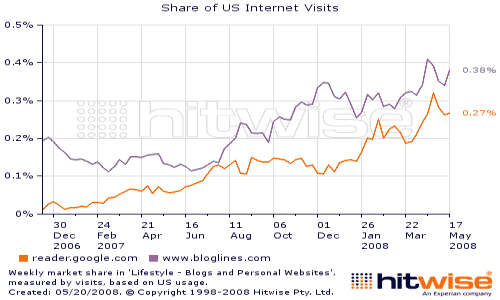
Bloglines announced it was shutting down in 2010, and we urged readers to export their Bloglines subscriptions before it closed. Google Reader followed: Google shut it down on 1 July 2013. In both cases, people who had an OPML export could carry their feeds to a new reader in minutes.
What is OPML?
OPML (external site) (Outline Processor Markup Language) is an XML format for outlines. RSS readers use it to exchange lists of feeds, including their folders. It does not contain the articles themselves, only the list of feeds you follow, so it is small and easy to keep as a backup.
How to export RSS feeds and import them in 2026
- Export from your current reader: look in its settings for an option named Export, OPML or Import/Export, and save the OPML file.
- Import into the new reader: look for Import or OPML in the new reader’s settings and upload the file. Your feeds and usually your folders come across.
- Check a few feeds: old blogs move or close, so remove feeds that no longer update.
- Keep a backup: save a fresh OPML export now and then, so you never lose your list if a service closes.
Why it is worth keeping your feeds
RSS still powers a lot of the web. Most blogs, news sites and podcasts publish a feed, and an RSS reader shows new posts from all of them in one place, in order, without an algorithm deciding what you see. Your list of feeds took years to build, so treat the OPML file like any other important backup.
RSS readers that import OPML
- Feedly (external site): the reader many Google Reader users moved to in 2013.
- Inoreader (external site): a web and mobile reader with rules, filters and search.
- NewsBlur (external site): a long-running reader that can learn which stories you like.
For a wider comparison, see our guide to the best RSS readers.
FAQ
How do I export my RSS feeds?
Use your reader’s Export or OPML option. It downloads an OPML file listing all the feeds you follow.
Can I still export feeds from Bloglines or Google Reader?
No. Both services have closed, so their exports are no longer available.
Does an OPML file include my read articles?
No. It only lists your feeds and folders, not the articles, read status or saved items.
Which RSS reader should I use now?
Feedly and Inoreader are popular choices, and both import OPML files, so you can try one and switch later.
Stuck on a gift? Try our free Gift Idea GeneratorIdeas for anyone by age, job, interests and budget, with Amazon.com and Amazon.in linksFind gifts →Get our free weekly email: new tech guides and tools, no spam.
New and updated tech guides, a free tool worth bookmarking and one useful pick, once a week. No spam, unsubscribe anytime.
One email a week. Unsubscribe anytime. See our privacy policy.


exactly what i was looking for, thanks!
For some reasons it’s not just importing all the blogs from my OPML. I am subsribed to 800+ blogs and it only imports 23 even when I try to import OPML file from Newsgator. Will wait and will try it again tommorrow.