
13 Ways to Prevent and Detect Content Plagiarism on Your Blog (2026)
How can you prevent and detect content plagiarism on your blog? Every blogger gets annoyed when a scraper site copies a post word for word, and it’s worse when the copy outranks the original. You can’t stop every copycat, but you can make copying harder, spot it quickly and get stolen content taken down. Here are 13 tactics to deal with content plagiarism in 2026, updated from Ramanujam’s original guest post with tips from guest authors Tran Tinh and Keshav Arora.
Quick answer: Show a clear copyright notice and license, add a link back to the original in your RSS feed, watermark images, and publish summaries rather than full feeds if scraping is bad. Detect copies with Google exact-phrase searches, Google Alerts, Copyscape and Google Lens. Then ask the site to credit or remove it, report it to the host, and file a DMCA removal request with Google.
Table of Contents
How to prevent content plagiarism

1. Show a copyright notice
Put a copyright line in your footer and a short content policy page. It won’t stop bots, but it tells honest people the rules. Your writing is protected by copyright as soon as you publish it, but for serious commercial content you can also register it with your national copyright office, such as the US Copyright Office (external site) or Copyright Office India (external site). Registration takes time and a fee, but it strengthens a legal claim. Avoid third-party sites that promise “instant government copyright” online.
2. License your content
If you’re happy for others to reuse content with credit, choose a Creative Commons license (external site) and display it, so people know exactly what’s allowed. You can hold a Creative Commons license alongside your normal copyright. If you want reuse only with your permission, keep the default “all rights reserved” instead.
3. Add a link back in your RSS feed
Many scrapers republish RSS feeds automatically. Add a footer line such as “This post first appeared on [your site]” with a link. Rank Math and Yoast both have RSS footer settings, so even stolen copies link back and help Google identify the original. Read more on how to stop RSS feed scraping.
4. Consider summary feeds
Under Settings > Reading you can show only an excerpt in feeds. Scrapers get less, though some readers prefer full feeds. Another trick from guest author Tran Tinh: delay your feed by a few hours or a day after publishing (a small code snippet or feed plugin can do this), so Google crawls and indexes your original before autoblogs copy it from the feed.
5. Watermark images
Add a subtle logo or site name to original photos and infographics with a photo editor or a watermark plugin.
6. Stop image hotlinking
Block other sites from embedding your images directly (which also uses your bandwidth) with your CDN’s hotlink protection, Cloudflare’s Scrape Shield, or .htaccess rules.
7. Use internal links
Copies of your posts then link back to your other pages, which helps both readers and search engines find the source. We don’t recommend disabling right-click or text selection; it annoys real readers and doesn’t stop bots.
How to detect plagiarism
8. Search for exact sentences
Copy a distinctive sentence, put it in quotes and search Google. Set Google Alerts (external site) for unique phrases or your brand name to be emailed new copies.
9. Use plagiarism checkers
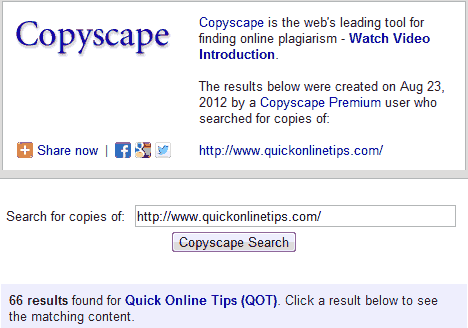
- Copyscape (external site): finds copies of a URL; Premium and Copysentry monitor your whole site.
- Grammarly (external site) and Quetext: check pasted text against the web.
- Google Lens or TinEye: reverse image search for stolen photos.
Keep proof that the content is yours: your drafts and revision history in WordPress, the original publish date, and archived copies on the Wayback Machine (external site) all help when you file a complaint. Services such as DMCA.com (external site) offer protection badges and paid takedown help if you’d rather not do it yourself.
How to take action
10. Contact the site owner
Many copiers don’t realise they need permission. Send a polite email asking for credit with a link, or removal. Find contact details on their site, or the registrar and host via a WHOIS lookup.
11. Send a formal takedown notice
If they ignore you, send a cease-and-desist or DMCA notice to the site owner and to their hosting company’s abuse address. Hosts and CDNs such as Cloudflare have abuse forms. This is often the fastest route: Tran Tinh once had scraper sites suspended by their host within two days of reporting them. If the copy is on Blogger, you can also report spam blogs to Blogger.
12. Report it to Google
Use Google’s copyright removal request (external site) to get infringing pages removed from search results. Bing has a similar form.
13. Get legal help for serious cases
For large-scale or commercial theft, a lawyer or takedown service can pursue removal or compensation.
FAQ
Will a scraper site hurt my rankings?
Usually not; Google is good at identifying the original. But scraped copies do sometimes outrank the original, so act if a copy outranks you or uses your brand.
Do I need to register copyright for my blog?
No. Copyright applies automatically when you publish. Registration is optional but can help in legal disputes, especially in the US.
Is it plagiarism if they link back?
Copying a whole post without permission is still copyright infringement, even with a link. Short quotes with credit are generally fine.
What about AI tools copying my content?
You can block AI crawlers such as GPTBot in robots.txt, though this doesn’t remove content already collected.
Originally written by guest author Ramanujam, then a computer science grad student at Virginia Tech and editor of the social media blog SocialCouch. Includes material originally written by guest authors Tran Tinh, a blogger from Vietnam (A-Z Blogging Tips), and Keshav Arora, a technical writer with the web agency Ipraxa. Updated for 2026 by QuickOnlineTips.
Stuck on a gift? Try our free Gift Idea GeneratorIdeas for anyone by age, job, interests and budget, with Amazon.com and Amazon.in linksFind gifts →Get our free weekly email: new tech guides and tools, no spam.
New and updated tech guides, a free tool worth bookmarking and one useful pick, once a week. No spam, unsubscribe anytime.
One email a week. Unsubscribe anytime. See our privacy policy.


Following these steps is a great way to prevent copied content, great find ,most people online believe it’s a free for all
this is wonderfull i sure will try this out
@Mitr
Thanks! Entertainment blogs which have a lot of images will benefit a lot from this .htaccess trick.
@David Walker
Thanks a lot! Copyscape is the first option but not much can be done with the free version. Try Tynt instead and see if it serves your purpose better.
Copying without authorization and profiting your self out of it is against the copyright law which is common to every one. You’ll not probably be sued by law if you are doing it in the internet, but Google will definitely sued you. And that will reflect in your status.
Thank you Ramanujam, for the sound advice. Plagiarism is a big headache to all bloggers and not taking any steps to prevent it can leave you wide open to all sorts of ‘attacks’. I like the simple feed copyright plugin; it’s a wonderful way to thank the spammers for linking it all back to you. I also use Copyscape (doesn’t everyone?) to detect plagiarism since nothing hurts more than duplicate content. Better safe than sorry I always say.
Thanks. Good piece of Info on Image Hotlinking. I have bandwidth issue in my entertainment blog because of img Hotlinking. I will implement the .htaccess and will try to Prevent it.