
How to Create Multiple Sidebars in WordPress (Widget Areas Guide)
Want different widgets on different parts of your site? Learning to create multiple sidebars in WordPress lets you show one set of widgets on posts, another on pages, and more in the header or footer. We first wrote this tutorial in 2007, when we ran six dynamic sidebars on QuickOnlineTips, and it followed our guide on how to widget-enable WordPress themes. The core function is still register_sidebar(), but the code is cleaner today, and block themes handle it differently. Here is the 2026 version.
Quick answer: In a classic theme, register each widget area in your child theme’s functions.php with register_sidebar() inside a function hooked to widgets_init, giving each a unique id. Then display each one in your templates with dynamic_sidebar( 'your-id' ). Add widgets in Appearance, then Widgets. Block themes use template parts in the Site Editor instead.
Table of Contents
Step 1: Register multiple sidebars
Add this to your child theme’s functions.php, so theme updates do not erase it:
function qot_register_sidebars() {
    $common = array(
        'before_widget' => '<section id="%1$s" class="widget %2$s">',
        'after_widget'  => '</section>',
        'before_title'  => '<h4 class="widget-title">',
        'after_title'   => '</h4>',
    );
    register_sidebar( array_merge( $common, array(
        'name' => 'Post Sidebar',
        'id'   => 'post-sidebar',
        'description' => 'Widgets shown beside single posts.',
    ) ) );
    register_sidebar( array_merge( $common, array(
        'name' => 'Page Sidebar',
        'id'   => 'page-sidebar',
    ) ) );
    register_sidebar( array_merge( $common, array(
        'name' => 'Footer Widgets',
        'id'   => 'footer-widgets',
    ) ) );
}
add_action( 'widgets_init', 'qot_register_sidebars' );
In 2007 we wrapped this in if ( function_exists('register_sidebar') ) and named sidebars “sidebar1”, “sidebar2” and so on. Always give each sidebar a unique, lowercase id; WordPress shows a notice if you leave it out, and widgets can get mixed up when you add more sidebars later.
Step 2: Display each sidebar in your templates
Place this where the widget area should appear, for example in sidebar.php, single.php or footer.php:
<?php if ( is_active_sidebar( 'post-sidebar' ) ) : ?>
    <aside class="post-sidebar">
        <?php dynamic_sidebar( 'post-sidebar' ); ?>
    </aside>
<?php endif; ?>
is_active_sidebar() skips empty sidebars, so no blank boxes appear.
Step 3: Show different sidebars on different pages
<?php
if ( is_single() ) {
    dynamic_sidebar( 'post-sidebar' );
} elseif ( is_page() ) {
    dynamic_sidebar( 'page-sidebar' );
}
?>
WordPress conditional tags like is_front_page(), is_category() and is_search() let you target any page type.
Step 4: Add widgets
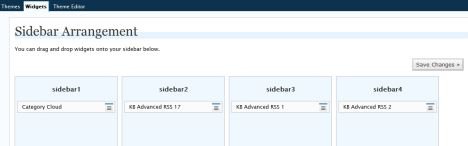
Go to Appearance > Widgets (or Appearance > Customize > Widgets). Your new areas appear by name. Since WordPress 5.8 this screen uses blocks, so you can add any block, such as Latest Posts, Search or Custom HTML, to each sidebar. Here is how our six sidebars looked in the old admin:
Block themes: use template parts instead
Block themes such as Twenty Twenty-Five have no widgets screen. Open Appearance > Editor, create a template part (for example “Post sidebar”), add blocks to it, and insert it into the templates that need it. No code is required.
Easier options without code
- Theme options: themes like Kadence and GeneratePress already include several widget areas and let you pick a different sidebar per page.
- Widget visibility plugins: show or hide individual widgets on chosen pages instead of creating new sidebars.
Keep sidebars light, as heavy widgets slow pages; check with Google PageSpeed Insights.
Ideas for extra widget areas
Beyond the classic right-hand sidebar, extra widget areas are useful in many places: a slim bar above the header for announcements, a box after each post for related links or a newsletter signup, a separate shop sidebar on product pages, and three or four footer columns for contact details, popular posts and social links. Each one is just another register_sidebar() call and a matching dynamic_sidebar() in the right template. Name them clearly, because your widget screen gets crowded quickly once you have five or six areas.
FAQ
How many sidebars can WordPress have?
There is no fixed limit. Register as many as your design needs, but more widgets mean slower pages.
Why does my new sidebar not appear?
Check that the id in dynamic_sidebar() matches the id in register_sidebar(), and that the sidebar has at least one widget.
Will theme updates remove my sidebars?
Not if you add the code to a child theme.





Perfect, just what I was looking for to be more flexible with my Adsens program :-)
Thakns :)
that rocks! I was looking for a guide like this to help me on my wordpress blog
I’ve tried your code for two sidebars and it works but then when I try to add a third sidebar my whole site crashes. This is what is in my functions.php
‘Process Sidebar’));
}
register_sidebar(array(‘name’=>’Contact Sidebar’));
}
register_sidebar(array(‘name’=>’Services Sidebar’));
?>
Any ideas?
Holy crapola!
It works, well almost. Now I just have to style it.
If I can get that working I am so squared away and so grateful. Thanks again, you made my day.
– Bob
Just wanna follow up and let you know that this works great on my blog. Thanks again.
I still have one big problem: the sidebar doesn’t show on my site. I can see both sidebars on my widgets, i’ve already put stuff on it, but it’s not on the website!
Great tutorial. This worked wonders for needing a second sidebar without installing some plugin to do it for me.
I wanted to add for those who are interested in using a file such as: sidebar-2.php so they don’t clutter up their template, simple paste in the code in to sidebar-2.php
Then in your main template, for example index.php, you can use the preferred get_sidebar(); function to call that new file.
Use this syntax: get_sidebar(‘2’); for the name will look for sidebar-NAME.php
Makes your template code look much cleaner. Thanks again for the great help.
I cant get the new sidebar to execute on the site. I’ve made a new sidebar function in the function.php. I’ve copied the existing sidebar and put the new “dynamic sidebar code” in it. But when I call for this new sidebar in a page nothing happens. There isnt even room for it since the text spreads across the entire page. This is what happens in this theme when there’s no sidebar designated.
The weird thing is that the sidebar shows upp among the widgets as its supposed to and if I place the “dynamic sidebar code” directly on the page you can se the sidebar spread across the page in an odd fashion. So I know that the code is working.
The code I’m using to call for the sidebar in the page is the include code:
Without the extra spaces.
I feel your article is missing a critical step.
How/where do you select which sidebar a post or page should display??
For instance, I created two sidebars. Both appear in my widgets tab.
I create post 1 and I want sidebar 1.
I create post 2 and I want sidebar 2.
Where do you make this selection??
thanks
wow, this is a great guide, i used it on my jobs site for ugandans and it worked. thanks alot
Hey there,
Good article and very clear… from the amount of comments it also seems to have been extramely useful. Can I also propose the use of the Widgets on pages plugin which allows you to add/remove and manage sidebars via the admin pages. These sidebars can then be added to the theme with 1 simple template tag. Might be an easier way for “beginners” to get the same control over their sites.
Hope this is of some use.
Todd
it works thanks………
OKY, I played around with the codes. I was able to get both sidebars up, but sidbar2 which is apart of the About Me page widgets are at the bottom of page. Any advice
Niema if the widgets are showing up at the bottom of the page it might be that you have CSS issues since its a 2nd sidebar
Hi,
I added the code. I have the second sidebar in my admin. I added one widget to check, so when I preview my site the sidebar appears and then disappear how come?
Thanks
Hello! I’ve just added the code you mentioned above and in the admin panel everything works fine.
But i have some problem with the code of the single.php: the portion “” doesn’t appear in the code of a single post.
Can you tell me why?
Excellent! Thanks very much!
It’s not working 100% for now but I’m getting there!
Cheers
After some searching I have found your post and you seem authoritative and clear to me and I hope you have a sec to point me in the right direction.
I just moved our site to a new host and on getting things back up one of my sidebar elements had disappeared.
I went to the widgets panel (wordpress 2.7.1) and created a new wysiwyg text widget in the same sidebar1 and placed my content into it. But everything is now transparent over the background image, it seems that firebug is telling me that it has no style at all.
What’s going on? I included the #wysiwig-13 element in the css, but the background color doesn’t seem to want to stick to this panel (Free Orientation).
Do I need to let someone else know that this panel has been added?
Thanks for any wisdom on this.
rama dev
Thank you for this easy tutorial! Beginner will surely appreciate this!
I figured it out. The get Sidebar was in the footer.php file. I had to created customized footer and sidebar phps, but now it is looking goof.
Your directions were easy to follow, but I am not getting the proper result. I am using the iBlog2 template which seems to draw info from the sidebar.php file before reading the template file. I was able to successfully edit the functions.php and then add a sidebar2 the the php page, (so two widgetitized sidebars display one on top of the other) but I cannot figure out how to have the theme template dictate the sidebar. this may be a drawback of the theme, but I could sure use some help if anyone has ideas.
seth
Great stuff man, this just open a hole new world of dynamic sidebars on my personal blog. Is there any way to show a different sidebars with certain posts,
THANK YOU! fantastic – helped me out loads… Still got something kooking out but this was awesome, thanks so much.
Thanks for tip! Because you took the time to put this online I’m a step closer to giving my blog the pro look I want it to have
I use your tutorial. That is great but I would ask you how make it. Here below what I want
Over Dhini :
– Beauty
– Chickmeida
– Special
– more
But on my sidebar over Dhini show also Site (this I dont want it)
Thank you
For each instance of sidebars that I have added, how would I go about defining which category IDs to include/exclude from each instance? I had originally defined the global exclusion IDs in the default-widget.php file prior to adding additional sidebar instances, but now I want to defeat that and include/exclude on specific instances of sidebars 1,2,3, etc. – thx – weevie833
Thank you so mutch I have tried every so called webmasters code and nothing worked, Why can’t anybody keap things simple like you! And show you what you need to do… 5 Stars
As I learn more I will always remember that I started here. Thank you for all the info I can put it to use in my business plan.
I found this page by googling.
Thanks for posting this tips!
Cool, it works perfect !! Thank you very much for your work ! But, wordpress is putting automaticly to the right side, to the other sidebar, and i wanted it to the left side of my site, how can i do this ? Thank you !
Thank you for this post. It helped me to save a lot of time. I was looking for the way to duplicate existing sidebars and finally found useful piece of information only here.
Another great article. CHEERS..! Just what i was looking for. And believe it took only 5 minutes to do this task. Really thanks…
Thank you very much for this! Many hours saved and the wife will appreciate that. I am now looking for a way to call one of my 10 sidebars dynamically inside the wp admin without having to change my code in my template per page. whooo…that was a long sentence.
If you have any tips in this area, I would love to hear about it.
~ Chais Meyer
I was searching like this. Mia said ” you saved her day” I agree Mia
Thanks for sharing this! My php knowledge is rudimentary, and this was a huge help. You saved me much time trying to figure out the problem with my template’s sidebars. I did run into an error updating this through the theme editor. Had to do it offline and ftp the files back up. Worked wonderfully.
Howdy-
You should probably put both calls to register_sidebar within your if statement:
‘mid_column’,
‘before_widget’ => ”,
‘after_widget’ => ”,
‘before_title’ => ”,
‘after_title’ => ”
));
register_sidebar(array(
‘name’=>’right_column’,
‘before_widget’ => ”,
‘after_widget’ => ”,
‘before_title’ => ”,
‘after_title’ => ”
));
}
?>
Otherwise the function will bomb if register_sidebar doesn’t exist for any reason. If you’re not worried about this, then omit the “if” statement altogether. However, just wrapping it around one call won’t help.
Thanks for the post!
Many thanks for this article– I went from scratching my head to 10 sidebars in 20 minutes.
Some people use a hierarchy method in the naming of the template files to achieve multiple WordPress sidebars, but in my opinion it is too cumbersome for most user’s needs. The method of multiple sidebars for WordPress that I use involves only a very simple PHP snippet added to the template to call the desired sidebar file depending on the area of the site that you are in.
Thank you so much! I just have 2 sidebars now. But… I still need the ‘very simple PHP snippet… to call the desired sidebar file depending on the area of the site’.
I would like to see different sidebars on different pages. Any PHP snippet available?
You can easily different sidebars on pages, single posts, index pages, archives, categories, etc.
I have got my dynamic sidebars widgetized in no time. Thanks alot! :)
Hi!
I found this article to be incredibly helpful, however, I’m having trouble with the headers in my second sidebar (which is actually at the very bottom of the page). You can see the “Calendar” but the title does not style with the like it should. The titles in the right sidebar are correct. I’m using for the titles and I’ve confirmed that my functions.php calls for . Can you assist?
Thanks!
As an amateur PHP programmer struggling to get my own site developed, I found this article to be of great assistance. Without this I would still have been struggling to figure this lot out. Thanks.
The dynamic sidebar template codes have to be inserted into the sidebar.php in your blog template. Otherwise how will it know where the code has to be executed. :-)
Can you explain one thing — how do you make your page call your new sidebars? I mean, I would like to call my second sidebar as the “right column”.
Do I have to edit my template pages?
Thanks!
Raj
Have added an additional sidebar called sidebar2 to the functions.php file and can see it OK in the widgets admin. However I am having a problem getting the new sidebar to execute. What is the correct format for to get ‘sidebar2’ to execute in the template.
Check under the widgets tab. Remember to name them differently.
I added 7 new sidebars to functions.php file within my current theme but do not see any additional sidebars in the wordpress admin. Any thoughts…
Nice article! Just to complement what you said… The function dynamic_sidebar accept numbers too, like 1 for the first sidebar and 2 for the second. I prefer using numbers, because sometimes I change the sidebar name for some users understand it.
David – it is indeed a h2 vs h4 issue. Customize it as per your own site CSS.
OK… I modified the base page, rather than a tweaked page, and that works. The formating seems a little off though, from the main page I’m working on:
http://fbcwaynesboro.org/wp
I have been tweaking on a second WP install here:
http://fbcwaynesboro.org/wp2
Going back and forth, the heading for the new sidebars doesn’t look the same. Is that because I’m using the h4 subtitles? Why are you suggesting the header change?
Thanks again!
On my template, the call for sidebar is:
I registered a new sidebar successfully; but when I add the call for new sidebar as you suggested…
I get a oddly formated page.
I am adding the code to a very slightly modified page template. Any ideas, or clues?
Thanks!
Very clear article.
In order to make this really usable I’d add the following plugin: https://lancelhoff.com/wordpress-duplicate-sidebar-widgets/
This plugin lets you duplicate existing widgets so you can use more then one instance of them. Can be very useful in case you want to have some common functionality on the sidebars.