
Make Your Site Faster with Google PageSpeed Insights (2026 Guide)
How do you make your site faster with Google PageSpeed? In 2009 Google’s Page Speed was a Firefox add-on that needed Firebug to run. Both are long gone. Today Google’s speed testing lives in PageSpeed Insights and Lighthouse, built into Chrome, and page speed is part of how Google judges page experience through Core Web Vitals. Here is how to use the current tools and fix the issues they find.

Quick answer: Test any page free at PageSpeed Insights (pagespeed.web.dev), look at the Core Web Vitals field data first, then fix the top opportunities it lists: compress and lazy load images, use caching and a CDN, cut unused JavaScript and CSS, and choose a fast host. Re-test after each change.
Table of Contents
Google PageSpeed tools in 2026
- PageSpeed Insights – enter any URL to get a performance score for mobile and desktop, real-user Core Web Vitals data and a list of fixes.
- Lighthouse – the engine behind PageSpeed Insights, built into Chrome DevTools. Open DevTools (F12), choose Lighthouse and run a report on any page, even one behind a login.
- Google Search Console – its Core Web Vitals report groups your slow URLs so you can fix whole templates at once.
What happened to Page Speed for Firefox, Firebug and YSlow?
The original Page Speed add-on was retired and its rules moved into PageSpeed Insights. Firebug was discontinued in 2017 when its features were folded into Firefox Developer Tools. Yahoo’s YSlow is no longer developed either. Many of their old rules, such as leveraging browser caching, minimising DNS lookups and serving static files from a cookieless domain, still make sense, but modern HTTP/2 and CDNs changed the priorities.
How to read a PageSpeed Insights report
- Core Web Vitals assessment. This uses real Chrome user data. The three metrics are Largest Contentful Paint (LCP, loading), Interaction to Next Paint (INP, responsiveness) and Cumulative Layout Shift (CLS, visual stability). Read our guide to Core Web Vitals.
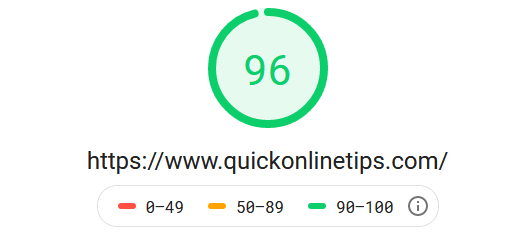
- Performance score. A lab score from 0 to 100 based on a simulated mobile device. Aim for green (90+), but real-user data matters more.
- Opportunities and diagnostics. Specific fixes ranked by estimated savings.
Common fixes that make sites faster
- Optimise images. Serve WebP or AVIF, resize to display size and lazy load images. See our guide to WordPress image compression.
- Use caching and a CDN. A page cache plugin such as LiteSpeed Cache and a CDN serve pages from close to your visitors.
- Remove unused JavaScript and CSS. Fewer plugins, fewer third-party scripts, and deferring what is left.
- Set image dimensions and reserve space for ads to avoid layout shift.
- Enable compression with gzip or Brotli and send the right Vary: Accept-Encoding header.
- Use HTTP/2 or HTTP/3. Read why HTTP/2 makes the web faster.
Other free speed test tools
WebPageTest and GTmetrix show waterfall charts that help find slow files. Compare more in our list of the best web page speed tests online.
A simple speed routine for site owners
Speed work is easier as a habit than a one-off project. Once a month, test your home page, your most visited post and one category page in PageSpeed Insights, and note the LCP, INP and CLS values. Whenever you add a new plugin, ad unit, font or embed, re-test the same three pages so you can see exactly what slowed things down. Keep an eye on the Core Web Vitals report in Search Console too, because it shows when real visitors start having a slower experience, often weeks before you notice it yourself. Small, regular checks stop a fast site from slowly getting heavy.
FAQ
Is Google PageSpeed Insights free?
Yes. It is free with no sign-up, and you can test any public page.
Why is my mobile score lower than desktop?
The mobile test simulates a mid-range phone on a slower network, so heavy scripts and large images hurt far more.
Does page speed affect Google rankings?
Yes, as part of page experience, though content relevance matters more. Faster pages also keep more visitors and earn more from ads.
Get our free weekly email: new tech guides and tools, no spam.
New and updated tech guides, a free tool worth bookmarking and one useful pick, once a week. No spam, unsubscribe anytime.
One email a week. Unsubscribe anytime. See our privacy policy.



This is really a good post. It is very useful to me. I was already knows some tips but this tips really helps me very much. Thanks a lot P Chandra