How to Type a Check Mark (✓) on Windows, Mac, iPhone and in Word
Here is how to type a check mark (✓) on any device: on Windows press Windows key + period (.) and search “check” in the emoji panel, on a Mac press Control + Command + Space and search “check”, on a phone pick ✔️ from the emoji keyboard, and in Microsoft Word use Insert > Symbol with the Wingdings font and character code 252. Or simply copy this one: ✓

Quick answer: Copy and paste ✓ or ✔. In Word, type
2713and press Alt + X to turn it into ✓. On Windows, press Win + . and search “check”. On Mac, press Control + Command + Space and search “check”. On iPhone and Android, open the emoji keyboard and search “check”.
Table of Contents
Check Mark Symbols You Can Copy
| Symbol | Name | Unicode | HTML code |
|---|---|---|---|
| ✓ | Check mark | U+2713 | ✓ |
| ✔ | Heavy check mark | U+2714 | ✔ |
| ✅ | Check mark button (emoji) | U+2705 | ✅ |
| ☑ | Ballot box with check | U+2611 | ☑ |
Need other symbols too? Our free copy and paste symbols tool lets you search by name and copy any symbol in one click.
How to Type a Check Mark on Windows 11 and 10
Use the emoji panel
- Click where you want the check mark.
- Press Windows key + period (.).
- Type check to search, then click ✔️ or ✅.
The emoji panel works in almost every app, including browsers, Notepad and chat apps. It inserts the coloured emoji style in apps that support emoji.
Use Character Map
- Press the Windows key, type Character Map and open it.
- Choose the Segoe UI Symbol font.
- Tick Advanced view, type check in “Search for” and click Search.
- Select the check mark, click Select, then Copy, and paste it where you need it.
How to Insert a Check Mark in Word, Excel and PowerPoint
These steps come from Microsoft’s own guide, Insert a check mark symbol:
- Place the cursor where you want the symbol.
- In Word or Outlook, choose Insert > Symbol > More Symbols. In Excel or PowerPoint, choose Insert > Symbols > Symbol.
- In the Font box, select Wingdings.
- In the Character code box, enter 252. Microsoft notes that code 254 gives a different check mark, two squares away.
- Choose Insert, then Close.
Microsoft also lists the Segoe UI Symbol font with character codes 2705, 2713 or 2714 if you prefer a check mark that isn’t tied to Wingdings.
The fastest Word shortcut: 2713 then Alt + X
In Word for Windows, type 2713 and immediately press Alt + X. Word converts the code into ✓. Use 2714 for the heavy check mark ✔. Once you have one, you can copy it or add it to AutoCorrect so a short code turns into ✓ as you type.
How to Type a Check Mark on Mac
- Click where you want the symbol.
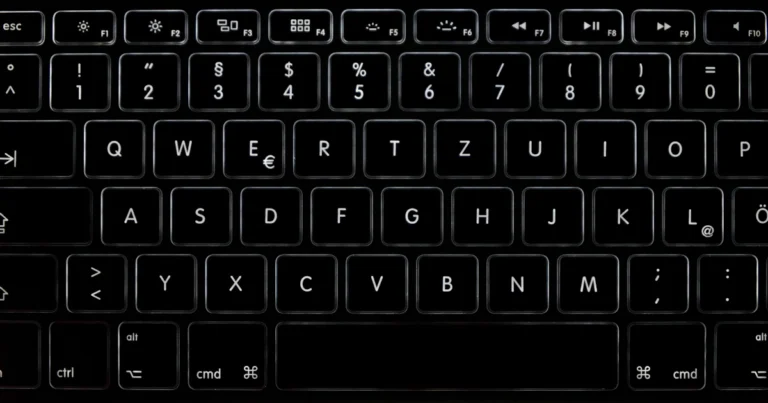
- Press Control + Command + Space to open the Character Viewer.
- Type check in the search box.
- Double-click ✓, ✔ or ✅ to insert it.
Symbols you use often appear under Frequently Used, so the next time it is one click.
How to Type a Check Mark on iPhone and Android
- Open the keyboard in any app and tap the emoji button.
- Type check in the emoji search bar.
- Tap ✔️, ✅ or ☑️.
Phone keyboards insert the emoji versions. If you need the plain ✓ in a document, copy it from the table above.
Google Docs and Websites
- Google Docs: choose Insert > Special characters, type check in the search box and click the symbol you want.
- Websites and HTML: use
✓for ✓ or✔for ✔.
Check Mark vs Check Box: Which Do You Need?
A check mark is just a symbol. If you want a box people can tick in a to-do list, use a checklist instead: Word has a checklist feature, Google Docs has a checklist bullet style, and Excel has a check box control. The symbol itself won’t change when clicked.
More keyboard symbol guides: how to type the degree symbol, how to type an em dash and how to type the copyright symbol.
FAQ
Is there an Alt code for a check mark?
Not a reliable one, so use the emoji panel (Win + .), Character Map, or 2713 + Alt + X in Word instead.
What is the Wingdings code for a check mark?
Character code 252 in the Wingdings font gives a check mark, according to Microsoft. Code 254 gives another check mark style.
How do I type a check mark on a Mac keyboard?
Press Control + Command + Space, search for “check” and double-click the symbol.
Why does my check mark turn into a letter?
A Wingdings check mark is really a letter shown in the Wingdings font. If the text changes to another font, the letter appears instead. Use the Unicode ✓ (2713), which looks right in most fonts.
Get our free weekly email: new tech guides and tools, no spam.
New and updated tech guides, a free tool worth bookmarking and one useful pick, once a week. No spam, unsubscribe anytime.
One email a week. Unsubscribe anytime. See our privacy policy.