
How to Create Multiple Sidebars in WordPress (Widget Areas Guide)
Want different widgets on different parts of your site? Learning to create multiple sidebars in WordPress lets you show one set of widgets on posts, another on pages, and more in the header or footer. We first wrote this tutorial in 2007, when we ran six dynamic sidebars on QuickOnlineTips, and it followed our guide on how to widget-enable WordPress themes. The core function is still register_sidebar(), but the code is cleaner today, and block themes handle it differently. Here is the 2026 version.
Quick answer: In a classic theme, register each widget area in your child theme’s functions.php with register_sidebar() inside a function hooked to widgets_init, giving each a unique id. Then display each one in your templates with dynamic_sidebar( 'your-id' ). Add widgets in Appearance, then Widgets. Block themes use template parts in the Site Editor instead.
Table of Contents
Step 1: Register multiple sidebars
Add this to your child theme’s functions.php, so theme updates do not erase it:
function qot_register_sidebars() {
    $common = array(
        'before_widget' => '<section id="%1$s" class="widget %2$s">',
        'after_widget'  => '</section>',
        'before_title'  => '<h4 class="widget-title">',
        'after_title'   => '</h4>',
    );
    register_sidebar( array_merge( $common, array(
        'name' => 'Post Sidebar',
        'id'   => 'post-sidebar',
        'description' => 'Widgets shown beside single posts.',
    ) ) );
    register_sidebar( array_merge( $common, array(
        'name' => 'Page Sidebar',
        'id'   => 'page-sidebar',
    ) ) );
    register_sidebar( array_merge( $common, array(
        'name' => 'Footer Widgets',
        'id'   => 'footer-widgets',
    ) ) );
}
add_action( 'widgets_init', 'qot_register_sidebars' );
In 2007 we wrapped this in if ( function_exists('register_sidebar') ) and named sidebars “sidebar1”, “sidebar2” and so on. Always give each sidebar a unique, lowercase id; WordPress shows a notice if you leave it out, and widgets can get mixed up when you add more sidebars later.
Step 2: Display each sidebar in your templates
Place this where the widget area should appear, for example in sidebar.php, single.php or footer.php:
<?php if ( is_active_sidebar( 'post-sidebar' ) ) : ?>
    <aside class="post-sidebar">
        <?php dynamic_sidebar( 'post-sidebar' ); ?>
    </aside>
<?php endif; ?>
is_active_sidebar() skips empty sidebars, so no blank boxes appear.
Step 3: Show different sidebars on different pages
<?php
if ( is_single() ) {
    dynamic_sidebar( 'post-sidebar' );
} elseif ( is_page() ) {
    dynamic_sidebar( 'page-sidebar' );
}
?>
WordPress conditional tags like is_front_page(), is_category() and is_search() let you target any page type.
Step 4: Add widgets
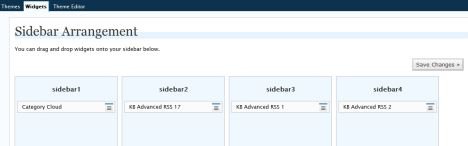
Go to Appearance > Widgets (or Appearance > Customize > Widgets). Your new areas appear by name. Since WordPress 5.8 this screen uses blocks, so you can add any block, such as Latest Posts, Search or Custom HTML, to each sidebar. Here is how our six sidebars looked in the old admin:
Block themes: use template parts instead
Block themes such as Twenty Twenty-Five have no widgets screen. Open Appearance > Editor, create a template part (for example “Post sidebar”), add blocks to it, and insert it into the templates that need it. No code is required.
Easier options without code
- Theme options: themes like Kadence and GeneratePress already include several widget areas and let you pick a different sidebar per page.
- Widget visibility plugins: show or hide individual widgets on chosen pages instead of creating new sidebars.
Keep sidebars light, as heavy widgets slow pages; check with Google PageSpeed Insights.
Ideas for extra widget areas
Beyond the classic right-hand sidebar, extra widget areas are useful in many places: a slim bar above the header for announcements, a box after each post for related links or a newsletter signup, a separate shop sidebar on product pages, and three or four footer columns for contact details, popular posts and social links. Each one is just another register_sidebar() call and a matching dynamic_sidebar() in the right template. Name them clearly, because your widget screen gets crowded quickly once you have five or six areas.
FAQ
How many sidebars can WordPress have?
There is no fixed limit. Register as many as your design needs, but more widgets mean slower pages.
Why does my new sidebar not appear?
Check that the id in dynamic_sidebar() matches the id in register_sidebar(), and that the sidebar has at least one widget.
Will theme updates remove my sidebars?
Not if you add the code to a child theme.





I first read your single widget article. Now this article has helped to much too! Thank you!
It is great post. But I have need footer widget. can i use this tutorial for my footer widget. Please say me. I have to need this type tutorial.
I cant thank you enough,
i was trying to do this for ages. thank you so much.
it works thanks
I am having a serious nerve effing problem with my sidebars.
I have tried for days now and havent gotten it to work.
I have tried every d*mn thing there is.
All i want is a new sidebar on my page template. I have copied every single thing that is on the sidebare-page template and the sidebar.php and duplicated everything in the css related to those to fit my own created sidebar, made just as in your guide.
And it doesnt work. The d*mn sidebar just sits at the end of all content and comments. In the sidebar-page template there is room for the sidebar to fit, there isnt in mine. YET I HAVE COPIED EVERYTHING!? Changed all names, all filenames, everything.
Getting seriously pissed at this.
Where is the magical ‘I want this sidebar to fit perfectly into this page also’-checkbox?
Thank You for sharing that tutorial, it helped me a lot with organizing different widgets on different pages.
cheers
working fine..Thanks
Wow, this is awesome guide that works to help me create dynamic sidebar widget myself, thanks QOT :)