
Thesis OpenHook Plugin: How It Fixed Thesis Theme Hooks (2026)
Thesis OpenHook was the plugin that made the Thesis WordPress theme easy to customize. When we moved QuickOnlineTips to Thesis in 2010, it saved us from crashing the site every time we edited theme hooks. Here is what OpenHook did, why it mattered, its status today, and safer ways to add custom code to a modern WordPress theme.
Quick answer: Thesis OpenHook gave every Thesis hook its own box in the WordPress admin, so you could add code without editing the risky custom-functions.php file. The plugin hasn’t been updated in years, and its own page says Thesis versions it supports are no longer available. For a modern site, use a child theme or a maintained snippets plugin such as Code Snippets, and a theme with built-in hooks like Kadence or GeneratePress.
Table of Contents
Thesis hooks and the crashing custom-functions.php
I spent our first week with the SEO-friendly Thesis WordPress theme editing the custom-functions.php file hundreds of times to get the right look. That file was powerful, and any error caused a PHP error that brought the site down instantly. No wonder it came with a warning.

Thesis had no single.php or sidebar.php to edit, so new users had to learn its hooks. We managed to bring our site down over 8 times! Worse, the WordPress admin also became inaccessible, and the only fix was to restore a backup of custom-functions.php via FTP.
So I started keeping dated backups of custom-functions.php on the server and edited it only by FTP, just in case. It was cumbersome, and as you added more custom hooks the file grew huge and cluttered. No wonder so many Thesis sites looked alike.
Thesis OpenHook: the plugin that fixed it
As I was getting frustrated, readers suggested the Thesis OpenHook plugin by Rick Beckman, and customizing Thesis became far simpler. OpenHook gave each hook its own box, with options like executing PHP in a hook, plus handy switches to remove Thesis’ default 404 content, remove the Thesis attribution or add debug information.
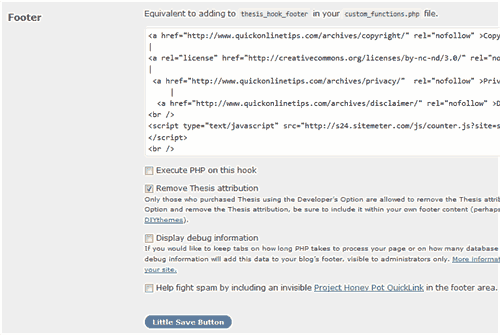
My custom-functions.php went back to default because every piece of code moved to its own hook slot. Whenever I wanted to change something, I knew exactly where to look. A drop-down menu listed all the Thesis hooks, and I never knew there were so many.

My advice back then: install OpenHook as your first plugin right after downloading Thesis. I even suggested the Thesis designers should build it in.
Thesis OpenHook today
The plugin’s WordPress.org page says it hasn’t been tested with recent major WordPress releases and may no longer be maintained. It supported Thesis 1.8 hooks and Thesis 2.1, and its FAQ notes those versions of Thesis are no longer available. Thesis itself has changed completely and is now part of DIYthemes’ products. So for a new site, OpenHook is not the right tool.
Safer ways to add custom code in WordPress now
- Use a child theme: put custom functions in a child theme so theme updates don’t wipe them. See how to add PHP files to a WordPress theme without FTP.
- Code Snippets: a maintained plugin that stores each piece of code as a separate snippet you can switch on or off, with a safe mode to recover from a bad snippet.
- Choose a theme with hooks built in: modern themes such as Kadence and GeneratePress offer hook areas in their premium versions. We compared frameworks in our Genesis framework review.
- Keep backups: my old FTP backup habit still applies. Keep a recent backup and know how to reach your files by FTP or your host’s file manager. Keeping plugins current helps too: see how to auto-update WordPress plugins and themes.
FAQ
What did Thesis OpenHook do?
It gave every Thesis theme hook its own box in the WordPress admin, so you could add HTML or PHP to a hook without editing custom-functions.php.
Does Thesis OpenHook still work?
Its plugin page says it hasn’t been tested with recent WordPress releases and may not be maintained, and the Thesis versions it supports are no longer available.
What can I use instead of OpenHook?
Use a child theme or a maintained plugin such as Code Snippets, and choose a theme with hook areas such as Kadence or GeneratePress.
How do I fix a site broken by a PHP edit?
Restore the last working copy of the file you edited using FTP or your host’s file manager, which is why keeping a backup before every edit matters.
Stuck on a gift? Try our free Gift Idea GeneratorIdeas for anyone by age, job, interests and budget, with Amazon.com and Amazon.in linksFind gifts →Get our free weekly email: new tech guides and tools, no spam.
New and updated tech guides, a free tool worth bookmarking and one useful pick, once a week. No spam, unsubscribe anytime.
One email a week. Unsubscribe anytime. See our privacy policy.


Is there a way to customize advertising manager to thesis open hook? I want to show amazon products to different post into different categories. It seems like I can put the amazon product ads, but I think its impossible to differentiate it in each post.
Yeah.. I’m using this plugins now. Easier to customize thesis. :D
ur doing a great job customizing it. the only problem i had with any design be it brochure, business cards, websites, blogs and many more is the number of fonts used.
if possible, try not to have more than 3 different type of fonts.
We will try to keep the fonts consistent to 1-2 only. Thanks for the tip.
well its always easy to customize the thesis using the open hook plugin it provides a better functionality and even a dumb fellow after understanding the thesis open hooks can customize the thesis theme. Well its a pleasure for me if i can help out in customizing thesis theme.
you got my email address email me if you require me?
Thanks for the mention. QOT thesis theme looks really cool and optimized now. The font used in content looks better too!
I am glad it is looking less like the thousands of Thesis blogs out there thanks to your tip.